Building a zero-lag English workflow using AI Agents and Social Automation

You want to use English at work with no waiting. A zero-lag English workflow gives you quick feedback. You can get better faster. It also helps you work well with others. When you use AI agents and social automation, you get help right away. Teamwork becomes easier and smoother. Here are some numbers to show this:
Benefit | Percentage |
|---|---|
Faster time to insight | 54% |
Productivity improvements | 53% |
Higher-quality work | 52% |
Increased productivity | 66% |
Cost savings | 57% |
Faster decision-making | 55% |
Agentic AI can make fast choices and use new data. This helps people make decisions faster. It lets workers spend more time on important jobs. These jobs need people to be creative and understand feelings.
With tools like Fluently, you can make your English workflow smarter. You can also make it work better right now.
Key Takeaways
A zero-lag English workflow gives fast feedback. This helps you get better quickly and work well with others.
Break big tasks into small steps with AI agents. This makes your work easier to do. It also helps you not forget anything important.
Use many AI agents for different parts of your English tasks. They can work at the same time. This saves time and gives you quick feedback.
Use social automation tools with AI for routine jobs. This lets you spend more time on important work. It also helps you save time.
Have regular feedback sessions to check your progress. This helps you learn faster and keep getting better at English.
Zero-Lag English Workflow Steps
Task Decomposition
You want to get things done faster. The first step in a zero-lag English workflow is to break big tasks into smaller, clear steps. This makes everything easier to manage. You can use AI agents to help with this. They know how to split up your work so you do not miss anything important.
Here is a table that shows some of the best ways to break down tasks when you use AI agents:
Method | Description |
|---|---|
Multi-Agent Systems | Different agents handle different parts of your task for better efficiency. |
AutoGen Framework | Agents talk to each other and share their special skills. |
CrewAI | You can build teams of agents, each with a special job. |
CIRL Frameworks | Agents learn what you like and adjust the tasks for you. |
CoT Planning | Agents plan step by step, which helps them succeed more often. |
ReAct Framework | Agents think and act in turns, so they can change plans if needed. |
Tree of Thoughts | Agents try many ways to solve a problem at the same time. |
Reflexion | Agents look back at what they did and try to do better next time. |
Neuro-Symbolic Systems | Agents use both smart rules and learning to split up tasks. |
When you use a tool like Fluently, you can see this in action. For example, Fluently can break down your English practice into grammar, vocabulary, and pronunciation. It gives you feedback on each part, so you know exactly what to work on.
Parallelization with AI Agents
Once you have your tasks broken down, you want to get them done quickly. This is where parallelization comes in. You let different AI agents work on different parts of your English workflow at the same time. This saves you time and helps you get feedback right away.
Here is how this process usually works:
The main AI agent splits your task into smaller jobs.
Each job goes to a different agent. These agents work at the same time.
Each agent focuses on its own job, like checking your grammar or listening to your pronunciation.
When they finish, the main agent collects all the results.
You get a full report with everything you need to know.
You can see this in Fluently’s real-time feedback. During a meeting, Fluently listens to your speech, checks your grammar, and gives you tips—all at once. You do not have to wait for one thing to finish before starting another. This is what makes a zero-lag English workflow possible.
You can measure how well this works by looking at things like:
How well the agents talk to each other and share results.
How much computer power they use.
How many agents you need for each job.
Orchestration and Coordination
You need a way to keep all these agents working together. Orchestration and coordination make sure every part of your zero-lag English workflow runs smoothly. Think of it like a conductor leading an orchestra. Each agent knows when to start, what to do, and when to finish.
Here are some smart ways to keep everything in order:
Break your big goal into smaller tasks. A planner agent can do this for you.
Let agents pick jobs that match their skills. They can even switch tasks if needed.
Use a system where high-level agents set goals, and lower-level agents figure out how to reach them.
Make sure agents follow the right order. You can use event lists or maps that show which job comes first.
When you use Fluently in a meeting, it joins the call, listens to your speech, and gives you feedback right away. It also creates a report after the meeting. This shows how good orchestration and coordination help you improve your English without delay.
You get many benefits from this setup. Here is a table that shows what you can expect:
Outcome | Description |
|---|---|
Faster time-to-market | You can use new English skills in real situations sooner. |
Improved model accuracy | The AI gives you better feedback, so you learn faster. |
Governance and compliance | The system follows rules and keeps your data safe. |
Cost optimization | You save money by using AI agents instead of hiring many tutors. |
You also get:
More freedom for each agent to make decisions.
Faster automation from start to finish.
Better use of your resources.
A zero-lag English workflow lets you practice, get feedback, and improve—all in real time. You do not have to wait for results. You can use your new skills right away, whether you are in a meeting, giving a presentation, or just practicing at home.
Automation Strategies for English Tasks

Social Automation Integration
You can make your English tasks easier by connecting social automation tools with AI agents. These tools help you handle routine jobs, like sending meeting invites or sharing notes. AI agents can check your writing, fix grammar, and even answer questions for you. When you set up these tools, you save time and avoid mistakes.
Here are some ways you can use social automation with AI agents:
Let AI handle simple decisions, like sorting emails or picking the right template.
Use smart bots to join meetings and take notes for you.
Connect your calendar to your English practice app, so you never miss a session.
Modern automation gives you more freedom. You can focus on important work while AI takes care of the rest. If something gets tricky, you can step in and make the final call.
Real-Time Collaboration
Working with others in real time makes your zero-lag English workflow even stronger. You can use AI-powered tools to chat, share files, and edit documents together. These tools help your team move from slow, manual work to fast, smart systems.
Here’s what you get with real-time collaboration:
Faster teamwork and better decisions.
Less waiting for feedback or updates.
More time to focus on creative ideas.
AI workflow assistants can handle boring tasks. You and your team can spend more time talking and solving problems. Everyone stays on the same page.
Feedback Loops
You need feedback to get better at English. Good feedback loops help you learn faster. You can set up regular sessions, like a “Feedback Friday,” where you and your team talk about what went well and what needs work.
Try these feedback ideas:
Make a board where everyone can post tips and ideas.
Ask your friends or coworkers to give you feedback on your English.
Use AI tools that give you instant feedback after each task.
These steps help you improve every week. You can see your progress and fix mistakes right away. That’s how you build a zero-lag English workflow that keeps getting better.
Practical Use Cases and Implementation
Automated Content Creation
AI tools like ChatGPT and Fluently can help you write faster. They help you make emails, reports, and social posts in English. You just type your topic or a few ideas. The AI writes a draft for you. You check the draft and make it better. This way, you save time and make fewer mistakes.
Here is how AI content creation helps at work:
Evidence | Impact |
|---|---|
Shows that many people use AI now | |
GPT-3 improved content creation speed by 40% | Makes your writing much faster |
90% of writing errors eliminated through AI | Helps you write with less mistakes |
Forbes cut content production time by 75% | You finish more work in less time |
AI tools can also change your writing for different people. You do not need a big team to write. You can think about your ideas while AI does the easy parts.
Meeting Analysis and Reporting
Meetings can take a lot of time, but you can make them better. Use Fluently to join your calls and check your English. After the meeting, you get a report. The report tells you about your grammar, vocabulary, and pronunciation. You can also use ChatGPT to turn notes into short summaries or action steps.
Try these ideas for better meeting reports:
Strategy | Description |
|---|---|
Make reports fit what your team needs | |
Adapt report formats | Pick templates for each group |
Automate distribution | Set up auto-delivery so everyone gets reports fast |
Establish monitoring systems | Check how well your AI tools work |
This way, everyone knows what happened and you can get better after each meeting.
Daily English Practice
You can get better at English by practicing every day. Make a routine and use Fluently for 10 minutes each day. Try talking about your day, telling a news story, or getting ready for a meeting. AI agents give you feedback right away, so you know what to fix.
Look at these tools and what they do:
Tool Name | Features | Target Audience |
|---|---|---|
Pronounce | Checks your pronunciation, gives corrections, and has grammar lessons | Business professionals, graduate students |
Eduling Speak | Gives speaking tasks, has a teacher dashboard, and fun activities | Casual learners, aspiring academics |
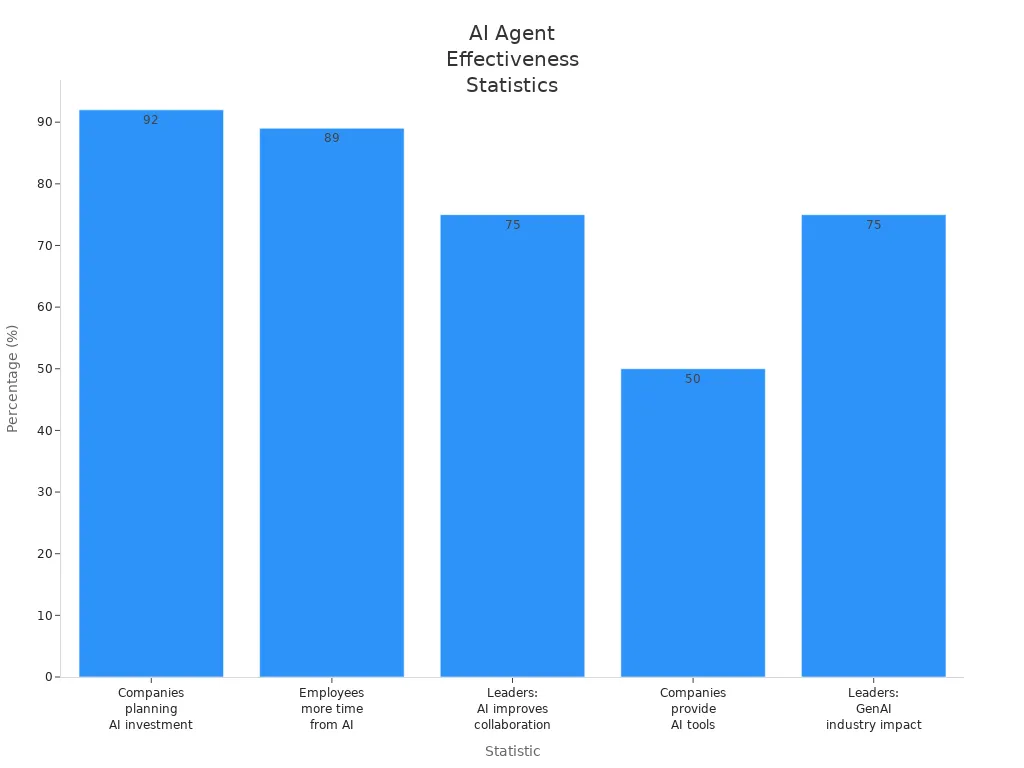
Many companies see good results from these habits. For example, 89% of workers say AI gives them more time for important work. Also, 75% of leaders say AI helps teams work together.
You can use these steps for daily practice, meetings, or test prep. A zero-lag English workflow helps you get feedback, improve, and use your skills right away.
You now know how to make a zero-lag English workflow. You can split big tasks into small steps. You can do many steps at the same time. AI agents give you fast feedback. Social automation lets you work with others quickly. You get results faster this way. Here is a table with top workflow types you can use:
Workflow Type | Description | Use Case |
|---|---|---|
Prompt Chaining | Step-by-step task solving | Chatbot tools |
Parallelization | Tasks run at the same time | Automated evaluations |
Reflexion | Learns from feedback and improves | App building agents |
Orchestrator-Worker | Central agent delegates jobs | Coding AI agents |
Try these workflows. Mix them together if you want. See which ones help you the most. Start now and watch your English get better with real-time help.
FAQ
How do I start building a zero-lag English workflow?
You can start by picking one AI tool, like Fluently. Set a daily goal. Try a short practice session. Let the AI give you feedback. Add more tools as you get comfortable.
Can I use these workflows if I am not a tech expert?
Yes! Most AI tools have simple steps. You just follow the prompts. You do not need coding skills. If you get stuck, look for help guides or ask support.
What if my team uses different tools?
No problem. Many AI agents and social automation tools connect with popular apps. You can link your calendar, chat, or meeting software. This helps everyone stay in sync.
How fast will I see results?
You may notice small changes in a week. If you practice every day, you will get better quickly. Real-time feedback helps you fix mistakes right away.
Is my data safe with these AI tools?
Most trusted AI tools use strong security. They protect your data and follow privacy rules. Always check the privacy policy before you sign up.
See Also
Jule: The AI Tool Simplifying Software Development Processes
Creating Captivating Social Media Graphics Using AI Technology
Exploring AI Agents: Their Functionality and Operations

© Copyright 2025 LinkstartAI - All Rights Reserved.