Video ads auto-published: Brief → Visuals → Clips → Multichannel Posting

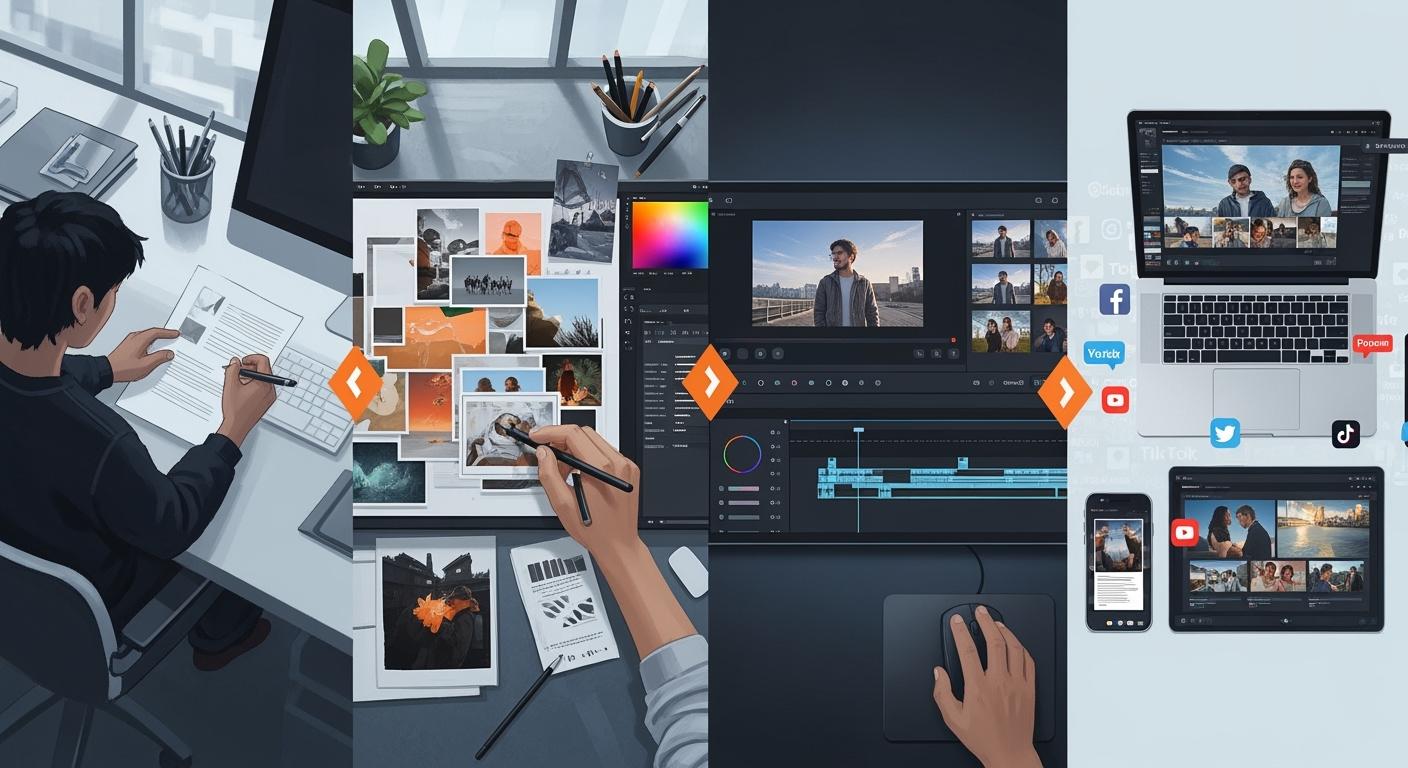
You want to start video ads fast and see results soon. Making ads by hand takes a long time. This can make your campaigns slow. Many marketers have these problems every day. Automation changes how you work. It lets you save time and share your message faster. In fact, 74% of marketers say automation saves them time. If you work in marketing, content creation, or e-commerce, you can use automation. It helps keep your campaigns quick and steady.
Statistic | Value |
|---|---|
Percentage of marketers reporting time savings from automation | 74% |
Key Takeaways
Automation makes video ad creation faster. You can start campaigns in less than 15 minutes. It used to take hours before.
AI tools help your brand look the same in every video ad. They use the same colors, fonts, and logos each time.
You can post video ads on many platforms at once. This helps you reach more people without extra work.
Real-time updates and tracking keep your team up to date. They help you react fast to how your campaign is doing.
Personalized video messages and interactive content get viewers interested. This helps more people take action.
Video ads automation workflow
Brief to visuals
You start by sending a campaign idea and a product image through a chat app. The system reads your brief and uses AI to plan the best way to show your product. It looks at market trends and what customers like. This helps you build a smart strategy before you even make the ad.
Next, the AI creates images for your campaign. It can make many different styles and looks in just a few minutes. You do not need to wait for a designer. This step lets you test new ideas quickly and see what works best.
Here is a table that shows the main phases in this process:
Phase | Description |
|---|---|
Planning and Strategy | AI checks market signals and customer behavior to guide your campaign. |
Content and Creative Development | AI makes creative images fast, so you can test many ideas. |
Campaign Execution and Media Buying | AI helps you run your campaign and buy ads at the right time. |
Personalization and Customer Experience | AI sends the right message to each person. |
Measurement and Optimization | AI checks results and helps you improve your ads in real time. |
Visuals to clips
After you have your images, the system turns them into short video clips. You do not need to edit videos by hand. The workflow uses automation to add smooth transitions and background music. It mixes your images and audio into a single video file.
Here is how this step works:
The system takes your images and makes them move, creating video transitions.
It adds background audio based on your campaign message.
It combines the video and audio into one finished clip.
The final video uploads to your storage, ready for review.
This process saves you a lot of time. Companies using automation report up to 80% faster production and lower costs. For example, you can turn an hour-long video into many short clips in just 30 minutes. This means you can launch your video ads much faster than before.
Clips to posting
Now your video clips are ready to share. The system merges all your clips into a polished ad. It then posts your video ads to many platforms at once, such as TikTok, Instagram, and YouTube. You do not need to upload each video by hand.
The posting process follows these steps:
The system sees a new video file in your storage.
It downloads the file and prepares it for posting.
It uploads the video to your social media tool.
It sets the right fields, like title and description.
It checks the best time to post.
It finds all your connected social accounts.
It splits and filters which platforms to use.
It schedules the post for each channel.
You also get real-time updates. The system sends you a message when your video ad is live. It tracks all your campaigns in a spreadsheet, so you can see what is happening at any time. This keeps your team in sync and helps you respond faster. Teams using these tools see up to 40% faster response times and 60% fewer missed tasks.
Tip: Automatic notifications and tracking help you stay on top of every campaign without extra work.
Benefits of automation
Speed and efficiency
You can launch campaigns much faster when you use automation. Manual work often slows you down and creates bottlenecks. Designers may spend weeks on a single campaign, which limits how many ads you can run. With automation, you can create and publish video ads in minutes instead of hours. For example, some automated tools let you launch a campaign in less than 15 minutes, while older methods might take up to five hours. This speed means you can test more ideas and react quickly to market changes.
Method | Time Taken |
|---|---|
Admanage.ai | |
Adnova.ai | 4-5 hours |
Automation also frees up your team. You spend less time on repetitive tasks and more time on creative strategy. This helps you scale production and reach more customers.
Consistency and quality
Automation helps you keep your brand message clear and strong. Every video ad uses the right colors, fonts, and logos. Your messaging always matches your brand voice. This makes your ads look professional and trustworthy.
Aspect | Description |
|---|---|
Colors | Every video uses your brand’s colors. |
Fonts | Fonts stay the same in every ad. |
Logos | Logos appear correctly in all videos. |
Messaging | Your message matches your brand’s voice. |
AI-powered tools also check for grammar, brand terms, and tone before you publish. You can explore more creative ideas per campaign, which leads to better results. High-quality video ads help you stand out and connect with your audience.
Multichannel reach
You can post your video ads to many platforms at once. Automation lets you reach TikTok, Instagram, YouTube, and more without extra work. This saves time and helps you get your message in front of more people.
You can run A/B tests to improve your ads.
Real-time data helps you adjust your campaigns quickly.
You can scale successful ads and track results easily.
Automation gives you the power to manage all your channels from one place. You see better results and make smarter decisions for your business.
Use cases
E-commerce brands
Automation helps you make lots of product videos fast. This is good for big catalogs and new launches. You can make more content and never get behind. Adding interactive parts makes shopping more fun for buyers. Personalized videos show shoppers the best products for them. This can help you sell more.
Here are ways e-commerce brands use automation:
Make new videos for every product launch.
Run holiday campaigns with new pictures and deals.
Give returning customers special video suggestions.
You can check your results with easy-to-read numbers. The table below shows how brands see changes after using automation:
Metric Type | Week 1 | Week 2 | Week 3 | Week 4 |
|---|---|---|---|---|
Creation Speed | Focus on creation speed | |||
CTR | Target >1.5% | |||
Completion Rates | Target >75% for 30-second videos | |||
Cost Per Click | Should be 20-30% lower than static ads | |||
Conversion Rates | Target >2% for warm audiences | |||
ROAS | Target >3X for sustainable growth | |||
Customer Acquisition Cost | Compare to email marketing and organic | |||
Lifetime Value Impact | Track repeat purchase rates from video-acquired customers | |||
Break-even Point | 10+ videos per month = positive ROI within 30 days |
Tip: You can change the workflow to match your brand’s look and campaign needs.
Social media marketers
Automation helps you keep your brand active everywhere. You can plan posts early and never miss a trend. It lets you try different messages and pictures to see what works. You can run tests, watch results, and change your plan quickly.
Many teams set up their workflow by:
Picking which platforms to post on.
Setting alerts for campaign news.
Changing video styles for each group.
This helps you reach more people and keep your message the same.
Content creators
You can grow your fans by sharing videos on many channels at once. Automation lets you focus on ideas while the system uploads and formats for you. You save time and reach more viewers.
The table below shows how automation helps content creators:
Feature | Benefit |
|---|---|
Integration with Video Platforms | Share and manage content easily on sites like YouTube and Vimeo. |
Social Media Scheduling | Plan posts so you stay active without extra work. |
Content Syndication Options | Share videos on many channels at once to get seen more. |
Efficiency Across Platforms | Automation does uploads and formatting, so you can be creative. |
Enhanced Reach | Easy sharing helps more people see and like your videos. |
Monetization Opportunities | More ways to earn money with automation helping you. |
Note: You can change the workflow to fit your style, brand, and favorite platforms.
Customization tips
Brand settings
You can change your video ads by editing your brand settings. First, update your brand’s info in your campaign sheet. Add your product name, features, and website. The system uses this info to make ads that fit your brand.
Aspect | Influence on Automated Video Ads |
|---|---|
Content Metadata | Makes creative ideas from your campaign goals. |
User Identity | Finds the right people for each ad. |
Ads change when users like or interact with them.
Personalization makes ads more fun to watch.
Special content helps your business earn more money.
The system looks at what users do and their situation. This keeps your ads interesting and useful.
Platform selection
You can pick where your ads will show up. Choose the platforms your audience likes, such as TikTok, Instagram, or YouTube. Turn channels on or off in your workflow settings. This helps you reach the right people and use your time well.
Pick only the platforms that fit your campaign.
Try different channels to see which ones work best.
Change your choices as your audience gets bigger.
Tip: Start with your two favorite platforms, then add more if you get good results.
Video style
You can decide how your videos look and feel. Change prompts in your workflow to set the tone, format, and transitions. Add captions and text overlays so people can understand your videos without sound.
Captions help people follow along with no audio.
Text overlays show important parts of your video.
Use big, clear text for small screens.
Most people watch videos with the sound off. Always use captions and bold text to keep viewers interested.
Notifications and storage
Get real-time alerts to stay updated. Set up notifications to know when your videos are ready or posted. This keeps your team in the loop and means less checking by hand.
Get alerts for every new video or campaign update.
Watch storage changes and data use right away.
Let the system format and check your content for you.
Save time and make fewer mistakes with automation.
Note: Real-time alerts help you see trends and fix problems fast.
You can make your marketing better by using automation for video ads. Automation helps you save time, make better videos, and reach more people. Start by picking clear goals, planning your steps, and checking your results. Many marketers use things like personalized video messaging, interactive videos, and testing with automation to get noticed. AI tools help you make, change, and improve videos for any group of people. If you want your campaigns to be faster and smarter, try automation and see how it helps your results.
Personalized video messaging helps more people pay attention.
Automated testing shows which videos work best.
Interactive videos let you talk with your viewers.
Try using automated video ads and help your brand grow in new ways.
FAQ
How do I start using automated video ad workflows?
You begin by connecting your chat app, storage, and social accounts. Then, you send your campaign idea and product image. The system guides you through each step and helps you publish your first video ad.
Can I control which platforms receive my video ads?
Yes, you choose your platforms in the workflow settings. You can enable or disable channels like TikTok, Instagram, or YouTube. This helps you reach your target audience.
Will my brand style stay consistent in every video?
Absolutely! The system uses your brand’s colors, fonts, and logos from your campaign sheet. Every video matches your brand style for a professional look.
How do I track the results of my video ad campaigns?
You get real-time updates and see all campaign data in a spreadsheet. This lets you check performance, track views, and measure results easily.
See Also
Comprehensive Suite for E-commerce Advertising Creatives
Crafting Captivating Social Media Graphics Using AI Solutions
Boost Your Site Visits with AI-Driven Blogging Tools

© Copyright 2025 LinkstartAI - All Rights Reserved.