How to Solve TikTok Video Production Challenges with the fal.ai Postiz Toolkit


You want to make TikTok videos quickly and easily. The TikTok video toolkit links fal.ai, OpenAI, and Postiz. This helps you turn ideas into videos faster. You do not need to use messy notes or slow editing anymore. You get clear captions and easy uploads.
Picture a way to work where everything is together. You will not lose your progress. Try this toolkit and watch your TikTok videos become more steady and easy to make again and again.
Key Takeaways
Use the fal.ai Postiz Toolkit to make TikTok videos easier. Putting all your work in one place saves time. It also helps you make fewer mistakes.
Let AI tools help you make videos. This means you can spend more time on your ideas. You will not get stuck editing for too long.
Keep your video quality and captions the same each time. This helps your audience trust you. It also keeps them watching your videos.
Use Google Sheets to check your progress. Staying organized helps you remember your video ideas. It also helps you know when to post them.
Try making different types of content. Use new visuals and things people can interact with. This keeps your TikTok feed fun and new.
TikTok Video Production Pain Points

Content Variety Challenges
You probably know how hard it is to keep your TikTok content fresh. You might run out of ideas or feel stuck making the same type of video over and over. Sometimes, you jot down ideas in different places, like your phone, sticky notes, or random documents. This makes it tough to find your best ideas when you need them. You want to grab attention with new hooks and formats, but scattered notes slow you down. If you want to grow your audience, you need a steady stream of creative content. That’s not easy when your workflow feels messy.
Slow Workflow Issues
You may spend hours editing videos, writing captions, and uploading each clip. The process can feel endless. You start with a good idea, but then you get bogged down by editing and organizing. You lose track of which videos are ready and which need more work. Sometimes, you forget to add captions or miss important details. This slows you down and makes it harder to post regularly. If you want to keep up with trends, you need a faster way to turn ideas into finished videos.
Tip: Try to centralize your workflow. When you keep everything in one place, you save time and avoid mistakes.
Cost and Consistency Problems
Making TikTok videos can get expensive, especially if you pay for editing or hire creators. Take a look at the average costs for small and medium-sized creators:
Influencer Tier | Average Compensation |
|---|---|
Nano | $500 – $2,000 |
Micro | $2,000 – $8,000 |
Mid-tier | $8,000 – $20,000 |
You also face challenges with consistency. If your captions or video quality change from post to post, your viewers might lose interest. Here’s what happens when captions and quality aren’t consistent:
Properly timed captions help viewers understand your message.
High-quality captions keep people watching and boost completion rates.
Captioned videos see only 22% of viewers skipping, compared to 39% without captions.
85% of videos are watched with sound off, so captions matter a lot.
Better video quality leads to more engagement and higher performance.
If you want your TikTok channel to grow, you need to solve these pain points. You need a toolkit that helps you create, edit, and publish videos quickly, while keeping costs low and quality high.
Introducing the TikTok Video Toolkit
Key Features Overview
You want a simple way to make TikTok videos. The tiktok video toolkit gives you just that. It brings together Google Sheets, fal.ai, OpenAI, and Postiz. You can manage your whole video process in one place. No more jumping between apps or losing track of your ideas.
Here’s how the tiktok video toolkit works step by step:
Step | What Happens |
|---|---|
1 | You start the workflow. The toolkit checks Google Sheets for new video ideas. |
2 | It grabs your video prompt and how long you want the video to be. |
3 | The toolkit uses fal.ai to make your video fast and easy. |
4 | It saves the video to Google Drive and creates a catchy title with OpenAI. |
5 | The toolkit uploads your video to Postiz, ready for TikTok. |
6 | It updates Google Sheets with your video link so you can track everything. |
You get full automation from your first idea to your final TikTok post. You do not need to know how to code. You can run the workflow by hand or set it to run on a schedule. The tiktok video toolkit even helps you make SEO-friendly titles, so more people find your videos. You save money because the toolkit uses Veo3 Fast, which costs less than most video tools.
Tip: Keep all your video ideas and progress in Google Sheets. You will never lose track of what you need to do next.
You also get a single dashboard for everything. You can schedule, design, and publish your videos without switching tabs. This makes your work faster and more organized.
Feature | tiktok video toolkit | Manual Methods |
|---|---|---|
Centralization | One dashboard for all your work | Many tools and platforms |
Automation | Schedule, design, and publish fast | Post and schedule by hand |
Efficiency | Smooth and quick workflow | Slow and easy to mess up |
Benefits for Creators and Marketers
When you use the tiktok video toolkit, you see big changes in how you work. Most creators say they make videos much faster. You can focus on your ideas instead of getting stuck in editing or uploading.
Check out these numbers from people who use the tiktok video toolkit:
Benefit Description | Percentage/Value |
|---|---|
Marketers using AI tools for content creation | 85% |
Higher content marketing ROI | 68% higher |
Likelihood to meet campaign goals | 25% more likely |
Users citing faster content generation | 93% |
Users using AI for deeper insights | 81% |
Global market value for AI content creation | Over USD 54 billion |
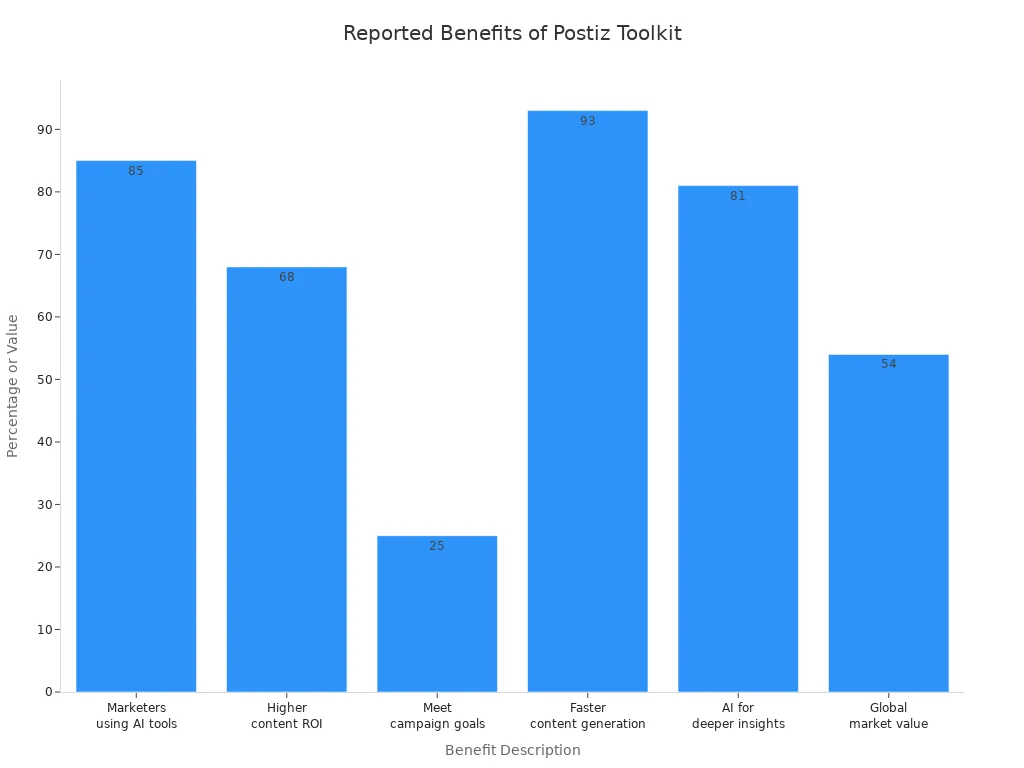
You can see that most people who use AI tools like the tiktok video toolkit finish their videos faster. They also get better results from their marketing. You are more likely to hit your goals and get more value from your content.
The tiktok video toolkit helps you:
Make more videos in less time.
Keep your captions and video quality steady.
Save money on editing and posting.
Stay organized with all your ideas in one place.
Reach more people with SEO-friendly titles.
If you want to grow your TikTok channel or run better campaigns, this toolkit gives you the tools you need. You can turn your ideas into finished videos without the usual stress.
Solutions for TikTok Video Production
Generating Content from Prompts
You want to turn your ideas into TikTok videos without getting lost in the process. The fal.ai Postiz Toolkit gives you a clear path from your first thought to finished video content. Here’s how you can do it:
Set up a Google Sheets template. Make two sheets: one called
Ideasfor your first thoughts and one calledPublishedfor your final video links.Get your API keys for OpenAI, Google Sheets, Fal.ai, and Blotato. Add them to your toolkit.
Start the workflow. You can test it first, then set it to run every day.
You can use prompts to guide your video content. For example, you might write who your audience is, what you want to say, and how you want your video to sound. Try starting with a hook like, “Did you know you can edit your videos in seconds?” This grabs attention right away. You can also ask ChatGPT to help you write TikTok challenges for your audience. If you make fitness videos, you can ask for a script that uses trending music and gets people moving.
Tip: Write your prompts with a clear goal. Think about what you want viewers to do after watching your video content.
Speeding Up Production
You do not have to spend hours making each video. The fal.ai Postiz Toolkit uses smart automation to help you move fast. Take a look at what makes your workflow quicker:
Automation Feature | How It Helps You Work Faster |
|---|---|
Finds trending topics so you do not waste time guessing. | |
AI-Written Viral Scripts | Writes scripts for you, making your video content ready fast. |
Human-Like AI Voiceovers | Adds voiceovers without you recording them yourself. |
Auto Video Creation | Puts your video together, no editing software needed. |
Auto-Posting to Multiple Platforms | Shares your video content everywhere with one click. |
Full Tracking in Google Sheets | Keeps all your work in one place, so you stay organized. |
You save time because you do not need to export or import files. Everything happens in one place. You and your team can see what is done and what needs work. This means you can make more video content in less time.
No more waiting for files to upload.
No more switching between apps.
No more losing track of your ideas.
Note: Many users say they save hours each week. They finish more video content and feel less stressed.
Ensuring Consistency and Quality
You want your TikTok channel to look sharp every time. The fal.ai Postiz Toolkit helps you keep your video content steady and high-quality. Here’s how you can do it:
Use the same Google Sheets for all your ideas and finished videos. This keeps your workflow smooth.
Let OpenAI write your captions and titles. You get catchy, clear text every time.
Track your progress in the dashboard. You always know which video content is ready to post.
If you use these steps, you will see fewer mistakes. Your captions will match your videos. Your viewers will know what to expect from your channel. You can post more often and keep your audience coming back.
Callout: Consistent video content builds trust. When people see you post often and your videos look good, they want to follow you.
You now have real solutions for making TikTok videos. You can turn prompts into video content, speed up your workflow, and keep your quality high. The fal.ai Postiz Toolkit makes it easy to create, manage, and share your ideas with the world.
Getting Started with the Toolkit
Setup Steps
You can start using the fal.ai Postiz Toolkit in just a few minutes. Here’s a simple guide to help you set up everything:
Open Google Sheets and create two sheets. Name one
Ideasand the otherPublished.Add your video ideas to the
Ideassheet. Write your prompts, target audience, and desired video length.Get your API keys for OpenAI, Google Sheets, Fal.ai, and Postiz. Paste them into the toolkit settings.
Download the toolkit and follow the instructions to connect it to your Google Sheets.
Run the workflow. You can test it first or set it to run automatically every day.
Check your
Publishedsheet for finished videos and links. You can track your progress easily.
Tip: Keep your sheets organized. This helps you find your best ideas and see which videos are ready to post.
Tips for Success
You want your video production to run smoothly. Experienced users have shared some helpful tips to avoid common mistakes:
Plan a diverse content calendar. Mix visuals, polls, and behind-the-scenes clips to keep your feed interesting.
Watch real-time events. Adjust your posting schedule if something big happens. This keeps your brand in touch with your audience.
Personalize automated messages. Use tools to customize responses for different groups. This makes your brand feel more human.
Schedule live videos and Q&A sessions. Interact with your followers in real time. People love seeing the real you.
Use automation for scheduling and reporting. Keep a person in charge of creating content and talking with your audience.
Callout: Automation saves time, but your personal touch builds trust and keeps viewers coming back.
If you follow these steps and tips, you will see your workflow become faster and more organized. You can focus on making great videos and connecting with your audience.
You can make TikTok videos faster and easier with the fal.ai Postiz Toolkit. When you centralize your workflow and automate creation, you boost quality and keep your posting steady.
You create longer videos, then use AI to find the best clips for TikTok.
You match your content to platform trends and avoid burnout.
You improve lead generation by adjusting your strategy based on audience feedback.
Try the toolkit for your next project. Watch your channel grow and your content shine.
FAQ
How does the fal.ai Postiz Toolkit help with video production?
The toolkit links Google Sheets, fal.ai, OpenAI, and Postiz. This makes making videos much easier. You can keep track of your ideas in one place. The toolkit helps you make videos and manage your work. Everything stays neat, so you finish videos faster.
Can I use the toolkit for different types of video content?
Yes, you can make many kinds of videos. The toolkit works for short clips, tutorials, and challenge videos. You can change how you make videos to match your style. This keeps your video making fun and creative.
Do I need editing skills to use the toolkit for video production?
No, you do not need to know how to edit. The toolkit does the hard parts for you. You just add your ideas and prompts. The toolkit makes the video, adds captions, and uploads it. You can focus on your ideas, not the tech stuff.
How does the toolkit improve video quality and consistency?
OpenAI writes your captions and titles for each video. The toolkit tracks your progress in Google Sheets. Your videos look the same and have clear captions. Your viewers see good videos every time.
What makes the toolkit faster for video production?
The toolkit saves you time by making and posting videos for you. You do not need to switch between apps or lose your ideas. The toolkit keeps your work simple and smooth. You can finish more videos in less time.
See Also
10 Essential AI Tools for TikTok Video Creation in 2025
Using AI Tools to Craft Captivating Social Media Visuals
AI Voice Cloning: A Cost-Effective Solution for Global Video Creators
Streamlining AI Music Production with ACE Studio 2.0
Unlocking Opportunities for Solopreneurs with Fimo AI Website Tool

© Copyright 2025 LinkstartAI - All Rights Reserved.