Personal English Learning automation tools: Fluently, ChatGPT, Notion, which has the most accurate data?

If you want the most accurate data for Personal English Learning, Fluently stands out. Accurate feedback helps you save time and energy. You want to focus on what makes the biggest difference. The 20/80 rule can transform your study routine:
You spend time on the most impactful tasks.
You identify the activities that help you improve the fastest.
You boost your learning results by working smarter.
This approach, paired with a three-stage workflow, lets you target your real needs and see fast progress.
Key Takeaways
Fluently gives the best feedback right away. It helps you fix mistakes fast. You can use it to get better at speaking English.
ChatGPT is great for grammar and vocabulary help. You can ask it about hard ideas or new words.
Notion works like your own phrasebook. You can save phrases and corrections there. This keeps your learning neat and easy to check.
Use the 20/80 rule. Focus on the 20% of mistakes that cause most problems. This helps you improve faster.
Using all three tools together helps you learn more. Each tool helps with a different part of learning English.
Personal English Learning: Which Tool Is Most Accurate?
Quick Answer and Recommendation
You want to find the tool with the best accuracy. Fluently is the top choice for real feedback and finding mistakes. It gives you quick corrections that help you get better fast. ChatGPT is also good at fixing grammar and giving new words. Notion is great for saving phrases and reviewing what you learn.
Here is a simple look at how these tools do in accuracy tests:
Fluently: Gives clear feedback on your spoken English. It points out your real mistakes.
ChatGPT: Is very good at grammar and vocabulary. It can miss new slang or special words.
Notion: Lets you save and organize your learning. It works best if you add good data.
Fluently and ChatGPT both have strong accuracy. Fluently is best for feedback on how you speak. ChatGPT helps you learn grammar and new words. Notion helps you keep your learning neat and easy to review.
Why Data Accuracy Matters
Getting correct data helps you learn English faster. When feedback is clear, you know what to fix. You do not waste time on things you already know. You focus on the mistakes that slow you down.
Tip: Good feedback helps you use the 20/80 rule. You spend your time on the 20% of mistakes that cause most problems.
Using tools with high accuracy makes you feel more sure. You see real changes in your speaking and writing. You also save time because you do not make the same mistakes again.
Let’s see how each tool helps with accuracy:
Tool | Accuracy in Feedback | Best Use Case |
|---|---|---|
Fluently | Very high, real-time, context-based | Speaking practice and error correction |
ChatGPT | Deep explanations and vocabulary | |
Notion | Depends on input quality | Archiving and review |
Pick the tool that fits what you need. If you want quick and correct feedback on speaking, choose Fluently. If you want to learn grammar rules, ChatGPT is helpful. Notion is good for tracking your progress and reviewing what you learn.
Overview of Fluently, ChatGPT, and Notion
Core Features Compared
There are many tools for Personal English Learning. Each one has special features to help you learn. Here is a simple chart showing what each tool does best:
Tool | Main Function | Target User | Key Features Impacting Accuracy |
|---|---|---|---|
Fluently | Real-time speaking feedback and error detection | Learners who want to improve spoken English | Instant feedback, context-based error reports, tailored practice |
ChatGPT | AI-powered writing and explanation | Learners who need grammar and vocabulary help | Versatile analysis, deep explanations, web browsing for new info |
Notion | Digital phrasebook and knowledge archive | Learners who want to organize and review | Custom archiving, context-aware notes, workflow integration |
You can use all three tools in a simple routine:
Passive Absorption: Listen to podcasts or watch videos. Save new phrases in Notion.
Active Summary: Practice speaking with Fluently. Get feedback right away.
Refinement & Archiving: Use ChatGPT to explain hard grammar. Store your best phrases in Notion.
Tip: Using these tools together helps you fix real mistakes. You can also make your own phrasebook.
Strengths and Weaknesses in Accuracy
Each tool is good at some things but not perfect.
Fluently gives feedback on your speaking right away. You see mistakes fast and know what to change.
ChatGPT is great for grammar and vocabulary. It can answer hard questions and explain things. Sometimes, you should check if its answers are right.
Notion helps you keep your learning organized. How accurate it is depends on what you add. It works best when you use it with Fluently and ChatGPT.
When you use all three tools, you get the best results. This way, you focus on what you really need and keep getting better.
Fluently Accuracy and Workflow Role
Instant Feedback and Error Detection
You want to improve your English speaking skills. Fluently helps you do this by giving instant feedback every time you practice. When you speak, Fluently listens and checks your words, grammar, and pronunciation. You see your mistakes right away. This makes it easy to know what you need to fix.
Research shows that feedback helps learners get better at grammar. For example, students who received corrections made fewer mistakes than those who did not. You can trust Fluently to point out errors and help you learn faster. The tool highlights your main problems, so you do not waste time on things you already know.
Tip: Use Fluently after watching a video or listening to a podcast. Try to repeat what you learned. The app will show you where you need to improve.
Real-World Context and 20/80 Rule
Fluently works best when you use it in real situations. You can talk about your day, your work, or something you just learned. The app gives feedback based on what you say, not just on textbook examples. This means you practice the English you need for your life.
The 20/80 rule helps you focus on the most important mistakes. You spend your time fixing the errors that matter most. Fluently finds these core problems and lets you practice them often. You get better results because you work smarter, not harder.
Here is how Fluently fits into your workflow for Personal English Learning:
Stage | What You Do | How Fluently Helps |
|---|---|---|
Active Summary | Speak about your day | Gives instant feedback |
Error Detection | Review mistakes | Highlights key errors |
Targeted Practice | Repeat and improve | Tracks your progress |
You build confidence every time you use Fluently. You see your progress and feel ready to use English in real life.
ChatGPT for Deep-Dive Explanations
Data Sources and AI Limitations
ChatGPT can help you understand grammar and vocabulary. It also explains the small differences between words. ChatGPT uses three main kinds of data. It learns from things on the internet. It also uses data from partners. It learns from content made by users and trainers. This mix lets ChatGPT answer many English questions.
But ChatGPT is not perfect. Sometimes, it makes grammar or spelling mistakes. It can also give answers that sound right but are not correct. The table below shows some problems you might see:
Limitation Type | Description |
|---|---|
Grammar and Spelling Issues | ChatGPT sometimes breaks language rules. This can cause typos and grammar mistakes. |
Common Sense Reasoning | The AI can give answers that look right but do not make sense. |
Coherence and Relevance | Some answers may not fit the topic, even if the grammar is good. |
You should always check the answers you get. This helps you learn better and avoid mistakes.
Custom Examples and Contextualization
ChatGPT gives examples that match what you need. You can ask for simple explanations or daily life examples. The tool can show you how to fix grammar mistakes. It can explain hard ideas in easy words. It can rewrite sentences for your skill level. The table below shows what ChatGPT can do:
Feature | Description |
|---|---|
Grammar correction | |
Explanation in simple language | Makes hard ideas easy to understand. |
Rewrites at different proficiency levels | Changes content to fit your skills. |
Context-aware examples | Gives examples that fit your life. |
You can use ChatGPT at the end of your learning routine. After you find mistakes, ask ChatGPT to explain them or give new examples. This helps you know why you made the mistake and how to fix it next time. You build your skills step by step and make your learning fit you.
Notion as a Personal Phrasebook
Archiving and Customization
You can use Notion like your own English phrasebook. Start by saving phrases and corrections from your practice. When Fluently shows a mistake, copy the phrase and fix into Notion. You can add your own notes or examples too. Over time, you will have a list of real phrases that help you.
Notion gives you many ways to keep your learning neat. You can use tables, tags, and filters to sort your phrases. For example, you can tag phrases for "work," "travel," or "daily life." You can also mark your level, like "Beginner" or "Advanced." This makes it easy to find the right phrase when you need it.
Here are some ways you can change Notion for English learning:
Customization Feature | Description |
|---|---|
Templates | Use ready-made templates for vocabulary, grammar, or study plans. |
Linked Databases | Show your vocabulary on different pages for each topic. |
Flashcards | Add flashcards from apps like Anki or Quizlet. |
Icons and Covers | Use pictures to make your workspace fun and easy to use. |
Tags and Filters | Sort phrases by topic or skill level. |
Collaboration | Share your phrasebook with friends or teachers. |
Tip: Make a table for your most common mistakes. Check it every week to see how you are doing.
Data Reliability and Integration
You want your phrasebook to be safe and simple to use. Notion keeps your data in safe data centers. You can pick if your data stays in the US or Europe. Amazon Web Services runs these centers, so your notes are safe and always there.
Notion lets you choose where your data is kept.
Your data stays in strong, fast centers.
You can trust that your phrases and notes will not get lost.
Notion also works with other tools. You can set up ways to send your Fluently error reports right into Notion. You can use ChatGPT to explain a phrase, then save the answer in your phrasebook. Notion supports automation, so you spend less time copying and more time learning.
Description | |
|---|---|
Automate workflows | Sync data from Fluently and ChatGPT into Notion. |
OpenAI connectors | Use AI to help with explanations and examples. |
Task automation | Add comments or update your phrasebook automatically. |
Calendar syncing | Keep track of your study schedule. |
Triggers and actions | Update your notes when you add new phrases. |
Note: When you connect your tools, you make learning smooth. You collect, check, and improve your English every day.
Tool Comparison

Data Accuracy
You need feedback you can trust. Fluently fixes your speech as you talk. ChatGPT checks your grammar and words very well. Notion works best if you add good information. Using all three tools helps you learn English better.
Tool | Accuracy Level | Best For |
|---|---|---|
Fluently | Very High | Speaking and error correction |
ChatGPT | High | Grammar and vocabulary |
Notion | User-dependent | Storing and reviewing phrases |
Tip: Try Fluently for quick help. Use ChatGPT for clear answers. Save your work in Notion.
Workflow Integration
You want your tools to work together easily. Fluently, ChatGPT, and Notion make a strong team. Here is how each one helps you:
Fluently gives you feedback right away.
ChatGPT explains things and gives new examples.
Notion saves your notes and phrases.
You can change your learning to fit your needs.
You stay interested and learn at your own speed.
Generative AI tools help you learn by yourself. They support your grammar, vocabulary, and writing. The feedback helps you get better step by step.
User Experience and Value
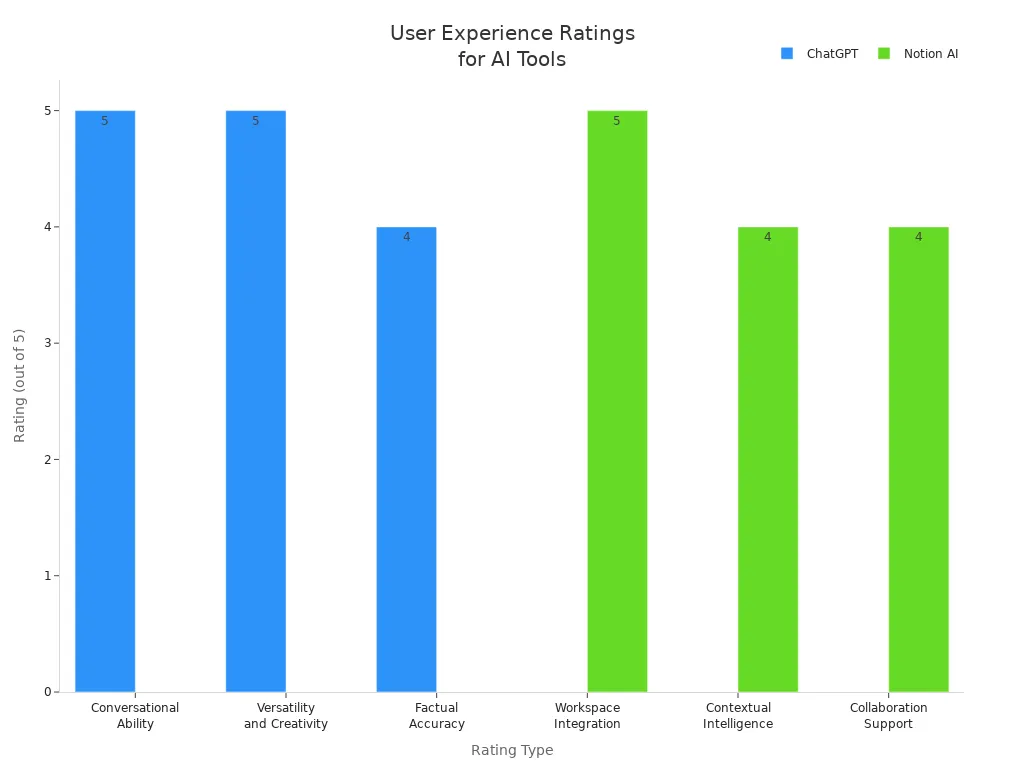
You want tools that are easy and helpful. ChatGPT is great for talking and being creative. Notion is good for working with others and keeping things organized. Fluently helps you feel sure with fast feedback. The table shows what users think about these tools:
Tool | Feature | User Rating | Description |
|---|---|---|---|
ChatGPT | Conversational Ability | 5/5 | Gives answers that fit your questions |
ChatGPT | Versatility & Creativity | 5/5 | Works for many learning styles |
ChatGPT | Factual Accuracy | 4/5 | Is right most of the time |
Notion AI | Workspace Integration | 5/5 | Fits well in your study routine |
Notion AI | Contextual Intelligence | 4/5 | Uses your notes to help you |
Notion AI | Collaboration Support | 4/5 | Easy to share and work with friends |
You get the most help when you use all three tools. Each one helps a different part of your English learning.
Key Factors in Choosing a Tool
Source Reliability
You need to trust the information you use to learn English. Good sources help you avoid mistakes and learn faster. When you pick a tool, check where its data comes from. Find out who made the information. You should also know why the information was made. Some tools are for learning, but others have different reasons.
Here is a table to help you check if a tool’s data is reliable:
Factor | Description |
|---|---|
Accuracy | Where does the information come from? Is it backed up by proof? Does the author give a list of sources or links to research? Can you check the facts with other sources? |
Purpose | Why was this information made? Is it for learning, selling, or politics? Does the author show both sides of an issue in a fair way? |
Authority | What is the author’s background? Do they have special degrees? Are they an expert on the topic? |
Tip: Always look for the same information in more than one place. This helps you make sure what you learn is true.
Customization and Learning Style
Everyone learns English in their own way. Some people like to talk, while others like to read or write. Customization in tools like ChatGPT lets you get feedback that fits your needs. You can ask for help with grammar, vocabulary, or practice real conversations.
Personal feedback helps you work on your weak spots. You can get better faster because you focus on what you need most. Many teachers and students say this kind of practice fills learning gaps and makes learning English work better.
Pick a tool that lets you change settings and practice your way. This keeps you interested and helps you reach your goals.
You get the best data when you use Fluently, ChatGPT, and Notion together. This way, you can find your real mistakes and practice what is important. Research shows that generative AI tools help you get better at English and control your learning. If you want the best results, try the 20/80 rule:
Use Fluently to get feedback right away.
Ask ChatGPT to explain things in detail.
Save your progress in Notion.
Start now and see your English skills improve.
FAQ
How do I start using these tools together?
You can begin by listening to English content. Practice speaking with Fluently. Save your mistakes and new phrases in Notion. Ask ChatGPT for explanations. This routine helps you learn faster.
Can I use Fluently, ChatGPT, and Notion for free?
You can try basic features for free. Some advanced options may need payment. Check each tool’s website for the latest details.
What makes Fluently’s feedback special?
Fluently gives you instant, context-based corrections. You see your real mistakes as you speak. This helps you focus on what matters most.
Tip: Use Fluently right after watching or listening to English content.
Which tool helps most with remembering new phrases?
Tool | Best For |
|---|---|
Notion | Saving and reviewing |
Fluently | Practicing speaking |
ChatGPT | Explaining meanings |
You can use all three for the best results.
See Also
Fluently Or ChatGPT: Which Is The True Speaking Mentor?
Evaluating AI Tools: Fluently, ELSA, Speeko - Which Is Best?
Best AI-Driven Learning Applications For Personal Growth In 2025
Challenges Faced By Advanced AI In Enhancing English Speaking

© Copyright 2025 LinkstartAI - All Rights Reserved.