Outreach vs Apollo: Hidden Pricing vs Transparent Costs for a 50-Person Team


When you compare Outreach vs Apollo for a 50-person team, you notice that Apollo displays its prices upfront. Clear pricing is crucial because it allows you to budget effectively and avoid unexpected expenses. Many companies base their budgets on the visible price, but additional fees for setup or support can lead to complications. These hidden costs can disrupt your budget and hinder your ability to evaluate your results.
Impact of Hidden Fees on Budgeting Accuracy | Description |
|---|---|
Increased Total Cost of Ownership (TCO) | Hidden fees can significantly raise the TCO of a SaaS product, leading to higher spending than initially planned. |
Unexpected Financial Strain | Unforeseen costs complicate financial planning and can create cash flow issues. |
Challenges in Scaling and ROI Measurement | Additional fees can impede growth and diminish the ROI from SaaS investments. |
Key Takeaways
Pick platforms that show prices clearly. This helps you avoid secret fees. Apollo tells you all costs before you pay. This makes planning your budget simple.
Know how much you will pay in total. Secret fees can make things cost a lot more. This makes it hard to plan your money.
Always ask for a list of features and extra costs. Do this before you sign a contract. This helps you not get surprise charges.
Think about what your team needs when you pick a platform. Outreach is good for automation. Apollo has clear prices and is easy to set up.
Pricing Transparency: Outreach vs Apollo
Which Platform Is More Transparent?
You want to know what you will pay before you buy a tool for your team. Pricing transparency helps you plan your budget and avoid surprises. When you look at Outreach vs Apollo, you see a big difference in how each company shows its prices.
Here is a simple table to help you compare:
Feature | Apollo | Outreach |
|---|---|---|
Pricing Transparency | Clear pricing with per-user costs and credits | Opaque pricing, requires quotes |
Pricing Structure | Tiered plans with defined credits | Modular pricing with additional upsells |
User Feedback | Generally positive but notes complexity | Complaints about forced upsells and contracts |
Apollo shows you its prices on the website. You can see how much you will pay for each user and what you get in each plan. Outreach does not show prices. You must talk to a sales person to get a quote. Many users say this makes it hard to know the real cost. Some users also say they feel pushed to buy extra features or sign long contracts.
Tip: If you want to avoid hidden fees, choose a platform that shows all costs up front.
How Pricing Is Presented
You can find Apollo’s pricing on its website. The plans start at about $59 to $119 per user each month. You pick a plan, and you see what you get. Apollo uses a credit system for some features. This means you may need to buy more credits if your team uses the platform a lot. Some users say their real costs can be much higher than they first thought—sometimes two or three times more—because they need extra features or credits.
Outreach does not show any prices on its website. You must ask for a demo or talk to sales. The company gives you a custom quote based on your team size and needs. This makes it hard to compare Outreach vs Apollo quickly. You may not know the total cost until you finish talking with the sales team.
Apollo:
Pricing is public and easy to find.
You see the cost per user and what each plan includes.
Some features use credits, which can add to your cost.
Outreach:
Pricing is not public.
You must request a quote.
You may face extra costs for add-ons or longer contracts.
When you compare both platforms, you see that Apollo gives you more information up front. Outreach asks you to talk to sales before you know the price. This difference can affect how you plan your budget and make decisions for your team.
Outreach Pricing Structure
Hidden Costs and Required Quotes
Outreach does not show prices on its website. You have to talk to a sales person to get a quote. This can take a while and you might not know the real price right away. You may think there is just one price per user. But there are often extra fees you do not see at first. These hidden costs can surprise you if you do not ask about them.
You should look out for these hidden costs:
You might pay $1,000 to $8,000 for setup and onboarding, depending on how hard your setup is.
Large teams may pay more for setup and training, which can make your bill bigger.
Admin seats cost about the same as user seats, so your total cost goes up.
Some features, like conversation intelligence or single sign-on (SSO), cost extra.
You may need to buy things like email warmup or placement testing on top of your plan.
When you compare Outreach and Apollo, Apollo shows prices on its website. Outreach makes you ask for a quote. This makes it harder to know your budget with Outreach.
Note: Always ask for a list of all possible fees before you sign a contract.
Add-Ons and Annual Contracts
Outreach makes you sign up for a year. You cannot pay month by month. This is normal for many tools, but you must plan your budget for the whole year.
Here is a table that compares Outreach’s contract rules to other platforms:
Feature | Outreach | Industry Standards |
|---|---|---|
Annual Commitment Required | Yes | Yes |
Mandatory Onboarding | Yes | Yes |
Monthly Billing Options | No | Yes |
Lock-in Contracts | No | Varies |
You might also pay more for extras like dialers, advanced analytics, or AI tools. These add-ons can make your total cost higher. Read your contract closely to see what is included and what costs more.
To avoid surprises, make sure you know what you are paying for. Ask about every feature and service your team will use. This will help you compare Outreach and Apollo and pick the best one for your budget.
Apollo Pricing Structure
Transparent Pricing Tiers
It is important to know what you will pay for a sales platform. Apollo makes this simple by showing prices on its website. You can see each plan’s cost and what features you get. This helps you look at your choices and pick what works best for your team.
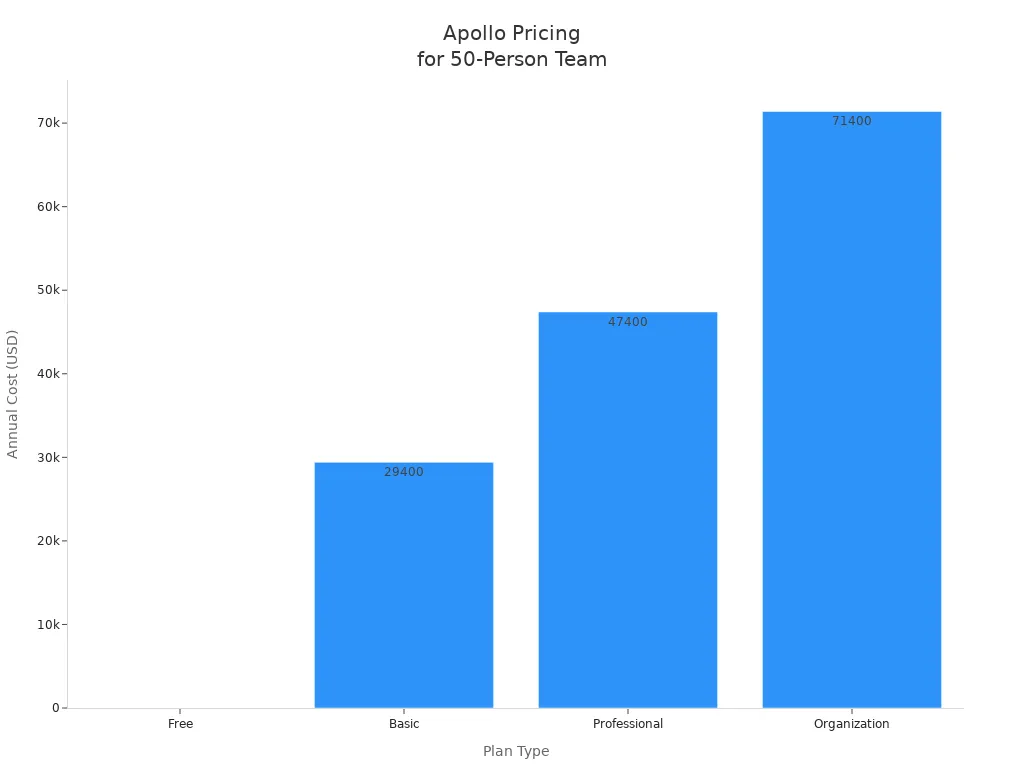
Here is a table that lists Apollo’s main plans for a 50-person team:
Plan Type | Price (Annual) | Mobile Credits/mo | Export Credits/mo | US Dialer | International Dialer | Sequences |
|---|---|---|---|---|---|---|
Free | $0 | 5 | 10 | No | No | 2 |
Basic | $49/user/mo | 75 | 1,000 | No | No | Unlimited |
Professional | $79/user/mo | 100 | 2,000 | Yes | No | Unlimited |
Organization | $119/user/mo | 200 | 4,000 | Yes | Yes | Unlimited |
You can see how the price goes up for bigger teams. For example, the Organization plan is $119 for each user every month. If you have 50 people, you can figure out your yearly cost fast. This clear pricing makes it easy to compare Outreach and Apollo.
Tip: Always check what features come with each plan before you choose.
Hybrid Model: Monthly Fees and Credits
Apollo uses a mix of monthly fees and credits. You pay each month for every user. You also get credits for things like mobile actions or exporting data. This gives you more control, but you need to watch how many credits you use.
Here are some things to remember:
Credits do not carry over. If you do not use them, they are gone.
If your team uses too many credits, you pay extra money.
Your usage can change each month. Busy times can make your costs go up.
You should plan ahead and keep track of your team’s credits.
Making rules for using credits can help you avoid surprise charges.
Factor | Impact on Cost Predictability |
|---|---|
Credit expiration | Credits do not carry over, so you might waste them. |
Overage charges | You pay more if you use too many credits. |
Varying usage patterns | Costs can go up if your team is very busy. |
Need for quarterly forecasting | Big teams need to plan to keep costs under control. |
Credit governance policy | Rules help you use credits wisely and save money. |
You can keep your costs steady if you watch your credits and plan for busy months. Apollo’s way works well for teams that want to know what they are paying. When you look at Outreach and Apollo, you see Apollo’s prices help you avoid hidden costs.
Outreach vs Apollo: Cost Comparison for 50 Users

Estimated Annual Costs
When you compare Outreach vs Apollo for a 50-person team, you need to look at the real numbers. You want to know how much you will pay each year, not just the price per user. Here is a side-by-side table to help you see the difference:
Platform | Base Price (Annual) | Add-Ons (Annual) | Estimated Total (Annual) | Pricing Transparency |
|---|---|---|---|---|
Outreach | Voice add-ons: $3,000 | $75,000 | Custom quote required | |
Apollo | $47,400 | Extra credits: $48,000 | $95,400 | Fully transparent online |
Outreach charges about $72,000 per year for 50 users. If you add voice features, the total goes up to $75,000.
Apollo’s Professional plan costs $79 per user each month. For 50 users, that is $3,950 per month or $47,400 per year. If your team needs more credits, you may pay up to $4,000 extra each month, which adds $48,000 per year. The total can reach $95,400.
Note: Apollo’s costs can change if your team uses more credits. Outreach’s price stays steady unless you add more features.
What’s Included and What’s Extra
You should always check what you get for the price. Some features come with the base plan. Others cost more. Here is a table to help you see what is included and what is extra for each platform:
Platform | Included in Base Price | Costs Extra |
|---|---|---|
Apollo | 30,000 credits (Basic), email, phone, sequence automation, CRM integration, call recording, analytics | Advanced automation, A/B testing, extra credits for high volume |
Outreach | User support, core sales engagement tools | Deal management, forecasting, AI analytics, voice add-ons |
Apollo gives you many features in the base plan. If your team sends a lot of emails or makes many calls, you may need to buy more credits.
Outreach includes support and main tools in the base price. If you want advanced AI or deal management, you pay more.
Tip: Always ask for a full list of features before you sign up. This helps you avoid paying for things you do not need.
Where Hidden Fees Can Appear
You want to avoid surprise charges. You should know where hidden fees can show up when you compare Outreach vs Apollo.
Apollo uses a credit system. If your team uses more credits than the plan includes, you pay extra. Some users say this can double or triple the cost. You may also pay more if you need better data quality.
Users sometimes report that Apollo’s data accuracy is not perfect. High bounce rates on emails can waste credits and money.
Outreach does not show hidden fees in user reports. Most costs come from add-ons you choose, like voice or AI modules. You see these costs when you get your quote.
Always read your contract and ask questions about extra fees. This helps you plan your budget and avoid surprises.
You can see that both platforms have things you need to watch. Apollo’s pricing is clear, but you must track your credit use. Outreach gives you a custom quote, so you need to ask about every add-on. When you compare Outreach vs Apollo, you get more control with Apollo’s transparent pricing, but you must manage your usage to keep costs down.
Usability, Support, and Scalability
Onboarding and Learning Curve
Starting with a new sales platform should be easy and quick. Knowing the price ahead of time helps you plan better. Apollo shows its prices, so you know what you will pay. This makes it simple to get started and set up your team. Outreach gives you a custom quote, so you might not know the full cost right away. This can slow down your setup and make planning harder.
Platform | Pricing Model | Onboarding Impact |
|---|---|---|
Apollo | Easy and fast onboarding because prices are clear | |
Outreach | Custom pricing | Harder onboarding since costs are not shown up front |
Clear prices help you train your team and set up tools faster.
Support Quality and Reliability
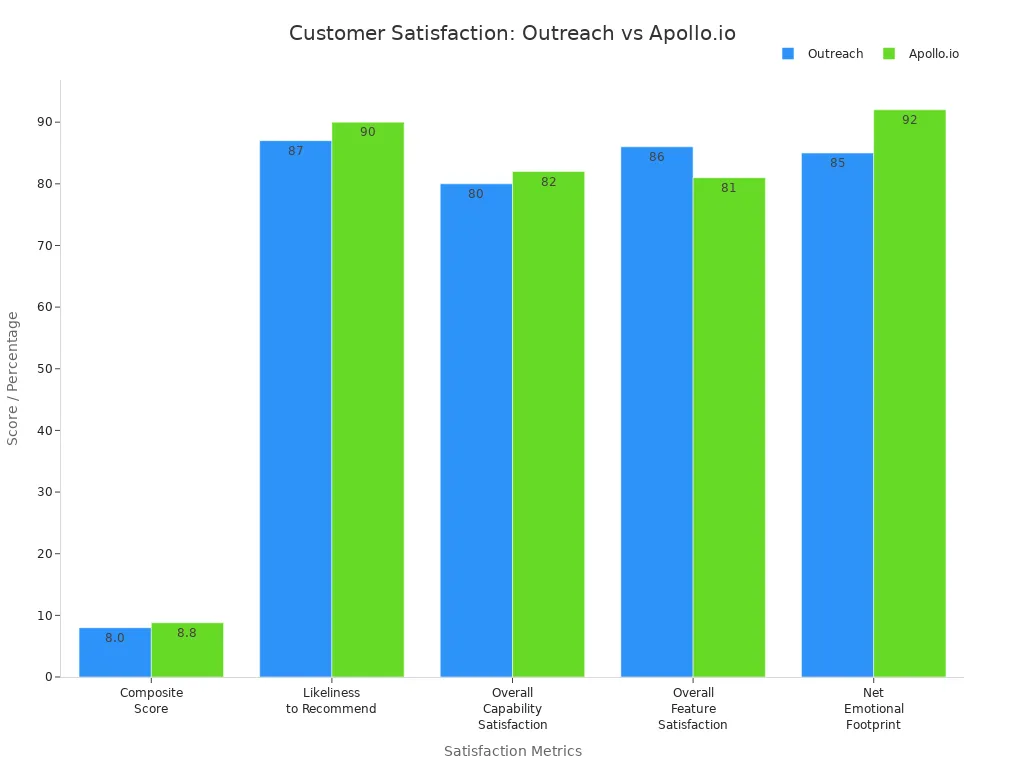
Good support means you get help when you need it. You want to feel sure that someone will answer your questions. Surveys say Apollo’s users are happier and trust the platform more. More people would tell their friends to use Apollo.
Metric | Outreach | Apollo.io |
|---|---|---|
Composite Score | 8.0 | 8.8 |
Likeliness to Recommend | 87% | 90% |
Overall Capability Satisfaction | 80% | 82% |
Overall Feature Satisfaction | 86% | 81% |
Net Emotional Footprint | +85 | +92 |
Apollo has a help center, live chat, and phone support for big teams. If you pay for a higher plan, you get faster answers. The Apollo Academy helps your team learn how to use the platform.
Scaling Costs as Teams Grow
When your team gets bigger, you want to know what you will pay. Apollo’s prices are easy to see, so you can plan as you add more users. Outreach needs you to talk to sales every time you want to change your team size. Many people say Apollo works well for big teams if you set up your CRM early. As you get more prospects, you can keep your outreach steady and organized.
Tip: Pick a platform with clear prices and good support. This makes it easier to grow your team.
Choosing the Right Platform
Who Should Choose Outreach?
Pick Outreach if your team wants strong automation and deep analytics. Outreach is good for groups that want to grow and need more features. If your team uses Salesforce or another big CRM, Outreach connects well with them. It can sync data both ways. You also get tools to help coach your team and improve sales.
Here is a table to help you see if Outreach is right for you:
Team Type | Benefits from Outreach |
|---|---|
Automation-focused teams | Use smart tools to make outreach easier. |
Teams needing advanced analytics | Get data to help make better choices. |
Scalable teams | Add more people and features as you grow. |
Customization-oriented teams | Change workflows to match what you need. |
Outreach works best for big teams or those with tough sales cycles. It is also good if you want AI to help with your work.
Who Should Choose Apollo?
Apollo is a good choice if you want clear prices and easy setup. You can see all costs before you buy, so planning is simple. Apollo fits small and medium teams that do a lot of prospecting. You get a database to find prospects, AI to help write emails, and plans you can change.
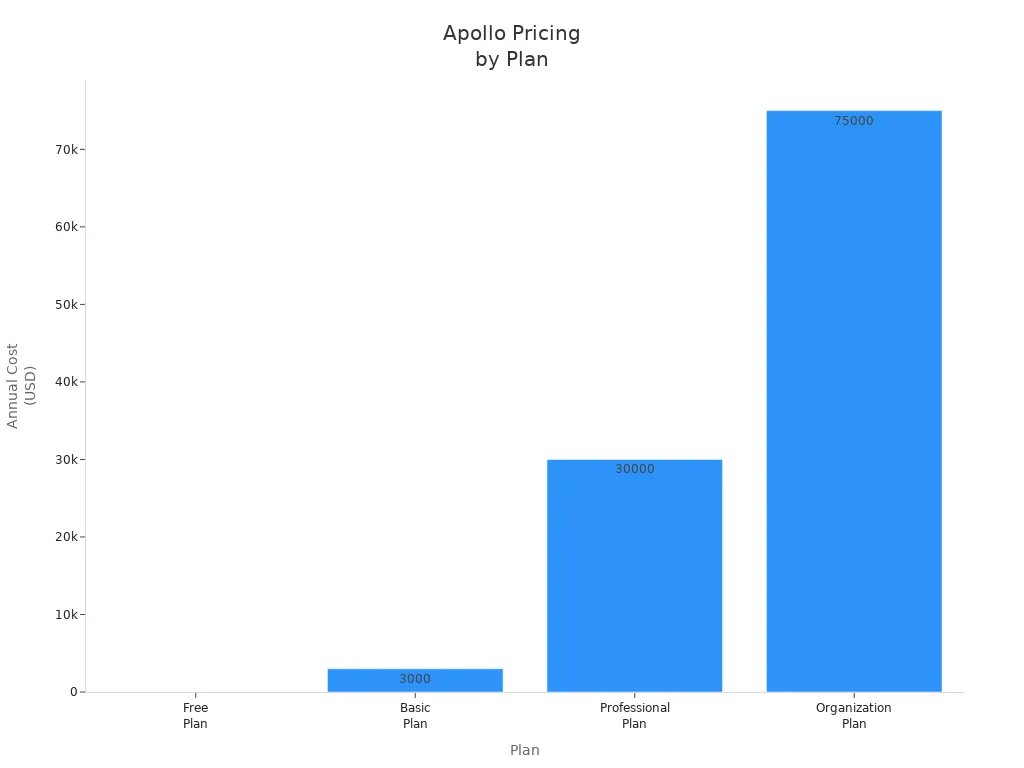
Check this table to find the Apollo plan for your team:
Plan | Cost | Ideal For | Key Features |
|---|---|---|---|
Free Plan | $0 per month | Small teams or individuals | Mobile credits, unlimited email, basic exports |
Basic Plan | $3K annually | Small teams | More credits, better filters, email provider connection |
Professional Plan | $30K annually | Medium companies | AI email writing, better reports |
Organization Plan | $75K annually | Large teams | Security, custom reports, more credits |
If you want costs you can predict and quick setup, Apollo is smart. You can start free and move up as your team gets bigger.
Tip: When you look at Outreach vs Apollo, think about your team size and budget. Also, check which features matter most. For a team of 50, Apollo’s clear prices and flexible plans help you plan and avoid surprises.
You want a platform with clear, predictable pricing for your team. Oliv.ai stands out with all-inclusive pricing from $19 per user each month, no setup fees, and a modular model that scales without hidden costs. Watch out for surprises like per-seat pricing that increases costs as your team grows, wasted outreach from poor deliverability, and tool sprawl that slows you down. Choose a solution that fits your budget and needs. Always ask for updated quotes before you decide.
FAQ
How do I get a quote from Outreach?
You request a demo on the Outreach website. A sales representative will contact you. You discuss your team size and needs. They send you a custom quote.
Does Apollo charge extra for heavy usage?
Yes. Apollo uses a credit system. If your team uses more credits than your plan includes, you pay extra. Track your usage to avoid surprises.
Can I switch plans easily with Apollo?
You can upgrade or downgrade your Apollo plan online. Changes take effect at the next billing cycle. This flexibility helps you adjust as your team grows.
What features cost extra with Outreach?
You pay more for add-ons like voice dialers, advanced analytics, or AI tools. Always ask for a full list of features before you sign your contract.
See Also
Analyzing Automation Costs: ROI Insights for Cowork, Zapier, Buffer
Exploring Google Antigravity: Costs, Restrictions, and Developer Insights
Strategies to Minimize Development Time for Minimum Viable Products
Enhancing SDR Team Efficiency with 11x, Slack, and Notion
Are TeamOut's AI Agents Capable of Supplanting Human Planners?

© Copyright 2025 LinkstartAI - All Rights Reserved.