NotebookLM’s Major Update Transforms Learning for Students and Professionals

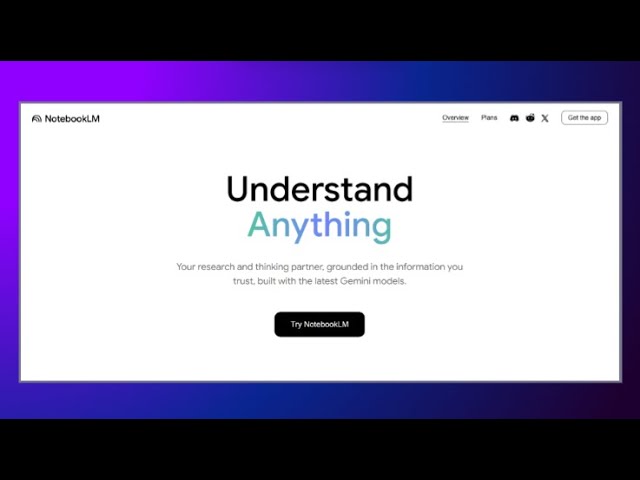
Google NotebookLM’s major update changes how you study and work. You can now get easy-to-understand content fast. You use flashcards, quizzes, and new video or audio overviews. These tools help you learn and reach your goals in school and at work. You can use better sources and privacy settings to learn more and keep track of your goals. The NotebookLM update lets you work with others, check your progress, and improve your learning. Think about how these major changes make your study time smarter and help you learn more every day.
Feature | Benefit |
|---|---|
Flashcards | Helps you understand topics better |
Helps teamwork and school progress | |
Helps you track goals at work and school |
Key Takeaways
NotebookLM now has flashcards and quizzes. These help you study better. They also help you remember more. Use these tools every day. This will make your memory stronger.
The new video and audio overviews let you learn in new ways. Pick the format that works for you. You can watch or listen, depending on what you like.
Mind maps and reports help you organize your ideas. They show how your ideas connect. Use these to plan projects. They help you focus on what matters most.
Customization options let you change your study materials. You can pick topics and set the difficulty. You can even change the AI's voice. This makes learning fit you better.
NotebookLM cares about your privacy and data safety. You decide who can see your notebooks. You can change your privacy settings easily.
Major Update Features
Flashcards and Quizzes
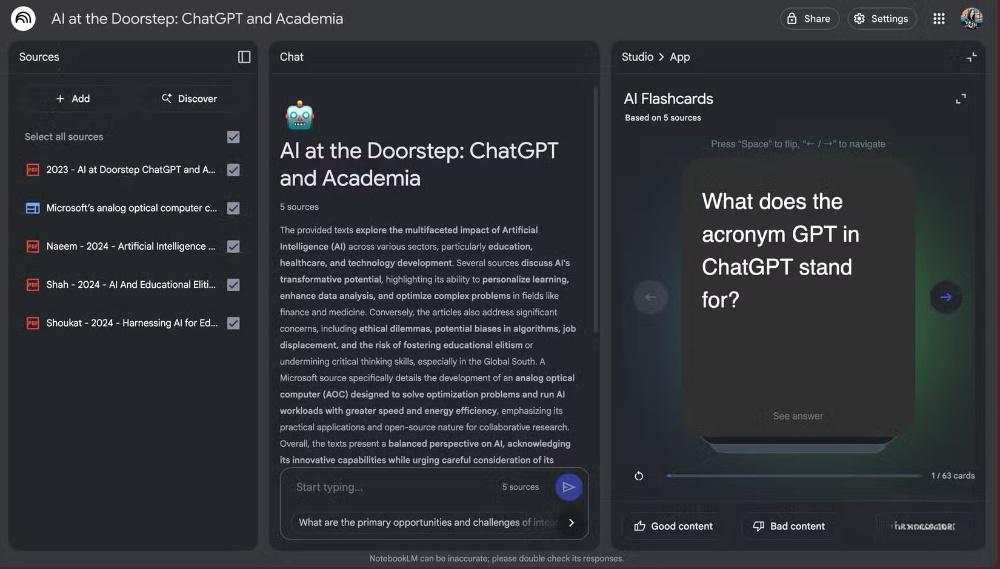
Now you can make flashcards and quizzes with one click in NotebookLM. These tools help you study better and remember more things. When you add your notes or documents, NotebookLM quickly makes flashcards and quizzes for you. You pick the topics and choose how hard you want them to be. This helps make your study time fit you and work well.
Tip: Try using flashcards every day to help your memory. Practicing often helps you remember facts faster.
Flashcards are great for learning languages and other subjects. They use active recall and repeating, which helps you remember things longer. Quizzes keep you interested and check what you know. You can change flashcards and quizzes to fit what you need. This makes learning fun and lets you join in.
NotebookLM lets you make flashcards and quizzes from any document.
You can change how many cards and quiz questions you want.
Interactive notebooks help you learn more about topics and remember better.
Students like these tools because they make studying easier. You spend less time making study tools and more time learning. The new updates make NotebookLM act like your own tutor, helping you learn each topic step by step.
Video and Audio Overviews
NotebookLM now has video and audio overviews. These new tools help you learn in different ways. You can watch slides with talking or listen to audio summaries while doing other things. This makes learning easier and fits your busy life.
Feature | Benefit |
|---|---|
Audio Overviews | Lets you learn while you do other things. |
Video Overviews | Shows slides with talking, making hard ideas easier. |
Customization | You can change content to match your goals and audience, making it more useful and fun. |
You get to pick how you want to learn. If you like pictures, video overviews help you understand tough topics. If you like listening, audio overviews give you deep talks. Students say audio summaries are fun and simple to use. Closed captions help everyone use the material. These new tools help all kinds of learners and make NotebookLM better for everyone.
Students use audio and video overviews to learn in new ways.
You can change these overviews to match your study goals.
The updates help more people learn and make it easier for everyone.
Mind Maps and Reports
NotebookLM now has mind maps and new reports to help you organize your ideas. Mind maps show how your skills and knowledge connect. You see the big picture and how things fit together. This helps you plan projects and organize your work.
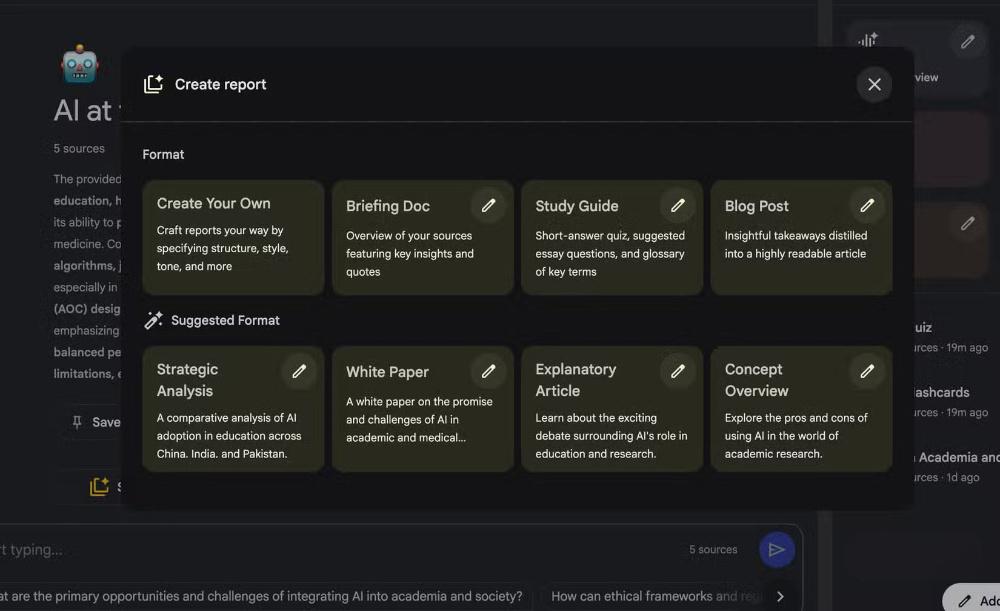
NotebookLM uses smart AI learning tools to make clear summaries from your documents. You get reports in formats like Custom, Briefing Doc, Study Guide, and Blog Post. These updates help you focus on important points and make choices faster.
NotebookLM puts important information together and shows patterns.
You use mind maps to plan projects and see how ideas connect.
The new look lets you do many things at once, listen to audio overviews, and use study guides together.
Working with OpenStax brings Featured Notebooks to NotebookLM. You get good academic resources and notebooks based on popular books. This makes learning better and more trustworthy.
The teamwork with OpenStax gives you trusted school content.
You use Featured Notebooks to study with checked materials.
These new tools help you get more done and make learning more active. Working together and using different types of content help you understand topics better. NotebookLM changes to fit what you need and helps you learn more.
Learning Experience with NotebookLM
Customization and Personalization
You can shape your study tools in NotebookLM to match your style. When you use flashcards, quizzes, or audio overviews, you decide how they look and sound. You pick the topics, set the difficulty, and choose the number of questions. You also control the voice of the AI. For example, you can select the 'Analyst' style for business tasks or the 'Guide' style for help centers. You write custom instructions to change the notebook’s role or tone. You even set how long you want answers to be, from short summaries to detailed explanations.
Note: Customizing your study materials helps you focus on what matters most to you.
Many users say that these options make their study time more personal and useful. When you add your own data and preferences, NotebookLM gives you content that fits your needs. This approach keeps you interested and helps you learn better. You can also create briefing documents and study guides that make exam preparation easier.
Benefits of Customization:
You get study tools that match your interests.
You feel more engaged and satisfied with your learning.
Learning Guide Mode
NotebookLM’s Learning Guide mode acts like your personal tutor. It adapts to your learning style and helps you step by step. If you learn best by seeing, it gives you visual materials. If you prefer listening, it offers audio guides. The AI checks what you already know before teaching new ideas. It changes the difficulty based on how well you do, so you always get the right level of support.
Tip: Try using Learning Guide mode to get help with tough subjects. The AI will guide you through each problem and explain things in a way that makes sense to you.
This mode promotes active learning. You answer questions, solve problems, and get feedback right away. NotebookLM uses different formats, like summaries, FAQs, and interactive chat, to keep you engaged. Studies show that this multi-format approach helps students understand and remember more. The collaborative features also let you work with others, making learning more fun.
How Learning Guide Mode Helps You:
Adapts to your learning style (visual, auditory, or hands-on).
Checks your knowledge before moving forward.
Adjusts difficulty in real time for better support.
Uses many formats to keep you interested.
Human-like Conversations
NotebookLM lets you talk to the AI in a natural way. You ask questions, and the AI gives answers that fit your needs. The responses use realistic speech patterns, so it feels like you are talking to a real person. You can ask follow-up questions, and the AI understands the context. This makes your study time smoother and more enjoyable.
Callout: Interactive audio discussions help you learn by talking through ideas and getting instant feedback.
You can turn long documents or videos into audio overviews. This feature lets you learn while you do other things, like walking or cleaning. Many users say that the audio overviews sound natural and make the content easy to understand. NotebookLM transforms content into different formats, so you always get information in the way that works best for you.
Why Human-like Conversations Matter:
You get answers that match your questions.
You can ask more questions and get helpful replies.
You learn in a way that feels comfortable and real.
NotebookLM gives you a learning experience that fits your style. You use notebooks to organize your work and get the most out of every study session.
App and Mobile App Enhancements
Accessibility and Global Reach
You can use the NotebookLM app almost everywhere now. The mobile app works in more than 150 countries. This means you can keep learning wherever you are. The app’s interface supports 18 languages. Spanish and Hindi versions are being tested. Only 3% of people say language is a big problem. This shows the app is easy to use. Most users who do not speak English, about 82%, use NotebookLM on their phones. The latest beta has 94% accurate note translation. This makes it easier to understand and share information.
Global Reach Fact | Details |
|---|---|
Countries Supported | 150+ |
Interface Languages | 18 |
Non-English Users on Mobile | 82% |
Translation Accuracy (2025 beta) | 94% |
Global User Base Outside North America | 61% |
Note: NotebookLM will add 12 more languages by 2026. This will help even more people join the learning community.
The app’s new features help everyone use it better. The new NotebookLM Plus interface feels like your own workspace. It is not just a blank page. You can use content in ways that work for you. Video overviews and audio summaries make learning clear and simple for all users.
Mobile App Features
The mobile app gives you strong tools right on your phone. You can use audio and video overviews to learn about topics. The new studio lets you ask questions and get answers fast. You can work with friends in real time. You can make study guides or reports from anywhere.
Feature | How It Helps You |
|---|---|
Interactive Learning | Engage with audio/video, ask questions, and explore topics |
Real-time Collaboration | Share notebooks and co-create content globally |
Automated Content Creation | Import sources automatically for complete materials |
Analytics Tools | Track engagement and improve your approach |
Exporting Capabilities | Download files for use on any platform |
Support for Diverse Learning | Choose visual or auditory formats for your style |
You can use analytics tools to see how your content is doing. The new studio lets you export your work to any device. The app supports both visual and audio learning. This makes it helpful for everyone. With these tools, NotebookLM helps you learn, create, and share knowledge anywhere.
Privacy and Trust
Data Security
You want your information to stay safe when using NotebookLM. Google uses strong tools to keep your data safe. Your personal data stays in your Google account, so you decide who can see it. NotebookLM does not use your data to teach its models. You can trust that only sources you pick can upload files. No other companies get to see your files.
Here is a table that explains how NotebookLM keeps your data safe:
Aspect | Description |
|---|---|
Data Usage | Personal data is not used to train models, ensuring privacy. |
Data Storage | Data is securely stored within your Google account, giving you control and easy access. |
Data Sharing | No sharing with third parties; uploads are restricted to authorized sources. |
Access Control | You set permissions for notebook access, protecting sensitive information. |
Data Protection | Enterprise-grade security, including encryption, safeguards your data. |
Compliance | Follows rules like GDPR and CCPA for best practices in data handling. |
Transparency | You get clear information about data usage and can change or delete your data at any time. |
NotebookLM does not save your chat history. Your talks stay private. The platform uses encryption and follows world privacy rules. You can feel sure your learning materials are safe.
User Control
You have many ways to manage your personal info in NotebookLM. You choose who can see your notebooks and what they can do. You can change sharing settings and set rules for each notebook. The Privacy Checkup Tool helps you look at and change your privacy settings. You can set your data to delete itself after some time.
Here are some features that help you stay in control:
You keep all your content inside your notebooks. NotebookLM does not search the web for more info.
You use Workspace security and encryption to keep your info safe.
You pick who can see your notebooks by changing sharing options.
You can check and update privacy settings with simple tools.
You set rules to delete old info automatically.
You see clear rules about how your personal data is used.
Users like new options such as Deep Dive, Brief, Critique, and Debate formats. These features help you make your learning fit you and keep your info safe. Google shows it cares about safe AI tools by giving you control and keeping your data private.
Tip: Always check your privacy settings to keep your notebooks safe.
NotebookLM’s big update brings new tools to help you learn and work. People say they can find answers faster and work better with others. You can use your voice, listen to audio summaries, and use interactive notebooks. These tools let you study or work in a way that fits you. Many users finish their work quicker and understand hard topics more easily. Try the new features to see how NotebookLM can make your study or work easier.
FAQ
How do you create flashcards in NotebookLM?
First, upload your source material. Then, click the flashcard button. NotebookLM makes cards for you. You pick the topics and how hard they are. This helps you learn and remember facts more quickly.
Can you use NotebookLM for group projects?
You can share notebooks with your team. Everyone can add their own notes and ideas. You all work together at the same time. This makes group work easier and helps you finish faster.
What makes NotebookLM good for different learning styles?
NotebookLM gives you many choices. You can use audio, video, or text. You pick what helps you learn best. This makes learning more fun and helps you understand better.
Is your data safe in NotebookLM?
Your information stays private and safe. You decide who can see your notebooks. Google uses strong security tools to protect you. You can change your privacy settings whenever you want.
Can you access NotebookLM on your phone?
You can download the mobile app to your phone. You use all the main features anywhere you go. You can study, make, and share notebooks on the move. The app works in many languages.
Tip: Use the mobile app for fast learning during your day.
See Also
Jule The AI Tool Simplifying Software Development Processes
GPT-5 Prompt Enhancer Quickly Boosts Your AI Intelligence
Vercel Introduces Fresh Open Source Coding Environment

© Copyright 2025 LinkstartAI - All Rights Reserved.