How LinkedIn Content OS Helps B2B Marketers Achieve Consistent Posting

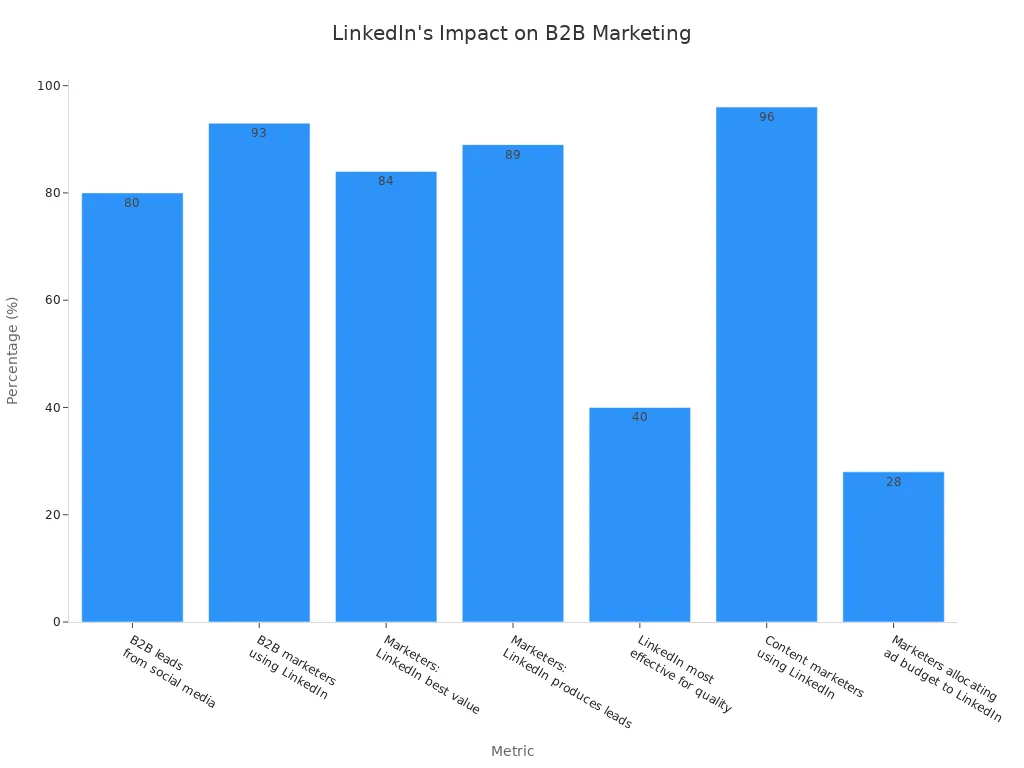
You know that posting often on LinkedIn helps B2B marketing. LinkStart AI’s LinkedIn Content OS helps you save time and fix work problems. It gives you a strong system to help you grow. Most B2B marketers use LinkedIn. About 75-85% of B2B leads come from LinkedIn. Having a good content plan is very important for success. A good LinkedIn plan means your content works well and helps your marketing.
The LinkedIn Content OS makes content easier to manage. It helps you focus on the most important marketing.
Key Takeaways
Use LinkedIn Content OS to save time when posting. It cuts down work from 10 hours to only 3.5 hours for 12 posts.
Talk to your audience and ask what they need. Real talks help you get better ideas for content.
Use a main place to manage all your content. This helps your team stay organized and keeps your brand the same everywhere.
Use AI tools to help write your posts. They make good content fast and keep it looking professional.
Check how your content is doing often. Look at the numbers to change your plan and get more people interested.
LinkedIn Posting Challenges for B2B Marketers
Time and Resource Constraints
B2B marketers have a lot to do every day. Posting on linkedin can seem like too much work. You want to share good content, but you do not have much time or help. Many teams spend hours each week making linkedin posts. Doing it by hand can take up to 10 hours a month for 12 posts. If you use an AI-powered system, you only need about 3.5 hours. This lets you work on other marketing jobs and still post on linkedin.
Posting Frequency | Manual Approach (Hours) | AI-Powered Approach (Hours) |
|---|---|---|
8 posts monthly | 5.5 - 6.5 | 2.5 |
12 posts monthly | 8 - 10 | 3.5 |
You need a plan to keep your linkedin posts steady. Posting 8 to 12 times a month works for most teams. If you try to post more than 20 times, you might get tired. It is better to post often for a long time than to post a lot and then stop.
Content Idea Generation
You want your linkedin posts to be special. Finding new ideas is hard in marketing. You need to know what your customers care about. Talking to them helps you learn what they really want. You should not only look at industry influencers for ideas. Try different types of content to reach more people. Real talks with customers give you ideas for good linkedin posts.
Ask your customers what they need from you.
Use new types of content to make your linkedin feed fun.
Use what you learn from real talks to make better posts.
Many marketers use AI to make linkedin posts fit each person. Automation saves time on boring jobs. You can use both AI and your own ideas to keep your posts real.
Strategy | Description |
|---|---|
Use AI for Personalization | AI looks at customer data to make special messages and get more people interested. |
Automate Repetitive Tasks | Automation does things like email campaigns so you have more time for creative work. |
Balance AI with Human Creativity | Using AI’s facts and your own ideas keeps your posts real and interesting. |
Workflow and Approval Issues
You need a simple way to get your linkedin posts ready. Many teams have trouble with their work process. If marketing and sales do not agree, it can slow down getting posts approved. Sometimes, your posts answer old questions or do not match what sales needs. Teams often care more about likes than about making money.
Teams have delays and mistakes because their work is not organized.
Sharing posts does not always help sales goals.
Waiting for approval can stop your posts from going out on time.
A newsroom style can help you make and share posts better. Editorial calendars help everyone know what to do. With a clear plan, you can post more on linkedin with the same team. Teams with better plans can post three times more than others.
73% of marketing teams say messy work slows them down.
Bad processes can make you lose leads and trust.
Teams with better plans post more and stay ahead.
You need a good system to handle your linkedin posts, keep your team working together, and make sure every post helps your business.
Solving Consistency with LinkedIn Content OS
Centralized Content Management
You need one place for all your linkedin content. The LinkedIn Content OS gives your team a main spot to work. You can use Google Sheets to keep track of every post idea. This system helps you stay organized and not get confused. You will not lose ideas or miss when something is due. Your team can see what is done, what needs work, and what is waiting for approval.
A central system helps your team work together better. You make fewer mistakes and talk more with each other. Everyone knows the plan and follows the same rules. Your linkedin content stays the same style and matches your brand. You also see more of what is happening in your work. You can check who is working on each post and what step it is at. This helps you find problems and fix them fast.
Tip: Use the governance tools in your content OS to set clear rules for your linkedin posts. This keeps your brand voice strong and helps you avoid mistakes.
Here is how a central system helps your linkedin marketing:
Evidence Point | Description |
|---|---|
Elimination of Silos | A central system removes silos and helps teams work together. |
Content Consistency | The system is one place for truth, so your content stays the same everywhere. |
Workflow Transparency | You see more of the work process, so there are fewer mix-ups and slowdowns. |
Governance Frameworks | Strong rules help you follow the law, avoid mistakes, and keep your brand safe. |
You can fix message problems, teamwork issues, and keep things steady by using a central system for your linkedin content. Your team will work better and reach your goals faster.
AI-Powered Drafts and Validation
You want your linkedin content to be good and ready to post. The LinkedIn Content OS uses GPT-5.1 to help you write drafts for your posts. You can turn ideas into clear, professional posts in just a few minutes. The AI helps you organize your posts, improve your ideas, and format them for linkedin. You do not have to start from nothing each time.
AI-powered drafts make your work faster and more steady. You get more regular linkedin posts. The AI checks your drafts for length, hashtags, and style. You can trust your content will look good and match your brand. At Carlat Publishing, teams use special AI tools to make first drafts from studies. Editors then check these drafts. This way, they get better and more steady content in less time. You can do the same for your linkedin marketing.
Many marketers use AI to keep their linkedin content clear and neat. You can focus on your message and let the AI do the small stuff. This helps you work faster and post more often. You do not have to worry about missing steps or making mistakes. The AI checks for problems before your post goes live.
Note: Even though AI helps you write drafts, you should always check your linkedin content before posting. This keeps your posts real and close to your audience.
Visual Enhancement and Approval Workflow
You want your linkedin content to stand out in the feed. The LinkedIn Content OS connects with Unsplash to give you great images. You can add cool visuals to every linkedin post. This makes your content more fun and helps you get people’s attention. Pictures also help explain your message and make your marketing easy to remember.
The approval workflow in the LinkedIn Content OS uses Gmail. You can send drafts to your team for review with one click. Everyone can see the content, suggest changes, and approve posts before they go live. This keeps your linkedin content safe and on-brand. You do not have to worry about unapproved posts or mistakes. The system tracks every step, so you always know who approved each post.
You can make a bunch of posts, add pictures, and send them for approval all at once. This saves you time and keeps your linkedin marketing running well. Your team can focus on ideas and strategy, not chasing approvals or fixing mistakes.
Add images from Unsplash to make your linkedin content stand out.
Use Gmail to review and approve posts fast.
Track every step to keep your content process clear and organized.
You can fix the most common linkedin marketing problems with the right tools. The LinkedIn Content OS gives you everything you need to make, check, and share great content every time.
Using LinkedIn Content OS: Step-by-Step Framework
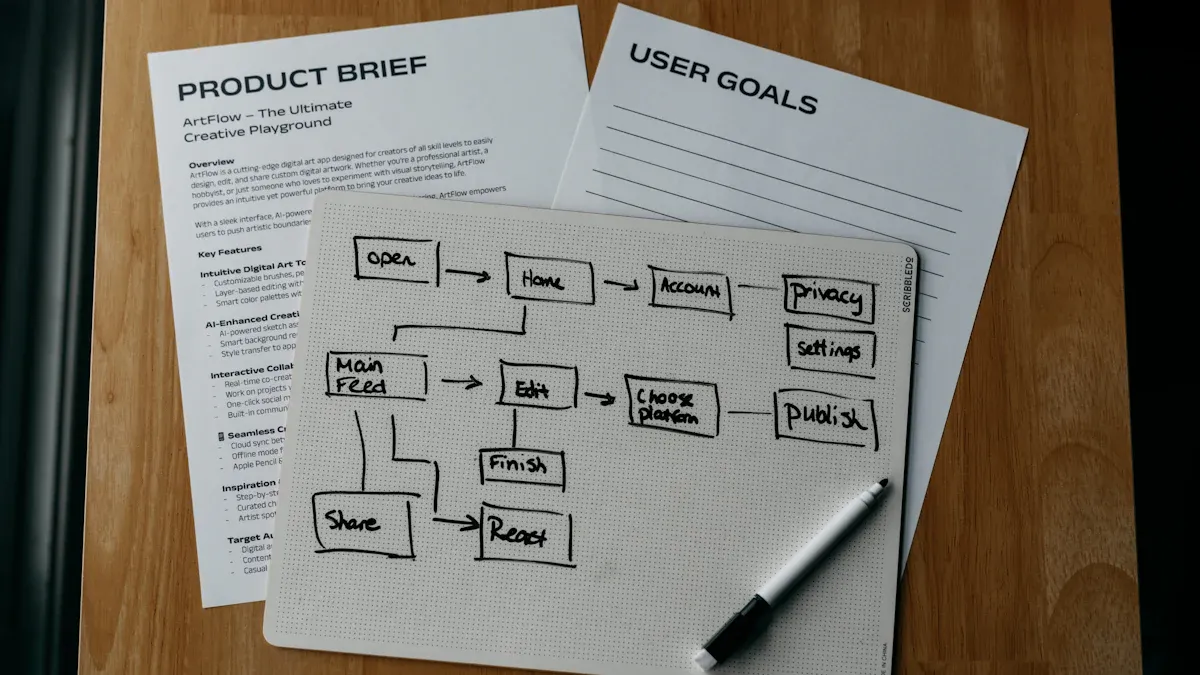
You want a system that works for linkedin content. LinkedIn Content OS shows you what to do. You can follow these steps to make your linkedin marketing easy and strong.
Capture and Organize Ideas
You need to grab ideas for linkedin content right away. Good ideas can pop up anytime. If you wait, you might forget them. Use tools like Signal or send yourself voice notes to save ideas fast. You can also write down rough drafts. This helps you keep your creativity moving.
Grab ideas quickly so you do not lose them.
Use tricks or voice notes if your hands are busy.
Sort ideas into a topic map for later.
Make content creation a step-by-step process.
Build a content calendar to keep your linkedin posts steady.
Pick daily themes to keep your content different and help you decide faster.
Reuse content that your audience likes.
You can use Google Sheets in LinkedIn Content OS to sort all your linkedin content ideas. This keeps everything together. You can see what you have, what you need, and what works best for your marketing.
Tip: Grab ideas as soon as you get them. Sort them in your content OS. This keeps your linkedin content ready to go.
Draft and Validate Content
You want your linkedin content to be clear and look good. LinkedIn Content OS uses AI to help you write posts fast. You can turn rough ideas into strong linkedin posts in minutes. The system checks your drafts for length, hashtags, and style. This makes sure your content fits linkedin’s best rules.
Write rough drafts first. Let your ideas come out.
Use GPT-5.1 to fix your drafts and match your brand voice.
Check each post for character limits and hashtag use.
Make sure your content follows your marketing goals.
Automation in LinkedIn Content OS cuts down manual work. You can turn hours of editing into minutes. The system handles boring tasks, so you can focus on your message. This makes your linkedin marketing faster.
Note: Always check your linkedin content before posting. Make sure it feels real and connects with your audience.
Approve and Schedule Posts
You need a simple way to approve and schedule linkedin content. LinkedIn Content OS gives you a clear plan. You can move each post through steps like Idea, Draft, Review, and Scheduled. Assign owners and set deadlines for each step. This keeps your team working together.
Use approval steps to check posts before they go live.
Set deadlines for design and final approval.
Make a team system so everyone knows their job.
Track each post as it moves through the steps.
You can schedule groups of linkedin content at once. This saves time and keeps your marketing steady. The system sends alerts when posts need review. You always know what is ready and what needs work.
Tip: Make groups of linkedin content and approvals. This keeps your posting steady and lowers stress.
Monitor and Adjust Strategy
You want to see how your linkedin content does. LinkedIn Content OS helps you track important numbers. You can see which posts get the most views, likes, and comments. You can also check who is reacting to your content.
Metric | Description |
|---|---|
Impressions & Reach | Shows how many people saw your post and how far it went |
Engagement Rate | Tracks likes, comments, shares, and saves as a percent of views |
Profile Views | Shows how well your content connects with your audience |
Follower Demographics | Shows who you are reaching by role, industry, and location |
Content Interactions | Shows what type of content works best for your audience |
You should check these numbers often. Look for patterns in your linkedin content. See what topics and formats get the best results. Change your plan to focus on what works. This helps you reach your marketing goals faster.
Watch how your linkedin content does.
Measure engagement numbers like clicks and shares.
Check and change your content plan often.
Note: Use numbers to guide your linkedin marketing. Focus on content that brings the best results.
You can use LinkedIn Content OS to grab ideas, write posts, get approvals, and track results. This step-by-step plan helps you keep your linkedin content steady and strong. Your marketing team can save time, make fewer mistakes, and grow your linkedin presence with confidence.
LinkedIn Content Marketing Best Practices
Batch Planning and Scheduling
You need a good system for linkedin content marketing. Start with a small goal of two or three posts each week. Make your posts in groups by spending a few hours planning and writing. Use a content calendar to keep your team organized and on track. Try to post three to five good linkedin posts every week. Use scheduling tools to set up your posts so your audience sees them at the right time. When you post on a regular schedule, your audience knows when to expect new content. This helps more people see your posts. It also makes you a trusted voice in your field. Posting often keeps your brand in people’s minds.
Tip: Making posts in batches saves time and lowers stress. You can focus on making good posts and keep your linkedin content marketing steady.
Leveraging Analytics
You need to check your linkedin content marketing results to get better. LinkedIn analytics tools show you how people react to your posts. You can see which posts get the most likes and comments. You can also see what topics your audience likes best. Use this information to change your posts and reach your goals. Watch important numbers like impressions, clicks, reactions, comments, shares, profile views, direct messages, and website clicks.
Metric | Description |
|---|---|
Impressions | Shows how many times your linkedin content appeared to your audience. |
Clicks | Measures how many times your audience clicked on your linkedin content. |
Reactions | Counts how your audience responds to your linkedin content. |
Comments | Tracks how often your audience interacts with your linkedin content. |
Shares | Shows how often your audience shares your linkedin content with others. |
Making small changes from analytics can help your linkedin content marketing. For example, a company in Canada got 150% more leads in one year by sharing industry news and client stories.
Engaging Your Audience
You want your linkedin content marketing to connect with people. Post useful content often to get more likes and comments. People who post 40 to 50 times a month get about 56% engagement. Make your connection requests and messages personal to grow your network. Join linkedin groups in your field and share what you know. Make great content that shows you are a leader and builds trust. Check your content marketing plan often to see what works best. When you talk with your audience, you get more leads and people know your brand. Seventy-four percent of buyers pick the company that gives value first. LinkedIn content marketing helps you reach your audience, get more engagement, and grow your business.
Note: Think about what your audience needs. Good linkedin content marketing builds trust and helps you get results.
You might find it hard to make linkedin content. LinkStart AI’s LinkedIn Content OS gives you an easy way to post on linkedin. You can sort ideas, write linkedin posts, and get them approved fast. The toolkit uses Google Sheets, GPT-5.1, Unsplash, and Gmail to help you work better. This saves you time and keeps your linkedin marketing on track. Each linkedin post matches your brand and reaches your audience. You can check how your linkedin posts do and change your plan to get better results.
Making a linkedin workflow helps you work faster.
Setting linkedin goals makes sure your posts help your business.
Every linkedin post has a reason.
Evidence Type | Description |
|---|---|
Makes linkedin jobs easier and helps you get more leads. | |
Implementation Strategy | Clear linkedin goals and research make your work better. |
Continuous Improvement | Looking at data and testing helps you get the best results from linkedin. |
You can make your linkedin better and grow your marketing. Try LinkedIn Content OS and see how it can change your linkedin content for the future.
FAQ
How does LinkedIn Content OS help you save time?
You use one system for all your LinkedIn content. You organize ideas, draft posts, and manage approvals in one place. This reduces manual work and lets you focus on strategy.
Can you customize the approval workflow?
Yes. You set up your own steps for review and approval. You assign tasks to team members and track progress. This keeps your process clear and efficient.
Is LinkedIn Content OS secure for your data?
Your data stays safe. The system uses trusted tools like Google Sheets and Gmail. You control who can access your content and approvals.
What results can you expect from using LinkedIn Content OS?
You post more often and with better quality. You see higher engagement and reach. You spend less time on manual tasks and more time growing your business.
See Also
Streamline Your Content Marketing With Cowork And Zapier
Cowork And Zapier: The Future Of Content Operations 2026
Create Your Own Content Empire With Cowork, Airtable, And Buffer

© Copyright 2025 LinkstartAI - All Rights Reserved.