Jule The AI Agent Making Software Development Easier


Jule is an AI agent from Google that works on its own. It helps you do software development tasks faster. You can link Jule to your GitHub and Google Cloud accounts. Many developers use Jule to fix bugs, make tests, and add new features. They do not need to watch over it. Teams using Jule finish work faster and keep their projects safer.
Jule works in your GitHub projects. This lets you automate coding jobs and stay in control.
You can give tasks to Jule and do other things. It is like having a junior developer on your team.
Teams say Jule helps them get more done. It takes care of simple jobs and saves time by reducing task switching.
Jule started in beta and got good reviews for being safe and working on its own.
Key Takeaways
Jule does coding jobs for you. This lets developers do more important work. Jule takes care of simple tasks.
Jule helps teams work faster. It helps finish projects quickly. Teams make fewer mistakes with Jule.
Jule works well with GitHub. Your code stays safe with Jule. It helps fix bugs and add new features.
The AI agent gives helpful tools. It makes audio summaries of commits. This helps teams talk better and share ideas.
Jule has different pricing plans. There is a free plan too. Small projects and big teams can use Jule easily.
How Jule Helps
Automates Coding Tasks
Jule can do many coding jobs that repeat often. This AI agent works while you do other things. You do not need to stop your work. Jule connects to your GitHub projects. It starts working when you give it a task. You can ask Jule to fix bugs or make your documentation better. You can also ask it to add new features. Jule can make audio summaries of your commits. This helps your team share updates more easily.
Here is a table with some tasks Jule does and examples:
Task Description | Example |
|---|---|
Fixing layout bugs and generating pull requests | Jule fixes a layout bug and makes a pull request. |
Creating audio summaries of commits | Jule makes an audio summary of recent commits for your team. |
Adding new features to existing codebases | Jule adds a new feature to track spending trends in a bill scanner notebook. |
Improving documentation | Jule improves the |
Generating audio changelogs from commits | Jule summarizes commits from the week and makes an audio changelog for team meetings or onboarding. |
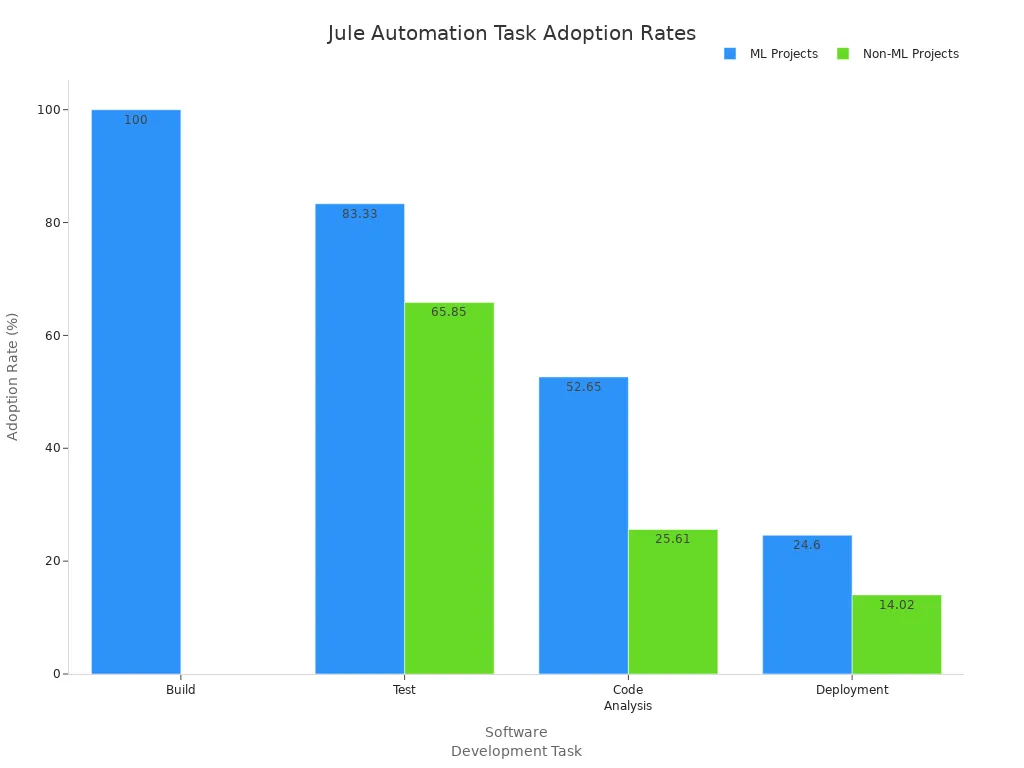
Jule helps with software development tasks in machine learning and other projects. The chart below shows how often teams use Jule for builds, tests, code checks, and deployment:
Boosts Productivity
Jule helps you finish more work in less time. When you use this coding assistant, your workflow gets better. One user said Jule did four hours of coding while they made coffee. You can trust Jule to check code quality, run browser tests, and help plan tasks.
Automated browser testing
Integrated web surfing for documentation
Environment snapshots for consistent setups
Interactive task planning for real-time adjustments
Jule works with pull requests and keeps your setup the same. You can focus on creative work. Jule takes care of routine jobs. Many teams say Jule makes them feel more confident. Freelancers can handle bigger projects. Startups move faster from idea to MVP. Large teams keep their code the same.
You will see tasks get done faster and fewer mistakes happen. Studies show users finish more tasks and write more code with Jule. Since its beta launch, Jule has become a trusted AI tool for developers who want to save time and get more done.
Jule Agent Overview

Asynchronous Operation
You can use Jules to help with coding while you do other things. When you give Jules a job, it works in the background. You do not have to watch it or keep giving it instructions. Jules can do many jobs at the same time, so you can focus on your own work. Jules uses Google’s Gemini 2.5 Pro, which helps it think and plan well. It can finish tasks that need many steps and can solve hard problems. Jules can look at a lot of code at once, so it understands your whole project.
Jules runs on a virtual machine in the cloud. This keeps your computer safe and lets Jules see your code in a secure way. You can ask Jules to write tests, add new features, fix bugs, update dependencies, and make audio changelogs. Because Jules works on its own, you get more done and do not have to wait for answers from AI.
Here is a table that shows what Jules can do:
Core Functionality | Description |
|---|---|
Asynchronous Task Management | Does many jobs at once, so you do not have to wait for each one. |
Real Codebase Integration | Connects to GitHub and knows about your project. |
Comprehensive Task Execution | Can write tests, fix bugs, and make pull requests by itself. |
Gemini 2.5 Pro Integration | Uses smart thinking to solve hard coding problems. |
Cloud-Based VM System | Works safely in the cloud and keeps your code protected. |
Integration with GitHub
Jules links to your GitHub account using a safe login method called OAuth. This keeps your data safe and only lets the right people see your code. You can match with GitHub branches, make pull requests, and get updates on your tasks. Jules runs in Google Cloud virtual machines that are separate from your computer, so your code stays safe when Jules copies and works on it.
Security tools include locked messages, smart access, and strong data locks. Google Cloud uses Security Command Center, Cloud Armor, and IAM to keep your projects safe. You are protected from threats and can choose who gets into your code. Jules’ GitHub link helps you do jobs automatically and keeps your code safe.
Tip: You can help your team get more done by letting Jules handle simple jobs. Jules works by itself, so you can spend more time on creative coding.
Key Features

Bug Fixing
You can count on Jules to fix bugs fast. This agent uses smart tools to spot problems and suggest fixes. When you connect Jules to GitHub, it checks your files for errors. You do not have to spend a long time looking for mistakes. Jules finds issues and gives you a report like a real code review.
Tip: Let Jules sort out bugs. You will save time and money.
Jules uses special ways to look at bugs and sort data. These methods help Jules pick the best way to fix things. You get better code and fewer mistakes. The agent also checks for rare cases and writes tests to make sure the fix works.
Methodology | Description | Outcome |
|---|---|---|
Automated Bug Analysis | Uses text and binary sorting for bug triage | |
Data Reduction Techniques | Picks out features and chooses examples | Makes results more accurate and faster |
Many people say Jules gives clear reports. You see what changed and why. The agent fixes API links, handles async jobs, and stops storage problems. You get more complete code and better results.
Test Creation
Jules helps you make tests for your code. You do not have to write every test yourself. The agent can add unit, integration, and API tests. When you start a new project, Jules sets up basic tests. If you already have tests, Jules follows your style and adds more.
More work done faster
Bugs found early
Saves money
Type of Test | Description |
|---|---|
Unit Tests | Checks if small parts of your code work right |
Integration Tests | Makes sure different parts of your code work together |
API Tests |
Users like that Jules makes docs and updates tools by itself. You get better results with new code. The agent works well with GitHub, so your tests run on their own. You find bugs early and keep your code safe.
Feature Implementation
Jules makes adding new features simple. You give the agent a job, and it plans the steps. Jules writes new code, changes old code, and explains what it did. You do not need to watch every step. The agent works in the cloud and uses Gemini 2.5 Pro for smart planning.
Note: Jules works alone and shows you the finished work, moving toward coding by itself.
When you ask Jules to upgrade a tool like Next.js, it copies your code, plans changes, and makes a pull request. You keep working while Jules does the job. This way lets you focus on ideas. Jules handles the details and keeps your project going.
Works well with GitHub
Handles tasks by itself
Edits many files and explains changes
Users give high marks for adding features. You see faster updates and better code. Jules helps you from beta to launch.
Dependency Updates
Jules keeps your project safe and stable. The agent updates dependencies by copying your code to a safe Google Cloud machine. You do not risk breaking your main code. Jules checks for old packages, upgrades them, and runs tests to make sure all works.
Jules uses an AI-powered helper to find bugs and slow spots. You get feedback before changes go live. This makes your software safer and more stable. You choose when updates happen, and Jules does the hard work.
Alert: Automated updates help stop security risks and keep your code current.
You see fewer mistakes and more stable builds. Jules works in the background, so you can focus on coding and new features.
Getting Started
Access and Setup
You can start using Jule in just a few steps. Jule makes it easy for you to connect your coding projects and get help right away. Follow this simple guide to set up Jule for your next software project:
Visit jules.google.com
Sign in with your Google account.
Accept the privacy notice.
Connect your GitHub account.
Complete the login process.
Choose the repositories you want Jule to access.
Return to Jule’s dashboard.
Select a repository from the list.
Pick the branch for Jule to work on.
Write a clear prompt for your coding task.
(Optional) Add setup scripts for your environment.
Select Give me a plan.
Tip: If you run into issues, check your connection settings or browser cookies. Many common problems have simple fixes, like adjusting permissions or turning off third-party cookie blocking.
Jule offers detailed guides to help you. You can find instructions for setting up virtual machines, using Rose suites, and getting help with version control. These resources support both new and experienced users.
Documentation/Guide | Description |
|---|---|
JULES VM set-up | Steps for setting up the virtual machine |
JULES help | Access to help resources |
Rose/Cylc set-up | Instructions for Rose and Cylc setup |
Plans and Pricing
Jule gives you options to match your needs. You can start with a free plan or choose a paid plan for more tasks each day. The table below shows the main differences:
Plan Type | Monthly Cost | Concurrent Tasks | |
|---|---|---|---|
Free Plan | $0 | 15 | 3 |
Pro Plan | $19.99 | 75 | 15 |
Ultra Plan | $124.99 | 300 | 60 |

You can pick the plan that fits your coding workload. The free plan works well for small projects or if you want to try Jule. Paid plans let you handle bigger projects and more tasks at once. Each user can decide which plan matches their needs best.
Note: The world of AI coding agents is always changing. Jule, Codex, and Claude all offer unique features. Try different tools to see what works for your project.
Jule helps you get software projects done faster. It manages tasks by itself. The agent checks its own code. You can do other work while Jule runs. This helps you get more done. Teams say Jule makes code better and work easier.
Benefit | Description |
|---|---|
You get to spend more time on big jobs. | |
Faster Development Cycles | Jule makes coding, testing, and fixing bugs quicker. |
Improved Code Quality | Automated tests and fixes make your code better. |
Enhanced Collaboration | Audio changelogs help your team know what’s new. |
Reduced Development Costs | Automation helps save money on projects. |
AI agents like Jule will keep changing how people build software.
You will see more tools that plan and finish jobs for you.
Coding will get easier for everyone, not just experts.
FAQ
How do you start using Jule?
You sign up at jules.google.com, connect your GitHub account, and pick your project. Jule guides you through each step. You can start automating tasks right away.
Is Jule safe for your code?
Yes. Jule runs in a secure Google Cloud environment. Only you and your team can access your code. Jule uses strong security tools to keep your data safe.
What tasks can Jule handle?
Jule can fix bugs, write tests, update dependencies, and add new features. You can give Jule a task, and it works in the background. Jule also creates audio summaries and changelogs.
Can you use Jule for free?
Yes. Jule offers a free plan. You get 15 tasks each day and can run up to 3 tasks at once. Paid plans give you more tasks and features.
Does Jule work with any programming language?
Jule supports many popular languages like Python, JavaScript, and Java. You can check the full list in the official documentation.

© Copyright 2025 LinkstartAI - All Rights Reserved.