How Video Shorts AI Makes Manual Editing Effortless in 2026

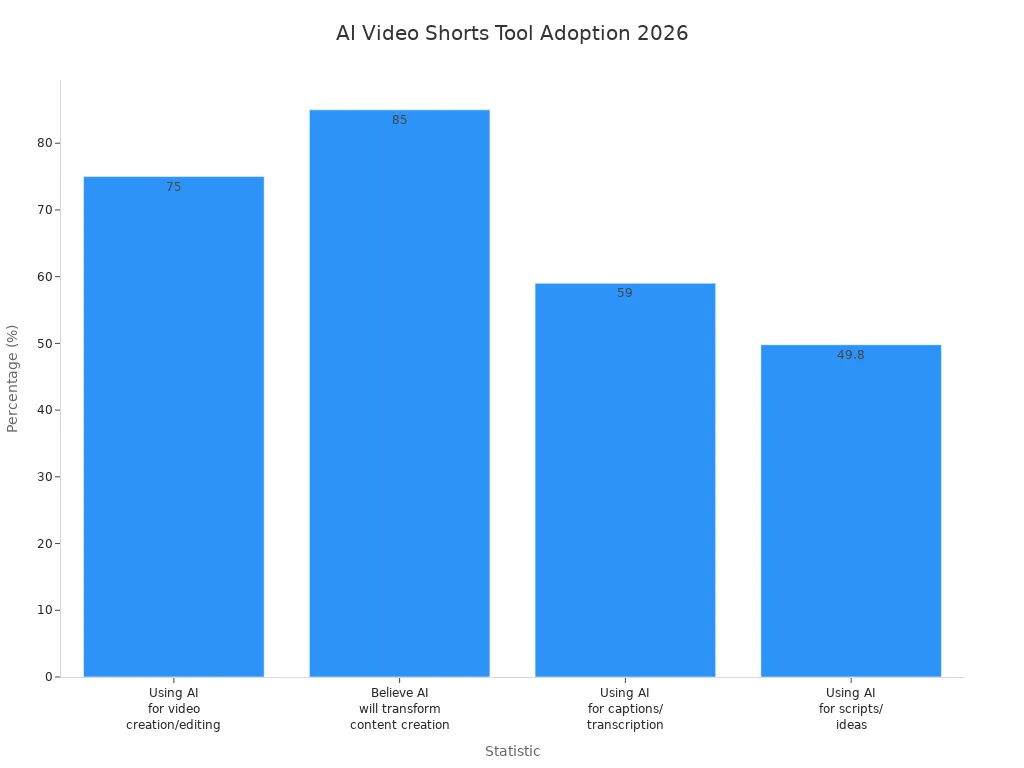
You do not need to spend hours editing videos by hand now because video shorts ai can help. Tools like LinkStart AI’s Long-to-Shorts Engine let you cut videos, choose the best parts, and plan posts easily. Many marketers use these tools:
Statistic | Percentage |
|---|---|
Video marketers using AI tools for video creation and editing | |
Marketers who believe generative AI will transform content creation | 85% |
Key Takeaways
AI video editing tools help you by doing the editing for you. This saves you time and lets you work on your story.
With AI, you can make many short clips from one long video. This helps you share more content and reach more people.
AI tools keep your videos looking the same and high quality. Your content looks professional every time you use them.
Video Shorts AI vs. Manual Editing
Common Editing Challenges
Manual editing can feel like it never ends. You might sit for a long time, looking for the best parts in your videos. You have to cut, trim, and match everything by yourself. This takes a lot of time and can make you feel annoyed, especially if you are just starting out.
Many new editors find it hard to learn. Before, only people with special skills could make great videos. Now, with ai and free editing tools, anyone can start making videos right away. These tools help you learn as you use them, so more people can make videos.
Manual editing can also make your videos look different each time. Your branding might not look the same in every video. Sometimes, the sound is not always good, or the style changes. This can make your channel or brand look messy. Here is a quick list of common problems:
Pain Point | Description |
|---|---|
Inconsistent Branding | Different team members apply branding differently, leading to a disjointed appearance. |
Varying Audio Quality | Audio quality differs based on the recording equipment used, affecting overall professionalism. |
Diverse Visual Styles | Visual styles vary across videos, contributing to a lack of cohesion in the onboarding library. |
Manual editing can also slow you down. It is hard to make new videos fast enough. You spend more time fixing old videos than making new ones.
How AI Solves Manual Tasks
Video shorts ai helps make things easier. With ai video editing tools like LinkStart AI’s Long-to-Shorts Engine, you do not have to do the boring parts. You can focus on telling your story.
Here is how video shorts ai helps you:
You upload your long video, and the ai starts working.
It uses smart tools to find the best parts, so you do not have to watch everything.
The engine uses Whisper to know where each word starts and ends, so your cuts are always neat.
Gemini helps the ai find 3 to 6 viral moments in your video. It even gives you ideas for titles and descriptions.
The tool changes your video for both vertical and horizontal screens, but keeps the same quality.
You can set your shorts to post by themselves, so your viewers always see something new.
Here is a table that shows how these features work together:
Feature | Description |
|---|---|
Finds Hooks Automatically | AI identifies 3–6 high-retention segments from the transcript with timestamps. |
Cuts Cleanly | Utilizes absolute-second FFmpeg timing to prevent cuts in the middle of words. |
Vertical & Horizontal Friendly | Adapts to both video orientations while maintaining source resolution. |
Whisper Transcription | Provides word-level timestamps for precise video clipping. |
AI Clip Mining (Gemini) | Detects 3–6 viral moments (15–60s) and generates titles/descriptions. |
With video shorts ai, you get more than just speed. You also get videos that look the same every time. The ai video editing tools check your edits before you post them, so everything matches your brand. New ai tools have fixed old problems like scenes that do not match or strange cuts. Now, your videos look smooth and professional every time.
Let’s see how manual editing and video shorts ai are different:
Pain Point | Video Shorts AI | Manual Editing |
|---|---|---|
Automates the editing process | Time-consuming manual work | |
Content Identification | Uses AI to find key moments | Requires manual searching |
Customization for Branding | Enhanced options for branding elements | Limited customization options |
You will see big changes in how you work, too:
Improvement Type | Description |
|---|---|
Time Efficiency | 25% decrease in production times compared to traditional methods. |
Editing Time | Reduction in editing time, especially in trimming and syncing. |
Script Quality | Elimination of filler words and repetitions for a polished voiceover. |
User Engagement | Improved understanding and retention through structured narration. |
Scalability | Faster turnaround for multiple video assets without compromising quality. |
With video shorts ai, you spend less time editing and more time making videos. You do not have to worry about learning hard skills or getting different results. The ai does the hard work, so you can share your ideas with everyone.
AI Video Editing Tools in Action
Auto-Editing with AI
You do not have to be an expert to make cool short videos now. With ai video editing tools, you can turn long videos into clips fast. Here is how the process usually works when you use auto-editing with ai:
Upload & Set Preferences: First, upload your video. You can tell the ai what topics you want or who should watch.
AI Processing: The ai looks at your video and finds the best moments. It makes short clips that people will like.
Review & Personalize: You get to see the clips the ai made. You can change them to fit your brand or add your own style.
Caption & Accessibility: Add captions so everyone can follow along. This step helps more people enjoy your videos.
Publish & Distribute: Share your clips on YouTube Shorts, TikTok, and other places. The ai can even help you pick the best time to post.
When you use LinkStart AI’s Long-to-Shorts Engine, you see all these steps happen. The engine takes audio from your video and uses Whisper to write out every word. Gemini helps pick the best parts for your clips. You get 3 to 6 fun social clips from just one upload. The tool can also set up your clips to post by themselves, so you always have new content ready.
Tip: Auto-editing with ai lets you focus on your story. The ai does the hard work for you.
YouTube Short Maker AI Features
YouTube short maker ai tools have changed how you make short videos. These tools use ai to find the best parts of your video and turn them into viral social content. Here is what you get:
Feature | Description |
|---|---|
AI Analysis | The ai checks your video for highlight moments that boost engagement potential. |
Customization Options | You can adjust your clips to fit your audience or brand style. |
Streamlined Sharing | Share your platform-optimized clips on different social media platforms with just a click. |
Dynamic Layouts | The ai offers layouts that make your short-form video look great on any device. |
Quick Edits | Get fast auto-edits that feel like a pro editor worked on them. |
YouTube short maker ai can understand different camera angles and switch layouts for you. You get cool templates, graphics, and easy tools to edit. This makes it simple to create short clips, even if you are new to editing.
Some popular ai video editing tools for short videos in 2026 are:
CapCut – Finds highlights, makes clips, and adds captions.
Pictory – Trims and finds the best parts fast.
Wisecut – Removes silent parts and adds music.
Descript – Lets you edit by changing the transcript.
VEED.IO – Gives you templates and auto subtitles.
InVideo – Uses templates for quick short videos.
Lumen5 – Turns long videos or text into short videos.
Kapwing – Makes it easy to clip, caption, and export.
YouTube short maker ai tools help you reuse your content. You can take one long video and make many clips for different platforms. This helps you reach more people and stay active everywhere.
Benefits and Limitations
You might ask, “Why use ai video editing tools?” The answer is easy: you save time, money, and effort. Here is what you get:
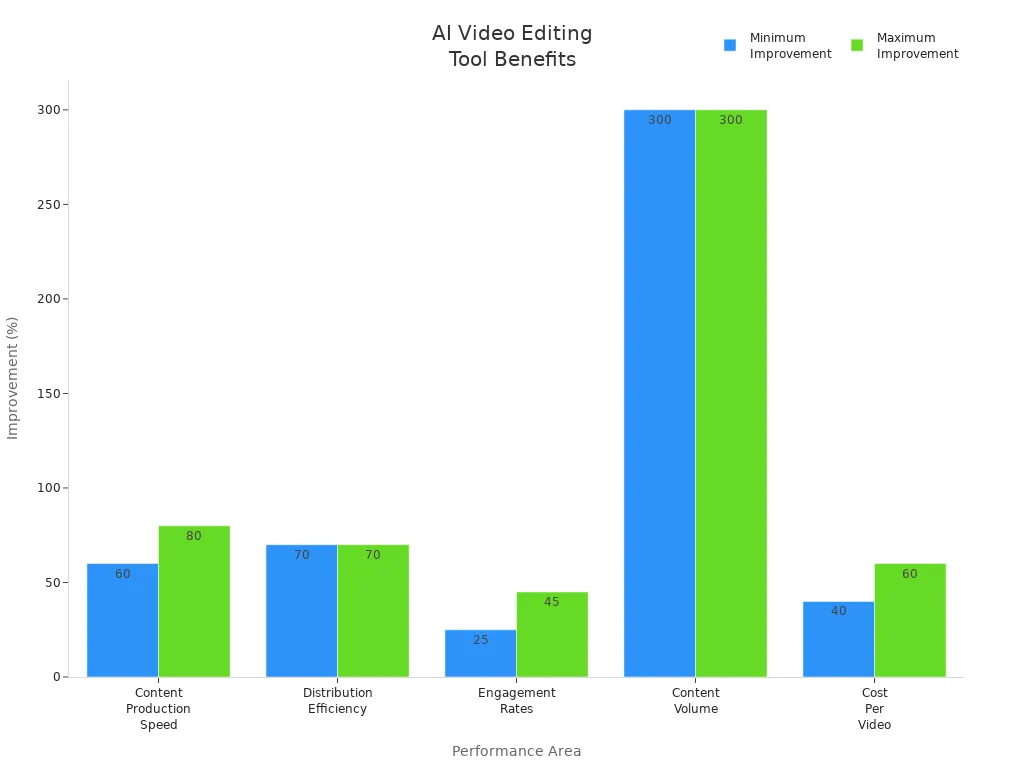
Performance Area | Typical Improvement | Timeline to Results | Measurement Method |
|---|---|---|---|
Content Production Speed | 60–80% faster creation | 2–4 weeks | Time tracking per video |
Distribution Efficiency | 70% reduction in manual work | 1–2 weeks | Task completion time |
Engagement Rates | 25–45% improvement | 4–8 weeks | Platform analytics |
Content Volume | 300% increase in output | 6–12 weeks | Publishing frequency |
Cost Per Video | 40–60% reduction | 3–6 months | Total cost analysis |
With ai video editing tools, you can:
Make three times more content from one video.
Reach up to 45% more people with better clips.
Cut your work by 60% when sharing videos.
Get 25% more likes and comments on your posts.
Publish your videos 40% faster.
You do not need special skills to use ai editors. The tools are easy to use, so you can start right away. This makes it possible for anyone to make short clips and social clips. You can try new styles and formats, making content repurposing fun.
Note: AI-powered short makers make video content cheaper and easier. You can try new ideas and reach more people without spending a lot.
But ai editors cannot do everything. They do not always know your brand’s voice or feelings you want to show. Human creativity is important for telling stories and making your video feel right. You bring the ideas, and the ai helps you finish faster.
Here is a quick look at what ai does well and where you matter most:
What AI Does Well | Where You Make the Difference |
|---|---|
Finds high-impact micro-moments | Sets the tone and story |
Makes fast auto-edits | Adds emotion and brand personality |
Schedules platform-optimized clips | Guides the viewer’s attention |
Handles content repurposing | Ensures visual continuity and creative intent |
You can use ai video tools to make social clips, viral social content, and short-form video that keeps people watching. But your ideas and feedback make each video special.
In 2026, ai video editing tools help you create, share, and grow. You get more time for planning and storytelling, while the ai does the tough parts.
Now, making short videos is quicker and simpler than before.
AI tools do the editing, find the best parts, and add captions for you.
This gives you extra time to think of ideas and tell your story.
Let LinkStart AI help you spend more time being creative and sharing your videos with more people.
FAQ
How does ai help you create youtube shorts faster?
You upload your video. The ai finds the best moments. It cuts clips for youtube shorts. You save hours and boost engagement with quick edits.
Tip: Let ai handle the editing. You focus on your story.
Can you use ai to improve engagement on youtube shorts?
Yes! Ai picks high-retention parts from your video. You get shorts that grab attention. More viewers watch, like, and share your youtube shorts.
What makes ai video editing tools easy for beginners?
You do not need special skills. Ai guides you step by step. You make youtube shorts from any video. The process feels simple and fun.
Ai finds highlights.
You review clips.
Shorts look professional.
See Also
Best 10 AI Tools for TikTok Video Creation in 2025
Creating Captivating Social Media Graphics Using AI Solutions
AI Voice Cloning: A Cost-Effective Solution for Global Video Creators
Streamlined Workflow for AI Musicians Using ACE Studio 2.0
Comparing ACE Studio 2.0 and Suno AI: Top Music Tools for 2026

© Copyright 2025 LinkstartAI - All Rights Reserved.