GPT-5.4 vs Gemini 3.1 Pro


Comparing AI Models for Workflow Efficiency
Explore the key differences between GPT-5.4 and Gemini 3.1 Pro.
Features | GPT-5.4 | Gemini 3.1 Pro |
|---|---|---|
Context Window | Handles 1 million tokens efficiently. | Also supports 1 million tokens. |
Pricing | Pay-as-you-go model for flexibility. | Freemium with monthly plans starting at $19.99. |
Integration Options | Integrates with OpenAI ecosystem tools. | Seamless with Google tools like Vertex AI. |
Unique Features | Advanced coding and browser automation. | Structured outputs and RAG capabilities. |
Performance Benchmarks | Excels in long-context reasoning tasks. | Strong in workflow automation and Google-native tasks. |
User Experience | Simple interface with ChatGPT and Codex. | Modern interface in Google’s ecosystem. |
Multimodal Support | Limited image input support. | Supports text, images, audio, and video. |
Coding Capabilities | Strong for debugging and automation. | Good for generating structured code outputs. |
You might ask which model is better for you: GPT-5.4 or Gemini 3.1 Pro. If you are on a technical team or do hard tasks, GPT-5.4 is great. It can handle long documents and do computer jobs by itself. This makes it perfect for big companies. Gemini 3.1 Pro is best for people who use Google tools a lot. It helps you work faster and costs less to start. Both models have special things they do well. Your choice depends on what you use and what you want. To see the differences fast, look at the table below.
Key Takeaways
Pick GPT-5.4 if you need to do hard tasks that need strong thinking and coding. - Use Gemini 3.1 Pro if you use Google tools a lot and want to work faster. - Both models let you use long documents without splitting them up. - Think about the price: GPT-5.4 makes you pay for what you use, but Gemini 3.1 Pro lets you try it for free first. - Try both models on small jobs to see which one works best for you.
Quick Comparison
Feature Table
You can use the table below to compare the main features of GPT-5.4 and Gemini 3.1 Pro. The table lists important details like core specs, prices, ways to connect, and test results. It helps you figure out which model is best for you.
Specification | GPT-5.4 | Gemini 3.1 Pro |
|---|---|---|
Context Window | 1 Million Tokens (Input: 1,050K, Output: 128K) | 1 Million Tokens |
Pricing | $2.50 per 1M input, $15.00 per 1M output, $0.25 per 1M cache | Freemium, paid plans from $19.99/mo |
Integration Options | Standard, Thinking, Pro | Flash-Lite (Preview), Vertex AI, AI Studio |
Benchmark Scores | Matches or surpasses industry experts in 83% of pro tasks | Excels in workflow automation and Google-native stacks |
Unique Features | Long-context reasoning, advanced coding, browser automation | Structured outputs, RAG, animated SVGs, dashboards |
Key Differences
Tip: Think about what your team or project needs most. Here are the main things that make each model different:
GPT-5.4 has a very big context window. It can look at long files or lots of code without trouble.
Gemini 3.1 Pro is great for making work faster and works well with Google tools. If you use Google Workspace or Vertex AI, it is easy to set up.
GPT-5.4 comes in three types: Standard, Thinking, and Pro. You can pick the one that fits your speed and detail needs.
Gemini 3.1 Pro is fast and can do many jobs at once. This helps busy teams finish work quickly.
If you need things like briefs, dashboards, or animated SVGs, Gemini 3.1 Pro is a good pick.
For tough thinking, coding, and browser jobs, GPT-5.4 is the best.
Pick the model that matches how you work, the tech you use, and the jobs you do most.
Core Features
Multimodal Abilities
When you choose an AI model, you want to know what types of information it can handle. Multimodal abilities let you work with more than just text. You might need to process images, audio, or even video. Here is a quick look at how GPT-5.4 and Gemini 3.1 Pro compare:
Model | |
|---|---|
Gemini 3.1 Pro | Text, Image, Audio, Video (native support) |
GPT-5.4 | Image (limited support) |
Gemini 3.1 Pro stands out if you need to work with many types of media. You can give it text, images, audio, or video, and it will understand them natively. This makes it a strong choice for projects that use lots of different content. GPT-5.4 can handle images, but only in a limited way. If your work is mostly text or code, GPT-5.4 gives you what you need. For teams that want to use audio or video, Gemini 3.1 Pro gives you more options.
Tip: If your projects use video or audio, Gemini 3.1 Pro is the better fit. For text-heavy or code-focused tasks, GPT-5.4 works well.
Integration and Ecosystem
You want your AI model to fit into your workflow. Both GPT-5.4 and Gemini 3.1 Pro offer wide integration support. They work with many popular tools and programming languages. Here is a table showing some of the main options:
GPT-5.4 | Gemini 3.1 Pro | |
|---|---|---|
AiAssistWorks | Yes | Yes |
Amp | Yes | Yes |
Brokk | Yes | Yes |
C++ | Yes | Yes |
CSS | Yes | Yes |
Charlie | Yes | Yes |
Dessix | Yes | Yes |
EaseMate AI | Yes | Yes |
HTML | Yes | Yes |
JavaScript | Yes | Yes |
JetBrains Junie | Yes | Yes |
LobeHub | Yes | Yes |
OpenCode | Yes | Yes |
Oz | Yes | Yes |
PHP | Yes | Yes |
SQL | Yes | Yes |
Springhub | Yes | Yes |
Transor | Yes | Yes |
TypeScript | Yes | Yes |
Vertex AI | Yes | Yes |
Both models give you strong support for integration. You can use them with tools like Vertex AI, JavaScript, or SQL. This means you can add them to your current projects without much trouble. If you already use Google tools, Gemini 3.1 Pro connects smoothly with Vertex AI and AI Studio. GPT-5.4 fits well with OpenAI’s ecosystem and works with many coding platforms.
You should pick the model that matches your team’s favorite tools and platforms. Both options make it easy to get started and scale up as your needs grow.
GPT-5.4 Capabilities
Long-Context Reasoning
You often need an AI that can handle large amounts of information without losing track. GPT-5.4 stands out with its ability to process up to 1 million tokens at once. This means you can give it entire codebases or long documents, and it will analyze everything in one go. You do not have to split your work into smaller parts.
Here is a quick look at what makes GPT-5.4 strong in long-context reasoning:
Feature | Description |
|---|---|
1M Token Context Window | Analyzes huge files or collections in a single session. |
Improved Tool Search | Finds and uses the right tools for complex tasks quickly. |
Built-in Computer Use | Interacts with software to complete, check, and fix tasks in a loop. |
You can plan and finish big projects more securely. The model reduces the time it takes to complete multi-step workflows. You also save on costs because it uses fewer tokens and tool calls. If you compare this to other models, you will notice that GPT-5.4 makes agents more responsive and efficient for large, complex jobs.
Note: If your team works with long documents or needs to review big codebases, GPT-5.4 gives you a clear advantage.
Coding and Automation
When you need to automate tasks or write code, GPT-5.4 offers unique strengths. It is the first OpenAI model with native computer use. You can ask it to operate browsers or desktop apps directly. This helps you debug and test code in real time.
Some key benefits include:
Rapid prototyping for new ideas and workflows.
Real-time debugging and automation of browser or desktop tasks.
Cost savings, as the new API feature cuts token costs by almost half.
Faster coding with up to 1.5x speed in Codex /fast mode.
High scores on benchmarks like SWE-Bench Pro, showing strong performance on real-world code.
You can use GPT-5.4 for mixed professional work, such as coding, research, and automation. It outperforms earlier models in frontend web development and general automation. If you want a model that can handle many types of coding and automate your workflow, GPT-5.4 is a top choice.
Gemini 3.1 Pro Strengths
Workflow Automation
You want your AI to help you finish work faster. Gemini 3.1 Pro has strong workflow automation tools. It can turn long instructions into simple steps. You can use it to make code, dashboards, and animated SVGs easily. Gemini 3.1 Pro lets you build and test workflows in Google-native places like Vertex AI and AI Studio.
Here are ways Gemini 3.1 Pro makes workflow automation easier:
You can give it big specs or repositories. The model breaks them into clear briefs and plans for changes.
You can make structured outputs like acceptance criteria or dashboards.
You can improve code with tests and rules. The model helps you fix your work until it is right.
You can deploy solutions fast if you use Google tools. Gemini 3.1 Pro connects well with Google Workspace and Vertex AI.
Tip: If you use Google tools, Gemini 3.1 Pro saves time. You do less manual work and get more done.
Hallucination Resistance
You need your AI to give reliable answers. Gemini 3.1 Pro uses advanced guardrails to cut down errors and hallucinations. The model checks its outputs against your prompts and rules. You get more accurate results, especially with hard or long tasks.
Gemini 3.1 Pro stands out in these ways:
You can trust its structured outputs. The model follows your instructions closely.
You can use prompt evaluation tools in AI Studio. These tools help you find mistakes before they cause trouble.
You can set up guardrails for your workflows. The model uses these guardrails to keep outputs on track.
Gemini 3.1 Pro gives you peace of mind. You spend less time fixing errors and more time building your projects.
If you compare Gemini 3.1 Pro to GPT-5.4, you see Gemini’s workflow automation and hallucination resistance make it a strong choice for teams who want reliability and speed. You can use Gemini 3.1 Pro to automate tasks, manage projects, and get accurate results in Google-native environments.
Performance Benchmarks

Speed and Accuracy
You want your AI model to work fast and give you the right answers. Speed and accuracy matter when you use these tools for real jobs. Both GPT-5.4 and Gemini 3.1 Pro handle large tasks well, but they show their strengths in different ways.
Here is a table that shows how the two models compare on key benchmarks:
Model | Price per 1M Tokens | Context Size | SWE-bench Score |
|---|---|---|---|
GPT-5.4 | $2.50 / $20 | 1M | N/A |
Gemini 3.1 Pro | $2.00 / $12 | 1M | 80.6% |
You see that both models support a context size of 1 million tokens. This means you can give them very long documents or codebases. Gemini 3.1 Pro scores 80.6% on the SWE-bench test, which checks how well the model solves software engineering problems. GPT-5.4 does not show a SWE-bench score here, but it is known for strong coding and reasoning skills.
Tip: If you need a model for software engineering tasks, look at the SWE-bench score. If you want a model for general long-context tasks, both models give you good results.
Real-World Results
You want to know how these models perform in real work. GPT-5.4 helps you finish big projects by reading long files and automating computer tasks. You can use it for coding, research, and browser jobs. Teams say it saves time and reduces mistakes.
Gemini 3.1 Pro shines in Google-native environments. You can use it to turn long specs into clear plans and dashboards. Many users like its speed and how it fits with Google tools. You also get strong guardrails, which means fewer errors in your workflows.
Use GPT-5.4 if you need deep reasoning and coding for complex jobs.
Choose Gemini 3.1 Pro if you want fast workflow automation and easy Google integration.
You should pick the model that matches your daily work and the tools you use most.
Pricing and Value
Cost Comparison
When you choose an AI model, price matters. You want to know what you get for your money. GPT-5.4 uses a pay-as-you-go model. You pay $2.50 for every 1 million input tokens and $15.00 for every 1 million output tokens. There is also a cache option for $0.25 per 1 million tokens. This works well if you have changing needs or want to control costs.
Gemini 3.1 Pro offers a freemium plan. You can start for free and upgrade to paid plans from $19.99 per month. This makes it easy to try before you buy. If you use Google tools, you may find the monthly plan fits your workflow better. Both models let you scale up as your needs grow.
Tip: If you want to pay only for what you use, GPT-5.4 gives you more control. If you like a simple monthly plan, Gemini 3.1 Pro is easy to budget.
Best Value Scenarios
You want the best value for your team or project. The right choice depends on how you work and what you need. Here is a quick guide to help you decide:
Use Case | Best Model | Why It Fits Best |
|---|---|---|
Startups | GPT-5.4 | Strong reasoning and automation for mission-critical tasks. |
Large Enterprises | Gemini 3.1 Pro | Handles high-volume, low-cost jobs and connects well with Google tools. |
Individual Devs | Hybrid | Mixing both models gives you speed and accuracy for different tasks. |
If you run a startup, GPT-5.4 helps you build smart assistants and automate complex jobs.
For big companies, Gemini 3.1 Pro saves money on large projects and works smoothly with Google.
As an individual developer, you can use both models together. This way, you get the best of both worlds.
Think about your main tasks and how you want to pay. The right model gives you the most value for your work.
User Experience
Interface and Usability
The way an AI looks and works is important. GPT-5.4 gives you a simple workspace. You use it with ChatGPT or Codex. These tools help you start fast. The menus are clear and easy to use. You get tips that help you finish tasks. This makes it simple to write code or check documents. You can also use it for browser jobs.
Gemini 3.1 Pro has a modern look in Google’s system. You use it in Vertex AI or AI Studio. If you know Google Workspace, it feels familiar. You can drag files in and set up steps for your work. You see results right away. This saves time and keeps you organized.
Here is a quick comparison:
Feature | GPT-5.4 | Gemini 3.1 Pro |
|---|---|---|
Main Interface | ChatGPT, Codex | Vertex AI, AI Studio |
Setup | Simple, guided | Seamless for Google users |
Workflow Management | Strong for coding, automation | Strong for project planning |
If you want a tool for coding and research, GPT-5.4 is a good choice. If you like Google tools, Gemini 3.1 Pro will feel right.
Context Window
Sometimes you need to work with big files or long chats. Both GPT-5.4 and Gemini 3.1 Pro can handle 2 million tokens. This means you can give them huge documents or long code without breaking them up.
You can check contracts, research, or code all at once.
The model remembers more, so you lose less info.
You get better answers for hard jobs like law, coding, or research.
A big context window changes how you work. You do not need to split files as much. You get more complete answers. Both models help you focus on your real work, not on file limits.
With a 2 million token context window, your AI can handle big jobs and keep all the details.
Model Selection Guide
Business Use Cases
Picking an AI model for your business means matching it to your work. GPT-5.4 and Gemini 3.1 Pro can help with many business jobs. Here are some ways you might use them:
Use Case | Description |
|---|---|
Multi-document legal contract analysis | Looking at many legal papers for useful info. |
Quarterly earnings call transcript processing | Summing up earnings call notes and data. |
Research paper synthesis across multiple studies | Putting together facts from different research papers. |
Customer support conversation history analysis | Checking old customer chats for patterns. |
You should think about a few key things before you pick:
Security: Make sure your data stays safe from leaks or prompt tricks.
Cost: Watch out for high prices if you use big context windows or lots of data.
Bias: Try the model with your own data to see if it is fair.
Integration: Check how easy it is to connect the model to your tools.
Vendor lock-in: See if you can change models or vendors later.
Tip: Set clear budgets, keep context size small, and check outputs. Update your models often and have a backup plan for important work.
Technical and Creative Tasks
You want an AI that can do both tech and creative jobs. Each model is good at different things.
Gemini 3.1 Pro does well on coding tests. It scores 2,887 on LiveCodeBench Pro and 80.6% on SWE-Bench Verified. This makes it good for quick code and making dashboards or animated SVGs.
Gemini 3.1 Pro may not do well with jobs that need many steps or where you must track changes. Developers say it works best for fast, single jobs.
GPT-5.4 is great for long-context thinking and automation. You can use it for debugging, research, and automating browser or desktop jobs. It also helps with creative writing, research, and big document checks.
Here is a chart showing how the models do on tech tests:
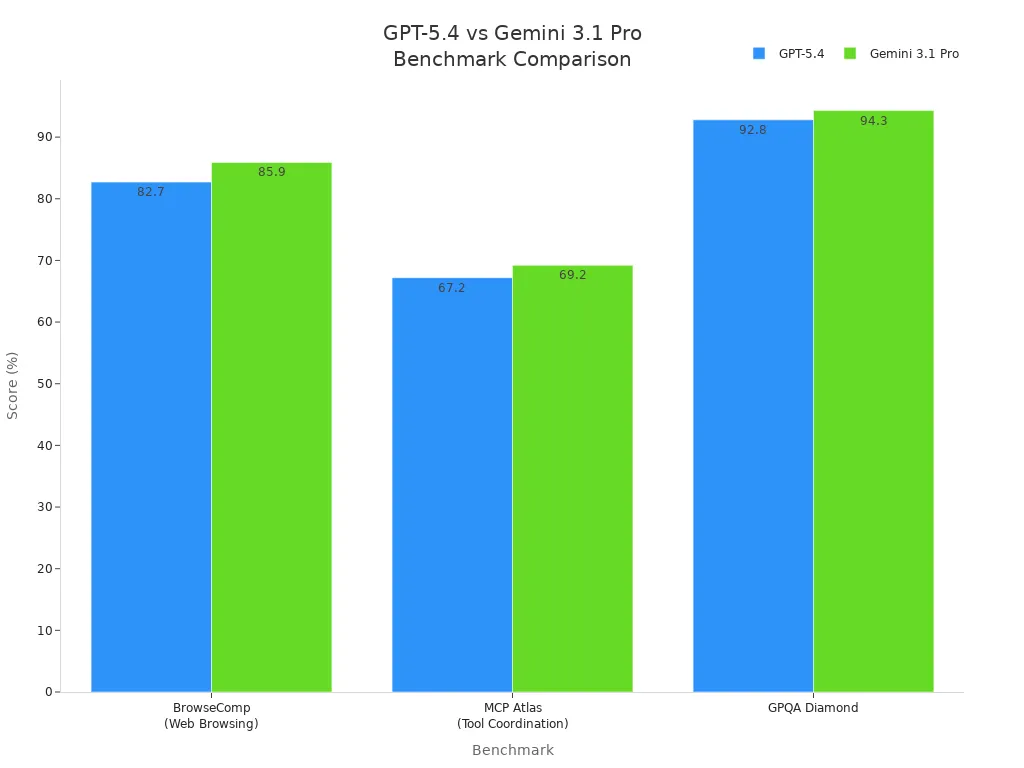
GPT-5.4 scores 75.0% in OSWorld for desktop automation and 82.7% in BrowseComp for web browsing.
Gemini 3.1 Pro scores 85.9% in BrowseComp and 94.3% in GPQA Diamond, showing strong tool use and question answering.
Note: If you need fast code or structured outputs, Gemini 3.1 Pro is a good pick. For hard, multi-step tech jobs or creative work, GPT-5.4 gives you more choices.
Decision Checklist
Use this checklist to help you pick the right model:
What is your main job?
Legal, research, or customer support checks
Coding, debugging, or creative writing
What tools do you use most?
Google Workspace, Vertex AI, or AI Studio
OpenAI tools like ChatGPT or Codex
How much do you care about cost?
Need steady monthly costs
Like pay-as-you-go for changing jobs
Do you need strong privacy?
Handle private data or need strict rules
How hard are your workflows?
Simple, one-shot jobs
Multi-step, long-context projects
Here is an easy way to choose:
Write your top three weekly jobs.
Match each job to what the models do best:
Use Gemini 3.1 Pro for Google jobs, structured work, or quick tasks.
Use GPT-5.4 for deep thinking, automation, or long-context checks.
Check if the model fits your tools. Pick the one that works with your stack.
Set a budget and watch token use or subscription costs.
Try both models on a small job before using them for big projects.
Remember: The best model fits your work, budget, and team skills. You can use both models for different jobs.
Now you know which model works best for you. If you want to make work faster and use Google tools easily, pick Gemini 3.1 Pro. If you need smart thinking and strong coding, GPT-5.4 is the top choice. The table shows the biggest differences:
Metric | GPT-5.4 (xhigh) | Gemini 3.1 Pro Preview |
|---|---|---|
Context Window | 1050k tokens | 1000k tokens |
Release Date | March, 2026 | February, 2026 |
Image Input | Yes | Yes |
Open Source | No | No |
You can start by doing these things:
Look at more details and see how each model is used.
Check out tasks like planning steps or making tech documents.
Try Gemini 3.1 Pro if you want to build things fast or work on new ideas.
Set up a way to use any model.
Make a list of tests to check results.
Decide what makes your project a success.
Choose the model that fits your daily jobs and favorite tools. Test both models on small jobs to find out which one is better for you.
FAQ
What makes GPT-5.4 better for technical teams?
You get strong coding, long-context reasoning, and browser automation with GPT-5.4. This model helps you handle big projects and complex workflows. If you work with code or need deep analysis, GPT-5.4 gives you more power.
When should you pick Gemini 3.1 Pro over GPT-5.4?
Choose Gemini 3.1 Pro if you use Google tools every day. It connects well with Google Workspace and Vertex AI. You also get fast workflow automation and structured outputs for project management.
Which model is more cost-effective for small teams?
Gemini 3.1 Pro offers a freemium plan and low monthly pricing. You can start for free and upgrade as you grow. GPT-5.4 uses pay-as-you-go pricing, which works well if you want to control spending.
Can both models handle images, audio, and video?
Gemini 3.1 Pro supports text, images, audio, and video natively. GPT-5.4 handles images with limited support. If you need to process audio or video, Gemini 3.1 Pro gives you more options.
How do you decide which model fits your workflow?
Make a list of your main tasks. If you need deep coding or long document analysis, pick GPT-5.4. For fast automation and Google integration, choose Gemini 3.1 Pro. Try both on small jobs to see which works best.
See Also
Gemini 3 Pro And Claude Sonnet 4.5 Disrupt Coding With Google AI
OpenAI Fast-Tracks GPT-5.2 Release To Compete With Google Gemini 3
Enhance Your AI's Intelligence Quickly With GPT-5 Prompt Optimizer
Latest Nano Banana Update Introduces Exciting New Features
ACE Studio's Ratings Show Class Divide: Trustpilot Vs Product Hunt

© Copyright 2025 LinkstartAI - All Rights Reserved.