Breakdown of ROI for Cowork, Zapier, and Buffer automation costs


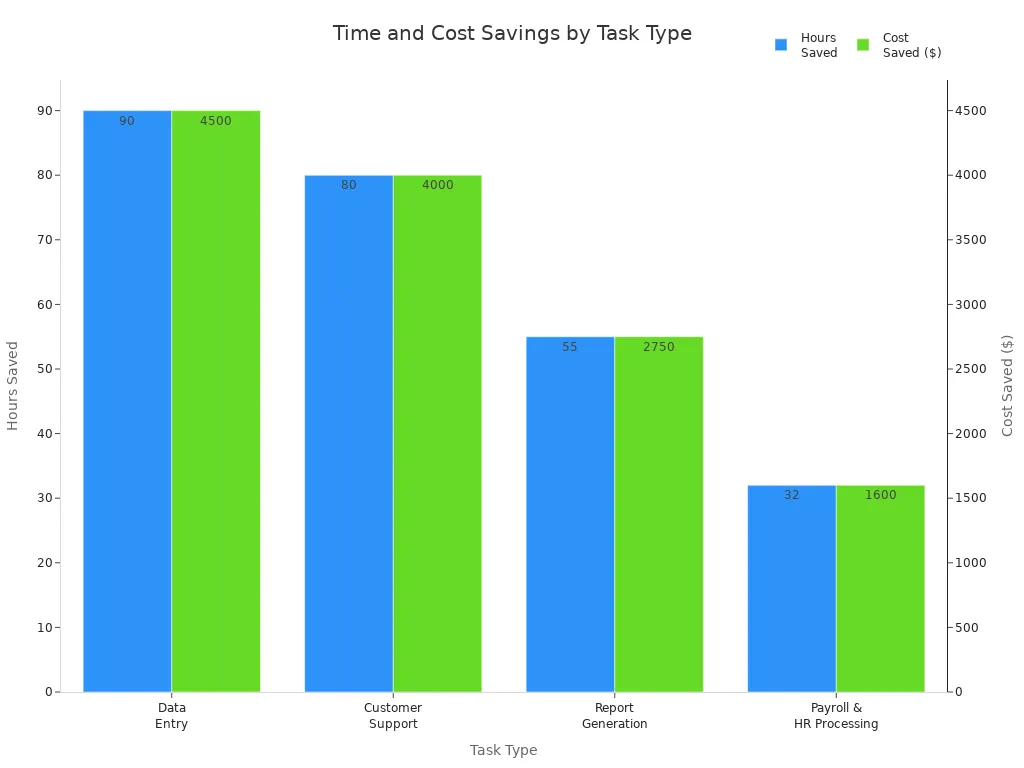
You can look at the Breakdown of ROI for automation tools like Cowork, Zapier, and Buffer using real numbers. Businesses can save up to 257 hours each month. This means they save $12,850 every month. The chart below shows how automation helps cut down hours and costs for jobs like data entry and making reports.
Task Type | Manual Hours per Month | After Automation | Hours Saved | Cost Saved ($50/hr) |
|---|---|---|---|---|
Data Entry | 100 | 10 | 90 | $4,500 |
Customer Support (Tier 1) | 200 | 120 | 80 | $4,000 |
Report Generation | 60 | 5 | 55 | $2,750 |
Payroll & HR Processing | 40 | 8 | 32 | $1,600 |
Total | 400 | 143 | 257 | $12,850/month |
Key Takeaways
Automation tools like Cowork, Zapier, and Buffer help save time and money. They can save businesses up to 257 hours and $12,850 each month. Using the right automation tool pays off fast. You can get your money back in 1 to 4 months. This helps you get the most from your investment. Look for tasks you do over and over in your business. These are the best jobs to automate. This saves a lot of time and money. Automation cuts down on manual work. It also makes workers happier. They can spend more time on creative jobs. Compare different automation tools before you choose one. This helps you pick the best one for your business size and needs. It makes sure your business runs as well as possible.
ROI Calculation Basics
ROI Formula and Metrics
You want to know how much value automation brings to your business. The standard way to measure this is with a simple formula. You can use these methods to find out if your investment pays off:
Automation ROI (%) = ((Benefits from Automation − Automation Costs) / Automation Costs) × 100
ROI = Savings ÷ Investment
Labor Savings minus Total Cost of Automated System
These formulas help you see the real impact of tools like Cowork, Zapier, and Buffer. You look at how much money you save and compare it to what you spend. For example, if you save $1,250 each month and spend $126, your ROI is very high. You can also track Return on Content Spend (ROC$). This metric treats your content as an investment, not just a cost. ROC$ lets you compare the Breakdown of ROI for content marketing with other channels. When you use AI in your workflows, you can boost productivity by 30%. This increase adds even more value to your automation strategy.
Comparing Automation Tools
You have many choices when it comes to automation. Cowork, Zapier, and Buffer each offer unique benefits. Cowork helps you create and manage content with less effort. Zapier connects your apps and automates tasks, saving you time. Buffer schedules and publishes your posts across social media platforms. You should look at how much time each tool saves you every week. You can also check how much money you keep by reducing manual work. Some businesses see a 454% ROI from content automation alone. You can use tables or charts to compare the Breakdown of ROI for each tool. This makes it easier to decide which one fits your needs best. When you measure results, you see which tool gives you the fastest payback and the biggest boost in productivity.
Breakdown of ROI: Cowork
Costs and Setup
You might wonder how much Cowork automation costs. Getting started is easy. You pay a monthly fee. Most small businesses pay between $99 and $199 each month. The price changes if you add more users or locations. If your business gets bigger, Cowork grows with you. You can pick a plan that works for you. Many businesses get their money back in a few months. Some break even in less than a year because Cowork helps them work faster and gives members a better experience.
Monthly subscription starts at $99–$199 for entry-level packages
Pricing goes up as your business and team grow
Bigger teams can get volume discounts
Most businesses break even in under 12 months
Time and Cost Savings
Cowork automation saves you time every week. You can set up workflows and do less manual work. People say they save 5 to 10 hours each week. If you use Cowork for content marketing, you save even more time. For example, one workflow saves up to 6.25 hours every week. That means you save 25 hours each month. If you earn $50 an hour, you save $1,250 every month.
Workflow Step | Manual Time | Automated Time | Time Saved |
|---|---|---|---|
Content Research | 2 hours | 10 minutes | 110 min |
Multi-platform Adapt | 3 hours | 20 minutes | 160 min |
Formatting | 1 hour | 5 minutes | 55 min |
Publishing | 30 minutes | 0 minutes | 30 min |
Archiving | 20 minutes | 0 minutes | 20 min |
Total | 7 hours | 35 min | 6.25 hr |
You also spend 30% to 60% less on labor. This means you pay less for boring tasks and more for creative work. The Breakdown of ROI shows Cowork automation pays off fast.
Business and Quality Benefits
Cowork automation does more than save money. It helps you do better work. Automation stops mistakes and keeps your data correct. You get better products and services. Your brand voice stays the same everywhere. Cowork helps you add keywords for SEO and marks sources for every piece of content. You make fewer mistakes and keep your reputation strong.
Brand voice stays the same on all platforms
Citations and sources are always correct
SEO gets better with automatic keywords
Data is reliable and there are fewer mistakes
Hidden Advantages
Cowork automation gives you extra benefits. Employees feel happier because they do less boring work. They get to be more creative and feel more involved. Automation helps with hybrid work and makes it easier to train new people. You make fewer mistakes and keep your systems working together. The Breakdown of ROI includes these hidden benefits that help your business grow.
Employees are happier and more interested in their jobs
Fewer mistakes and better data
New team members learn faster
Supports flexible and hybrid work styles
Tip: When you use Cowork automation, you get more time for new ideas and important projects. Your team can focus on what matters most.
Zapier ROI Analysis
Subscription and Setup
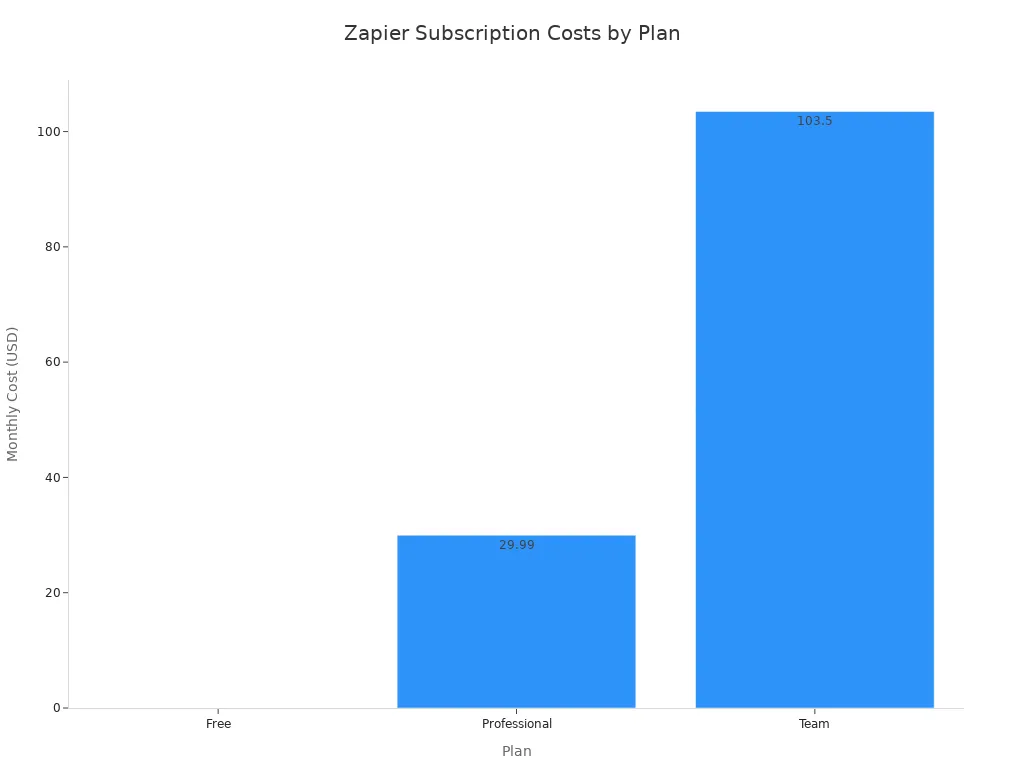
You can use Zapier for free or pay for more features. The setup is easy to follow. First, you pick a plan. Then, you connect your apps. After that, you make your first automation. Here is a table that shows the main plans and what you get with each one:
Plan | Price (billed monthly) | Best for | Key features |
|---|---|---|---|
Free | $0 | Beginners testing basic automations | Two-step Zaps, 100 tasks/month, visual editor, and templates |
Professional | $29.99/month | Solopreneurs and power users | Multi-step Zaps, 750 tasks/month, filters, formatting, Paths, and 8,000+ integrations |
Team | $103.50/month | Small to mid-sized teams managing shared workflows | Unlimited users, shared folders, admin controls, 2-min update time, and 2,000+ tasks/month |
Enterprise | Custom | Larger organizations needing security and governance | SSO, SCIM, audit logs, Partner API, advanced access controls, and dedicated CSM |
Time Saved and Cost Impact
Zapier helps you save lots of time every month. Many people say they save 50 to 100 hours each month. Some people save 15 to 25 hours every week. If you set up more workflows, you can save even more time.
You can save 50–100 hours each month.
Some users save 15–25 hours every week.
More complex workflows can save even more time.
When you save time, you spend less money on work. You also get to do more important jobs. The Breakdown of ROI for Zapier shows that even small teams can get big results.
Business Value
Zapier pays for itself pretty quickly. Most small businesses get their money back in 2 to 4 months. Mid-sized businesses usually see payback in 3 to 6 months.
Business Size | Typical Payback Period |
|---|---|
Small Businesses | 2-4 months |
Mid-sized Businesses | 3-6 months |
You can see the value by checking how fast you get your money back. Teams also feel happier because they do less boring work. Many people say they like their jobs more.
Indirect Benefits
Zapier gives you extra good things for your business. Your workflows work better together. You make fewer mistakes. You also get more time for creative work. Here is a table that shows some of these indirect benefits:
Benefit Type | Description |
|---|---|
Improved Workflow Integration | Automation streamlines processes, reducing the need for manual intervention and enhancing overall efficiency. |
Reduced Manual Errors | By minimizing human error, automation ensures more accurate data handling and fewer mistakes in operations. |
Time Reclamation | Employees can focus on strategic tasks rather than repetitive manual work, leading to increased productivity and innovation. |
Tip: When you use Zapier, your team gets more time for new ideas and important projects. This helps your business stay ahead.
Buffer ROI Insights
Pricing and Setup
Buffer has a free plan you can use. You can connect up to three social channels with it. If you want more features, you can pick the Essentials or Team plans. These plans cost less for each channel when you add more channels. You get better analytics and tools to work with your team.
Plan | Monthly Cost per Channel | Yearly Cost per Channel | Number of Users | Scheduled Posts per Channel | Analytics | Community Inbox |
|---|---|---|---|---|---|---|
Free | N/A | N/A | 1 | 10 per channel | Yes (basic) | Yes |
Essentials | $6 (1-10 channels) | $60 (1-10 channels) | 1 | Unlimited | Yes (advanced) | Yes |
Team | $12 (1-10 channels) | $120 (1-10 channels) | Unlimited | Unlimited | Yes (advanced) | Yes |
You can set up Buffer very fast. Just connect your social accounts and start scheduling posts.
Time and Labor Savings
Buffer helps you save lots of time every month. Marketing teams say they save up to 40 hours each month with Buffer. You do not have to log in and out of different platforms. You can plan and schedule all your posts in one place. This means you spend less time on boring tasks and more time being creative.
Save up to 40 hours per month
Schedule posts for all channels at once
Spend less time switching between accounts
Measurable Benefits
Buffer gives you results you can see. You can get more engagement and more leads. Many users see five times more engagement. Some teams cut their cost per lead by 68%. Buffer can help you get a 300% ROI in just 90 days.
Metric | Outcome |
|---|---|
Engagement Rate | 5x higher engagement rates |
Lead Generation | 68% reduction in cost per lead |
Content Efficiency | 300% ROI within 90 days |
Network Growth | 200%+ increase in post engagement |
Time Savings | 87% time savings on content creation |
New Connections | 50+ new meaningful connections |
Qualified Inquiries | 3-5 qualified business inquiries |
You can check these results with Buffer’s analytics tools.
Additional Value
Buffer gives you more than just automation. You get basic analytics to see how your posts are doing. You can use a community inbox to manage messages. The Team plan lets you work with others and schedule posts together.
Basic analytics for post performance
Community inbox for easy message management
Team plan for working together
Buffer makes it easy to manage social media and see your progress.
How to Measure ROI for Automation

Identify Opportunities
Start by looking for tasks that take a lot of time. Find jobs that happen again and again. These jobs usually follow simple steps. Ask your team which jobs are boring or slow. Pay attention to jobs with lots of data entry. Pick tasks that happen every day or week. When you find these jobs, you know where automation can help most.
Steps to identify automation opportunities:
Look for jobs that repeat and take a long time.
Ask your team about jobs they do not like.
Find jobs with lots of data entry.
Focus on jobs that happen a lot.
Pick jobs that are easy and regular.
Gather Data
You need to get information before you check ROI. Write down how much time each job takes now. List the costs for work and materials. Count how many mistakes happen and how often. See how fast you finish jobs and how happy your team is.
Metric | Description |
|---|---|
Cost Saving | Labor, materials, and other workplace improvement costs. |
Time Savings | Time saved during task completion and deployment. |
Error Reduction | Number and severity of mistakes reduced by automation. |
Productivity Gains | Task completion speed, fewer errors, and higher employee satisfaction. |
Tip: Use time tracking tools and simple charts to keep this information.
Calculate Payback
You can find out how long it takes to get your money back. Add up the total cost of your automation tools. Compare this to the money and time you save each year. Divide the cost by your yearly savings. This shows you how long it takes to pay back your investment.
Step | Description |
|---|---|
Add up your investment and compare it to yearly savings. | |
Calculate ROI Timeframe | Most businesses see ROI in 3–5 years, but many get results faster. |
Assess Hidden Benefits
Automation gives you extra value that is not always easy to see. You can check how your team feels by doing quick surveys or team talks. Watch for fewer mistakes and happier workers. Look at feedback and online reviews to see if your team feels more involved. Automation also helps you track how fast jobs get done and how many are finished. This shows the real effect on your business.
Do surveys often to see if your team is happy.
Check work and feedback to see if things are better.
Use automation data to find ways to grow and celebrate wins.
Note: Hidden benefits like better teamwork and happier workers can help your business do well.
Comparing ROI and Payback
Fastest Payback Tool
When you buy automation, you want results fast. Cowork usually gives you your money back the quickest. Many people say they break even in just a few months. Cowork helps you save time making and managing content. If you use Cowork for daily work, you might see savings in the first month. Zapier also pays for itself quickly if you set up lots of automations. Buffer gives fast results for social media teams, but how fast depends on how much you post.
Tip: If you want results soon, try Cowork for content or Zapier for connecting apps.
Best Fit by Business Size
Pick a tool that fits your business size. Small businesses often use Buffer or Zapier because they are easy and cheap. Cowork is good for teams that are growing or have lots of content to handle. If you have a mid-sized company, Cowork helps with big automations and Zapier connects many apps. Large companies often use all three tools together to do more jobs.
Small businesses: Buffer and Zapier for quick wins
Mid-sized businesses: Cowork and Zapier for deeper automation
Large businesses: Combine Cowork, Zapier, and Buffer for full coverage
Note: You can use different tools as your business gets bigger.
Summary Table
Here is a table to help you compare how fast each tool pays you back:
Tool | Typical Payback Period | Best For | Monthly Cost (Starting) | Main Benefit |
|---|---|---|---|---|
Cowork | 1–3 months | Content teams, agencies | $99–$199 | Fast content automation |
Zapier | 2–4 months | Small to mid-sized | $0–$29.99 | App integration, task automation |
Buffer | 2–3 months | Social media teams | $6 | Social scheduling, analytics |
Use this table to pick the best tool for you. Think about your team size, how much you want to spend, and your main goals.
You can see Cowork gives you your money back the fastest. It also has the highest Breakdown of ROI for content teams. Zapier and Buffer help you save time and get more work done. If you want to pick the best tool, follow these steps:
Look at all the jobs in your business.
Write down each step for every job.
Find out where things slow down or go wrong.
Choose tools that match what you need.
Ask important team members for their ideas.
Keep checking and making your system better.
Make sure you know your goals for automation.
Pick the best chances to save money and time.
Check your results so you get the most ROI.
You should think about what your business needs and use these steps to pick the best automation tool for you.
FAQ
How do you calculate ROI for automation tools?
You use this formula: ROI (%) = ((Benefits − Costs) / Costs) × 100. You should track how much time and money you save. Compare these savings with what you pay each month for the tool. This shows you if the tool is worth it.
How quickly can you see payback from Cowork, Zapier, or Buffer?
Most people get their money back in 1 to 4 months. Cowork usually pays for itself the fastest. Zapier and Buffer also give quick results. You see payback faster when you automate jobs you do every day.
What hidden benefits do automation tools offer?
Your team feels happier and makes fewer mistakes. New workers learn their jobs faster. Automation helps you work from anywhere and lets you spend more time on creative work.
Can you use these tools together?
Yes! You can connect Cowork, Zapier, and Buffer. This gives you a full automation system. You save more time and get more work done across your business.
See Also
Leveraging Cowork and Zapier for Future Content Operations
Streamlining Content Marketing Through Cowork and Zapier
Creating Your Own Content Empire with Cowork, Airtable, and Buffer

© Copyright 2025 LinkstartAI - All Rights Reserved.