8 Best No-Code Platforms for Building Apps in 2026


You see the world moving fast. Organizations save thousands every year and cut development time by up to 90%. No-code platforms let you build apps without coding. By 2026, over 70% of new apps use these tools. You can join millions of citizen developers and create something amazing.
Key Takeaways
No-code platforms let people make apps without knowing how to code. This makes building apps easy for everyone. - You should pick a platform that matches what you need. Think about things like how big your app can get, how much you can change it, and if it works with tools you already use. - Try a free plan first to see what features and templates are there. This helps you know if it is right for your project before you pay for it.
1. Setapp
Use Case
You want to build an app fast. Setapp helps you do that. You can create MVPs, launch startups, or scale your business. If you have an idea, you can turn it into a real app without hiring a developer. Setapp works well for founders, small teams, and anyone who needs a full-stack web application. You can use it to test new products, automate tasks, or build tools for your company.
Features
Setapp gives you a drag-and-drop interface. You can build apps visually. The platform uses AI to help you generate revenue and improve your app. You get access to plugins, integrations, and visual logic. You can connect your app to other services and add features as your business grows. Setapp makes it easy to update your app and respond to user feedback.
Tip: You can use Setapp to build apps that grow with your business. Start small and scale up when you need more features.
Pricing
Setapp offers flexible pricing. You can start with a free trial. Paid plans unlock more features and integrations. Pricing depends on the number of users and the complexity of your app. You can choose a plan that fits your budget.
Pros & Cons
Pros:
Easy to use for beginners
Supports revenue generation
Scalable for startups and large businesses
Cons:
Advanced features may require a paid plan
2. Bubble
Use Case
You want to build something custom. Bubble lets you create websites, web apps, and even native mobile apps. Many people use Bubble for:
Custom CRM systems to manage customer and employee data
E-commerce platforms for selling products online
Customer support portals for handling questions and support requests
You can design app screens, add user sign-up, and manage data like user profiles or posts. Bubble works well if you need a tool that fits your business, not just a template.
Features
Bubble gives you a visual editor. You drag and drop elements to build your app. You can set up workflows, automate tasks, and connect to other services. Bubble stands out for:
Flexible database management
Workflow automation
Customizable user permissions
Integration with APIs and plugins
You get a lot of control over how your app looks and works. This makes Bubble a favorite for people who want to build data-driven products or internal tools.
Pricing
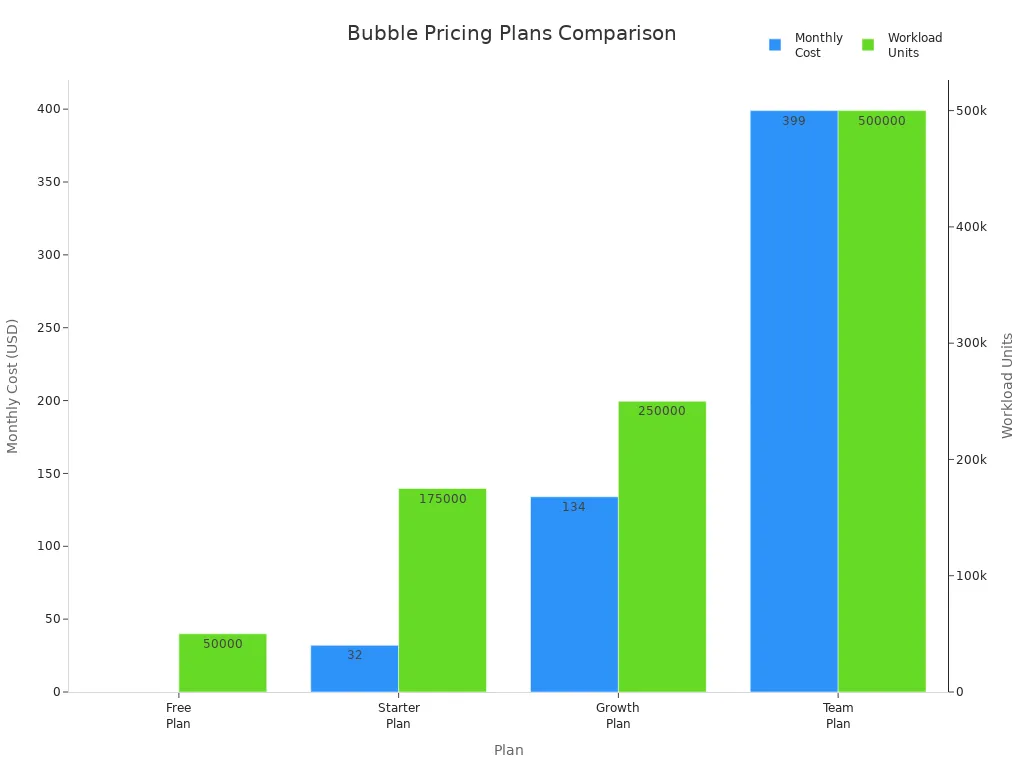
Bubble starts with a free plan. This is great for learning or testing ideas. If you need more features, you can pick a paid plan. Here’s a quick look:
Plan | Monthly Cost | Workload Units |
|---|---|---|
Free Plan | $0 | 50,000 |
Starter Plan | $32 | 175,000 |
Growth Plan | $134 | 250,000 |
Team Plan | $399 | 500,000 |
Tip: Start with the free plan if you’re new. Upgrade when you need more power or want to work with a team.
Pros & Cons
Pros:
Great for custom apps and data-driven tools
Visual editor is easy to use
Good for automating workflows
Cons:
Can slow down with large datasets or lots of users
Not the best for real-time or heavy multimedia apps
Bubble is one of the most popular no-code platforms for a reason. You get a lot of freedom to build what you want, but you should know its limits if you plan to scale big.
3. Softr
Use Case
You want to make a business app quickly. Softr lets you build tools, portals, and dashboards without coding. You can link your app to Airtable or Google Sheets. This helps you manage data right away. Softr is good for small teams and startups. It also works for anyone who wants a simple and nice-looking app. If you need a prototype or MVP fast, Softr can help you do it in just a few hours.
Features
Softr is easy to use. It gives you ready-made templates and parts like Lists, Charts, Forms, and Tables. You can set up your app fast and change things with drag-and-drop tools. Softr connects easily to other data sources. It supports two-way data sync. You do not have to change your data to use it. The learning curve is not too hard. You can start building even if you are new to no-code platforms.
Easy setup with ready-made templates
Syncs in real time with Airtable and Google Sheets
Drag-and-drop tools for quick building
Great for business apps and team tools
Tip: Try Softr’s AI App Generator to make prototypes in seconds. You can test ideas and get feedback very fast.
Pricing
Platform | Pricing Structure Description | Cost Implications |
|---|---|---|
Softr | Different prices for features and user types (internal vs external) | Good for small projects, but confusing for big ones |
Stacker | High price for each user | Costly if you have many clients |
Noloco | Clear and growing pricing model | Cheaper as you get more users |
You can start with Softr’s free plan. Paid plans give you more features and let more people use your app.
Pros & Cons
Pros | Cons |
|---|---|
Make working apps in just a few hours | Not much design freedom |
Great at working with Airtable | No native mobile apps or app store publishing |
Has its own databases (2025 update) | Not HIPAA compliant |
Very good customer support | Pricey for B2C apps with lots of users |
AI App Generator helps you make prototypes fast | Hard business logic needs workarounds |
Free plan really works well | |
Gets updates often and has helpful guides |
You can build apps fast and get help even on cheap plans. Softr is great for speed and connecting to other tools. But check if it works for big projects before you start.
4. Microsoft Power Apps
Use Case
You want to make business apps that work with Microsoft tools. Power Apps lets you build apps for your team or company. You can use it to automate jobs and manage data. It connects with Office 365. Big companies use Power Apps to update old systems. They also use it to start new projects faster. If you use Microsoft services, Power Apps fits well.
Features
Power Apps helps you build apps for many users. Security is strong because Microsoft Dataverse keeps your data safe. You can link your app to Excel, SharePoint, Teams, and AI features. IT teams control who can use each app. This keeps your company safe and organized. You build everything in one place, so you save time.
Feature | Description |
|---|---|
Handles big data and complex business needs. | |
Security | Uses Microsoft Dataverse for strong protection. |
Integration | Connects with Microsoft services and AI tools. |
Governance and Resilience | Lets IT manage security and keep things running smoothly. |
Unified Platform | Build and launch apps from one dashboard. |
Pricing
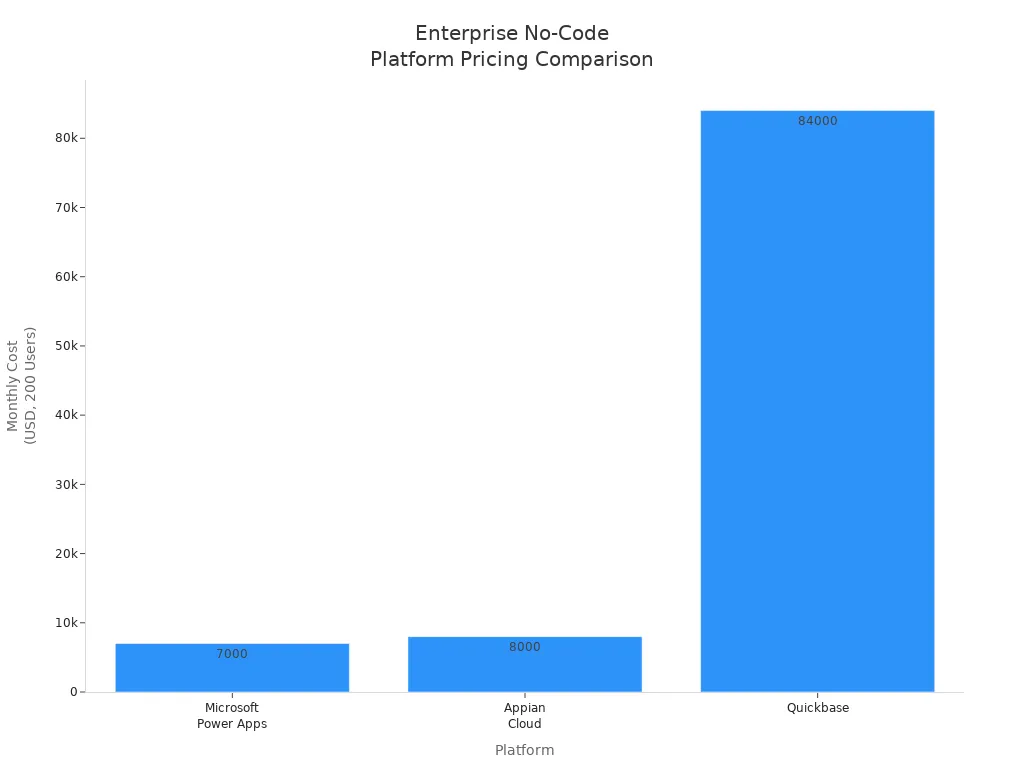
Power Apps charges by user. You pay $5 per user for two apps. You pay $20 per user for unlimited apps. Premium connectors cost more. Here is how Power Apps compares to other platforms:
Platform | Pricing Model | Monthly Cost (200 Users) | Key Features |
|---|---|---|---|
Microsoft Power Apps | Per-app: $5/user (2 apps limit) | $7,000 (with premium connectors) | Premium connectors require extra fees. |
Kissflow | Starts at $2,500/month | N/A | Workflow automation. |
Mendix | Starts at $1,875/month | N/A | Custom enterprise features. |
Appian Cloud | Starts at $75/user | $8,000-$15,000 | Lower rates for infrequent users. |
Quickbase | Starts at $35/user | $84,000-$132,000 | Costs rise with more users. |
Note: Power Apps is a good deal if your team uses Microsoft tools.
Pros & Cons
Advantages | Limitations |
|---|---|
Some features are limited | |
Works well with Office 365 | Can have performance issues |
Mobile-ready apps | Harder to connect with outside systems |
Easy to automate with Microsoft Flow | Needs a separate app for sharing |
Power Apps is a strong choice for big companies. It is good for security, scale, and working with Microsoft tools.
5. Glide
Use Case
You want to make a mobile app quickly. Glide lets you turn spreadsheets into apps without coding. Many small businesses use Glide for things like tracking inventory or projects. Some use it to make employee portals. You can build tools for your team or for customers. Glide is good for supply chain, retail, real estate, and hotels. Look at the table to see what apps you can make and who uses them:
Industries Using Glide | |
|---|---|
Employee portals | Supply Chain |
Project management dashboards | Manufacturing |
Inventory management tools | Retail |
Customer Relationship Management (CRM) | Real Estate |
Field service applications | Hospitality |
Professional Services |
Features
Glide is made for mobile apps first. You can build apps that look nice on phones and tablets. The editor is easy to use and fits any screen size. You can see your app on your phone as you build it. Glide lets you make Progressive Web Apps, so your app works even when offline. Here are some mobile features from Glide:
Feature | Benefit |
|---|---|
Responsive Design | Apps work on any device, especially mobile. |
Mobile-Friendly Solutions | Great for teams on the go. |
Integrated Mobile Preview | See your app on a phone as you build. |
Progressive Web Applications (PWAs) | Downloadable and offline-ready, perfect for field work. |
Tip: Glide is great if you need a mobile app for your business and want to launch it fast.
Pricing
Glide has a free plan for simple apps. Paid plans start at $25 each month. You get more features and support with paid plans. The price depends on how many people use your app and how complex it is. You can pick a plan that matches your needs and budget.
Pros & Cons
Glide helps you build apps without spending a lot. It is easy to connect with other tools and set up fast. Some people think it is hard to change the look of their app. If your business grows fast, it can be hard to make your app bigger. Here is a quick summary:
Pros | Cons |
|---|---|
Cost-effective | Customization Limitations |
Integrations | Scalability Challenges |
Dependency on Glide | |
Limited Advanced Features | |
Learning curve |
Note: Glide works best for small businesses and simple apps. If you need more advanced features or want to grow big, you might want to try other platforms.
6. Webflow
Use Case
You want your website to look amazing. Webflow helps you design web apps and sites without writing code. If you care about style and layout, you will love Webflow. Designers use it to build portfolios, landing pages, and business sites. You can create blogs, online stores, or even interactive pages. Webflow works well for creative projects and brands that need a unique look.
Features
Webflow gives you full control over your site’s design. You drag and drop elements and see changes right away. The built-in CMS lets you manage content easily. Hosting is fast, and SEO tools help your site get noticed. Check out what makes Webflow special:
Feature | Description |
|---|---|
Drag-and-drop design with full styling and layout control. | |
Built-in CMS | Manage dynamic content and scale your site easily. |
Hosting and SEO | Fast performance, global CDN, and built-in SEO optimization. |
Tip: You can update your site anytime. Webflow makes it easy to add new pages or change your design.
Pricing
Webflow offers flexible plans. You can start for free and upgrade when you need more features. Here’s a quick look:
Platform | Plan Type | Price Range |
|---|---|---|
Webflow | Site Plans | |
Ecommerce Plans | $29, $74, $212/month | |
Without Code | Single Plan | $15/month (flat rate) |
Pros & Cons
Pros:
Advanced design tools
Easy for designers
Great for visually-driven projects
Cons:
Limited automation
Hard to scale complex sites
SEO can be tricky
You stay in the Webflow ecosystem
Webflow is perfect if you want a beautiful site and control over every detail. If you need heavy automation or advanced e-commerce, you might want to look at other platforms.
7. Airtable
Use Case
You want to keep your work organized and save time. Airtable lets you build apps to help your business run better. You can make CRM pipelines to follow customers. It is easy to track projects and connect tasks together. You can watch your inventory with automatic math. Marketing teams use Airtable to see how campaigns are doing. SEO dashboards help you check keywords and backlinks. You can even set up web scraping to collect data about your competitors.
Use Case | Description |
|---|---|
CRM Pipelines | Keep track of customers and sales steps. |
Project Management | Connect tasks, check resources, and see progress. |
Inventory Tracking | Watch products, suppliers, and how much you have. |
Marketing Reporting | Put all campaign data in one place. |
SEO Dashboards | Follow keywords, backlinks, and how well you do. |
Web Scraping Workflows | Get data automatically for research and building databases. |
Features
Airtable gives you a strong database that is simple to use. You can link data and keep it correct. There are APIs and scripts for custom ideas. Working with your team is easy with real-time updates and task lists. You can change how your data looks with different views and filters.
Feature | Benefit |
|---|---|
Relational Database Capabilities | Link data and avoid repeating information. |
Flexible API and Scripting | Make your app do more than the basics. |
Give out tasks, share updates, tag, comment, and see changes right away. | |
Customizable Views | Pick how you want to see and sort your data. |
Tip: Use Airtable’s teamwork tools to help everyone stay updated. You can give tasks, share progress, tag friends, comment, and see changes fast.
Pricing
Airtable has a free plan for small teams or projects. Paid plans start at $20 per user each month. Higher plans give you more space, extra features, and better support. You can choose a plan that fits your team and what you need.
Pros & Cons
Pros:
Simple to start and use
Great for working with others and automating jobs
Flexible database and ways to view data
Good for many business needs
Cons:
You need paid plans for more features
Big teams may find it costly
8. AppSheet
Use Case
You want to build apps that work with your data. AppSheet lets you create mobile and web apps without writing code. You can use it to automate tasks, track inventory, or manage projects. Many people use AppSheet to build tools for their teams. If you work in a company that uses Google Workspace, you can connect your apps to Google Sheets, Drive, and other tools. This makes it easy to pull in data and share your app with others.
Features
AppSheet gives you a simple interface. You can drag and drop to build your app. The platform works on Android and iOS, so your app runs everywhere. You can automate workflows and set up notifications. AppSheet connects with Google Workspace, which helps you use your data and work with your team. Here’s a quick look at how AppSheet helps enterprise users:
Benefit | Description |
|---|---|
You can use data from Google Sheets, Drive, and other tools to build your app. | |
Streamlined Workflows | AppSheet automates tasks inside Google Workspace, saving you time. |
Custom Solutions | You can make apps that fit your company’s needs. |
Collaboration and Sharing | Teams can share and build apps together. |
Tip: AppSheet is great if you want to build apps that use your company’s data and help your team work together.
Pricing
AppSheet offers a free plan for small projects. Paid plans start at $5 per user each month. You get more features and support as you upgrade. Pricing depends on how many people use your app and what features you need.
Pros & Cons
Here’s a quick summary of what you get with AppSheet:
Pros | Cons |
|---|---|
The interface is intuitive and simple to use. | Some users find the documentation lacking in detail. |
It offers powerful automation for repetitive tasks. | It might not handle complex app requirements well. |
You can build apps that run on Android and iOS without any coding skills. | Advanced customization options can be limited. |
AppSheet makes it easy to build apps and automate work. You can start fast and grow your app as your needs change.
Platform Comparison

Features Overview
You want to see what makes each platform unique. Here is a simple table that shows the main features and who should use each platform:
Platform | Best For | Key Features | AI Integration |
|---|---|---|---|
Setapp | Startups, MVPs, scaling | Drag-and-drop, plugins, revenue tools | Advanced, built-in |
Bubble | Custom web/mobile apps | Visual editor, workflow automation, APIs | Growing |
Softr | Business tools, portals | Templates, Airtable sync, AI app generator | Yes |
Power Apps | Enterprises, MS users | Office 365 links, security, automation | Yes |
Glide | Mobile apps, SMBs | Spreadsheet-to-app, PWA, mobile preview | Basic |
Designers, brands | Visual design, CMS, hosting | Limited | |
Airtable | Teams, project managers | Relational DB, templates, collaboration | Some |
AppSheet | Google Workspace users | Data automation, mobile/web, workflow | Yes |
Pricing Summary
You want to know how much these platforms cost. Most platforms let you try for free. Paid plans start at about $5 to $32 each month or per user. If you need special features or advanced AI, you pay more. You can pick a plan that works for your team and your money.
Scalability & AI
You want your app to grow as your needs change. Setapp, Bubble, and Power Apps work well for big teams and hard projects. Setapp has strong AI tools that help you earn money and make your app better. Softr and AppSheet use AI to help you build faster and automate jobs. If you want simple apps, Glide and Airtable are good for small groups.
Tip: Think about how big your app could get and how much AI you need before picking a platform. No-code platforms give you choices for every step.
Selecting No-Code Platforms
For Beginners
If you are new, you want something simple. Pick a platform that is easy to use. Look for drag-and-drop tools and lots of templates. You should not have to learn much before you start. Here is a table to show what you get as you go from beginner to expert:
Score | Criteria |
|---|---|
1 | You can only change a little. There are not many features. It is hard to do more than the templates. |
2 | You can change how things look. You get some new features. AI helps a little. |
3 | You can make your app look special. You can add new things. AI helps a lot with the front part. |
4 | You get all that, plus AI helps with logic and data. |
5 | You get everything above. AI can build whole apps by talking to you. |
Tip: Try platforms with many templates and easy steps. You will learn quickly and feel good about building.
For Scalability
You want your app to grow as your business grows. Choose a platform that works well with more users and bigger data. Make sure it does not slow down. Check these three things:
Dimension | Description |
|---|---|
Computational Scalability | Can do more work without getting slow |
Data Scalability | Handles bigger and harder data |
Infrastructure Scalability | Runs well on different computers and setups |
AI tools help big projects grow better.
Some no-code platforms are best for small projects.
For Flexibility
You might want to change your app later. You may want to add new things. Look for these:
Ways to change and customize
Lots of plugins to pick from
Easy to keep and control your app
A flexible platform lets you try new ideas. You do not have to start over.
For AI Features
AI can help you save time and build smarter apps. Some platforms give you:
AI that makes logic and data for you
Ways to build apps by talking to the computer
Strong AI for the front part of your app
If you want the newest AI tools, pick a platform that uses AI a lot.
Getting Started
Steps to Begin
You want to build your first app. Here’s how you can start with no-code platforms:
Pick a Platform
Choose the platform that fits your needs. Look at your goals and decide if you want a website, mobile app, or business tool.Sign Up and Explore
Create an account. Try the free plan first. Explore the dashboard and look for templates.Choose a Template
Templates help you start fast. Pick one that matches your idea. You can change it later.Add Features
Use drag-and-drop tools to add buttons, forms, and pages. Try plugins and integrations to connect your app to other services.Test Your App
Preview your app. Check if everything works. Ask friends or teammates to try it.Launch and Share
Publish your app. Share it with your team or customers. Update it as you get feedback.
Tip: Start small. You can add more features as you learn.
Common Pitfalls
You might run into problems. Here are some mistakes to avoid:
Skipping the tutorials and guides
Trying to build too much at once
Ignoring user feedback
Not testing your app before launch
Forgetting to check pricing as your app grows
Pitfall | How to Avoid |
|---|---|
Too complex too soon | Start with simple features |
No feedback | Ask users for opinions |
No testing | Test before sharing |
Note: Take your time. Learn as you go. You will get better with practice.
You have many choices when it comes to no-code platforms. Here’s what you should remember:
Check if the platform connects with your tools.
Make sure you can change what you need.
Test if it’s easy to use.
Look at the price and how it grows with you.
Keep your data safe.
Try a small project first.
Now is the best time to build your own app. Take the first step and see what you can create!
FAQ
What is a no-code platform?
A no-code platform lets you build apps without writing code. You use drag-and-drop tools. You can create websites, mobile apps, or business tools.
Can I use these platforms if I have no tech skills?
Yes! You do not need to know how to code. The platforms use simple steps and templates. You can start building right away.
Which no-code platform is best for beginners?
Softr and Glide work great for beginners. You get easy templates and simple tools. You can build your first app in just a few hours.
See Also
Best 10 AI Tools for Creating TikTok Videos in 2025
Leading AI Apps for Personalized Learning and Growth in 2025
Essential Tech Stack for Solo Developers: Figma, Supabase, and More
Jule: The AI Assistant Simplifying Software Development Tasks
AI Technology Managing Real Applications on Web, Desktop, and Mobile

© Copyright 2025 LinkstartAI - All Rights Reserved.