How cross-border video creators can use AI Voice Cloning to reduce voiceover costs from $50K to $500

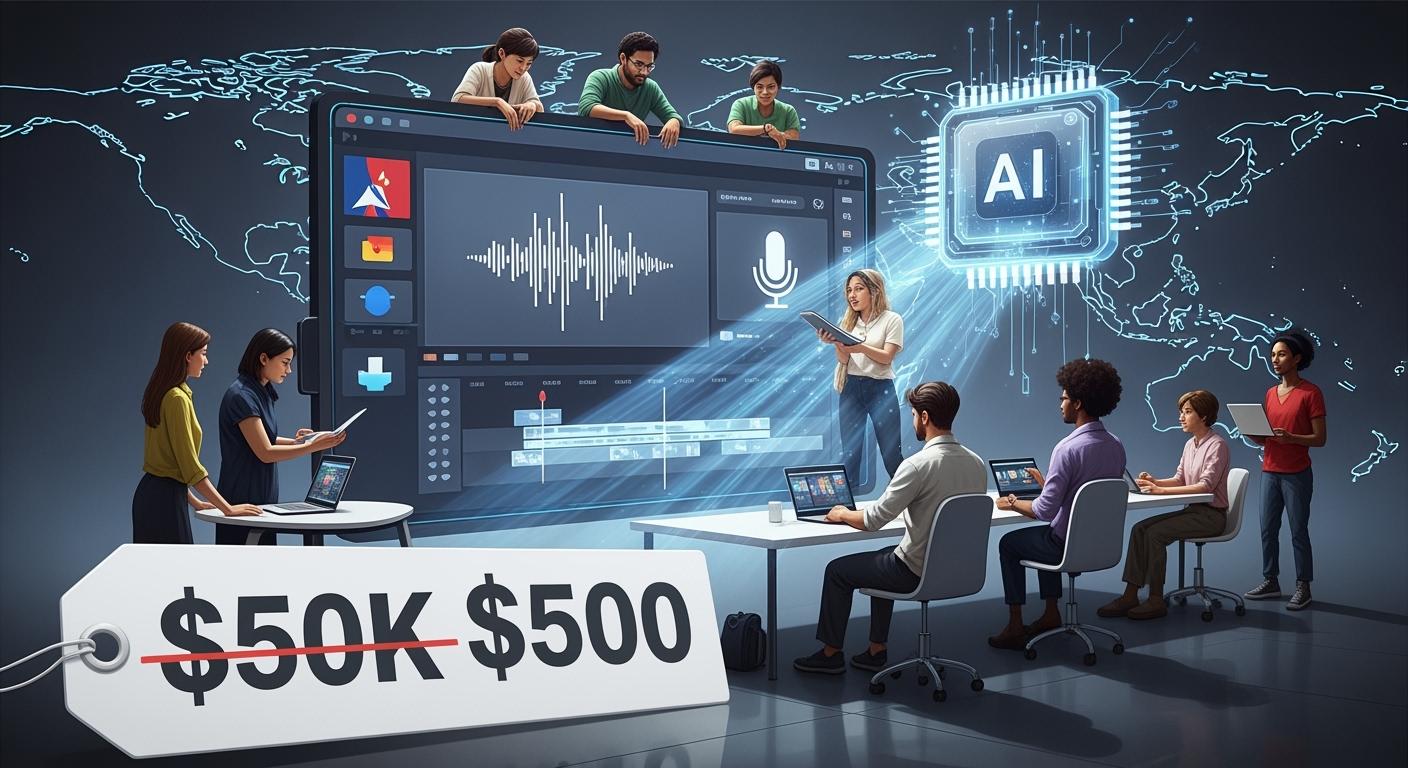
You see videos everywhere now. In 2026, AI Voice Cloning is changing how you make content for new markets. The industry grows fast, jumping from $1.45 billion in 2022 to $9.75 billion by 2030. Take a look at this:
Year | Market Size (USD) | CAGR (%) |
|---|---|---|
2022 | 1.45 Billion | N/A |
2030 | 9.75 Billion | 26.1 |
With tools like ACE Studio, you can save big. Traditional voiceover costs can drop by 99%. That means you reach more people without breaking your budget.
Key Takeaways
AI Voice Cloning can cut voiceover costs a lot. This helps creators make videos in many languages for less money.
AI tools can help write and translate scripts. This makes making videos faster and easier.
AI voices sound clear and real. This helps people everywhere enjoy your videos.
Social automation tools share your videos on many sites fast. This helps more people see and like your videos.
Using AI Voice Cloning saves money and time. It also helps your brand grow around the world.
Market Shift in Multilingual Video Production

Traditional Voiceover Cost Challenges
You want to reach people all over the world. Platforms like TikTok and YouTube keep growing fast in 2026. More viewers want videos in their own language. This means you need to make content in many languages. But traditional voiceover work can get expensive and slow.
Here’s a quick look at the main challenges:
Cost Challenge | Description |
|---|---|
High Voiceover Costs | |
Revisions & Re-records | Small script changes mean booking studios and paying talent again. |
Localization Demands | Each new language multiplies your costs. |
Technical Limitations | Mixing voice with music makes updates harder and more expensive. |
Frequent Re-recordings | Script changes lead to more studio time and editing. |
Multi-language Rollouts | Every language needs its own talent and studio session. |
You might spend over $12,000 a year just for voiceovers. If you want to launch a campaign in ten languages, costs can skyrocket. Even a short explainer video can cost $350 to $850 per language. These numbers add up fast, especially if you need to update your content often.
AI Voice Cloning Democratization
Now, things are changing. AI Voice Cloning lets you create voices for your videos at a fraction of the old price. You can pay as little as $29 to $99 a month for unlimited use. This means you can make videos in many languages without worrying about huge bills.
The technology is now easy to use. You can create a voice clone with just a few audio samples.
Small creators and big brands both use these tools. You don’t need a big studio or a huge budget.
The quality of AI voices keeps getting better. Your videos sound natural and professional.
AI Voice Cloning has moved from being just a creative tool to a core part of business. Companies use it to train teams, support customers, and keep their brand voice the same everywhere. You can now reach global audiences, boost engagement, and save money—all at once.
Tip: AI-powered subtitles and captions can increase your video’s reach by up to 20%. More people will watch, like, and comment when they understand your message.
AI Voice Cloning Workflow for Content Creators
Creating multilingual videos used to be tough. Now, you can use AI Voice Cloning to make the process smooth and affordable. Let’s walk through the workflow step by step so you can see how easy it is to reach viewers in any country.
Script Creation and Translation
You start with your script. You can write it yourself or use AI tools like ChatGPT or Claude. These platforms help you create clear, engaging scripts for your videos. If you want to translate your script into other languages, AI can help with that too.
Here’s how you get the best results:
Assign ChatGPT a role, like “You are a marketing expert.”
Avoid generic prompts. Be specific about what you want.
Tell the AI the tone or style you need.
Give context, like your target audience or country.
Share reference materials if you have them.
Use clear separators for different parts of your script.
Ask for positive instructions, like “Make this sound friendly.”
Explain why you need the translation.
Request reviews or edits with clear criteria.
Make sure the AI understands before it starts.
Control the length of your script.
Work together with the AI, making changes as needed.
AI translation tools do more than swap words. They keep the tone, timing, and meaning of your message. Your video will sound natural in every language. These tools even match the emotion and pacing, so your message feels right for each audience.
Tip: If you want your video to connect with viewers in different countries, always check the translation for cultural fit.
Multilingual Voice Generation
Once your script is ready, you move to voice generation. AI Voice Cloning platforms like ACE Studio, Google Chirp 3, ElevenLabs, and PlayHT let you create voices in many languages. You can clone your own voice or pick from hundreds of AI voices.
Here’s a quick look at top platforms:
Platform | Realism Score | Key Features & Use Cases |
|---|---|---|
ElevenLabs | Great for video narration, audiobooks, gaming, and real-time AI agents. Offers voice cloning and multilingual dubbing. | |
PlayHT | Perfect for podcasts, e-learning, and conversational AI. Supports voice cloning and many languages. |
These tools use smart technology to make voices sound real. They study your script for tone and emotion. They break down words into sounds and put them together with the right rhythm and accent. The result is a voice that feels natural and matches your brand.
Here’s the usual process for AI Voice Cloning:
Choose the right platform for your needs.
Create or upload your voice clone.
Type or upload your script.
Set the tone, emotion, and style.
Preview and adjust the voice.
Export the audio and add it to your video editor.
Review and render your final video.
Note: You can generate voices in over 80 languages and pick from more than 600 AI voices. This means you can reach viewers almost anywhere.
Video Sync and Social Automation
Now, you need to sync your new voiceover with your video. Use editing tools like Runway, DaVinci Resolve, or Adobe Premiere. These platforms help you match the voice to the visuals, making sure everything lines up.
Here are some best practices for syncing:
Use visual markers, like scene changes or text overlays, to anchor the voiceover.
Match the voice with the speaker’s lip movements for a natural look.
Adjust audio timing and add pauses for smooth delivery.
Test your video on different devices to make sure everything works.
Change voice settings like pitch and speed to get the best sound.
Once your video is ready, you can use social automation tools like Hootsuite or Gumloop. These tools let you publish your video to YouTube, TikTok, Instagram, and more—all at once. You don’t need to upload each version by hand.
Here’s what social automation does for you:
Instantly localizes your video for each country.
Personalizes your story for different audiences.
Speeds up production and saves you time.
Cuts costs for translation, voiceover, and editing.
Callout: With AI Voice Cloning and social automation, you create your video once and distribute it to N countries. You reach more viewers, grow your brand, and save money.
You now have a complete workflow. You write your script, translate it, generate voices, sync everything, and share your video worldwide. AI Voice Cloning makes it possible for you to scale your content and connect with global audiences.
Cost Breakdown and ROI with AI Voice Cloning
Monthly Cost Comparison
You want to see where your money goes. Let’s look at the costs for video localization. Traditional voiceover production uses up your budget quickly. You pay for studio time, voice actors, managers, and lots of changes. With AI Voice Cloning, you just pay a monthly fee and use a few smart tools.
Here’s a table that lists the main cost parts:
Cost Component | Description |
|---|---|
Direct Costs | Professional dubbing rates are $20-$40 per minute for mid-range quality. |
Time Cost | You spend weeks working with dubbing studios instead of starting new projects. |
Opportunity Cost | Waiting to launch ads in new languages can mean missing out on sales. |
Testing Cost | High prices make it hard to test many ad versions, so you might lose money. |
Management Cost | Working across time zones and handling changes adds extra costs. |
Now, let’s compare the monthly costs for each tool you need:
Tool/Service | AI-Powered Cost (Monthly) | |
|---|---|---|
Scriptwriting | $500 - $2,000 | $50 - $200 |
Voiceover | $200 - $500 | $20 - $50 |
Animation/Visuals | $1,000 - $5,000 | $100 - $500 |
Editing/Post-Production | $500 - $2,000 | $50 - $200 |
Social Automation | $200 - $500 | $10 - $50 |
Total | $2,700 - $9,500 | $270 - $950 |
You can see the difference right away. Traditional workflows can cost $75,000 or more each month if you localize ten videos in ten languages. AI-powered workflows lower that to about $400 per month. That’s over 99% in savings. You get more videos, faster launches, and more chances to try new ideas.
💡 Tip: With AI tools, you can try more video ideas without worrying about spending too much.
ROI Calculator for Video Localization
Let’s talk about return on investment. You want to know if using AI Voice Cloning is worth it. The answer is yes, and the numbers show it.
Here’s a table that compares different ways to localize videos:
Localization Method | Cost Range (10 Videos, 10 Languages) | Engagement Impact |
|---|---|---|
Subtitle only | $15,000 - $30,000 | 40-60% drop vs. native language |
Voice-over dubbing | $50,000 - $200,000 | 20-40% drop vs. native language |
Re-shoot in each language | $1,500,000+ | Highest quality, but impractical |
AI Avatar Localization | $2,000 - $10,000 | Keeps engagement with native feel |
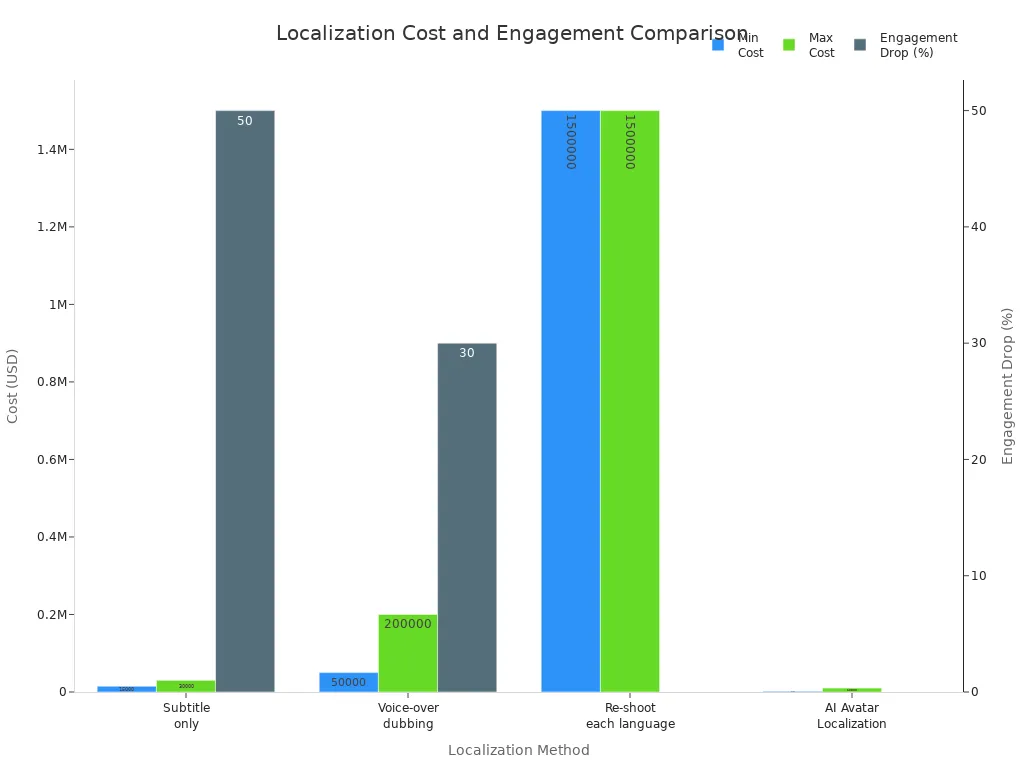
You can see that AI solutions save you 93-99% compared to traditional voice-over. Plus, your videos sound local and real, so people stay interested.
Let’s look at some real numbers for SaaS companies and brands:
Type of Video | Traditional Cost | AI Video Production Cost |
|---|---|---|
Basic explainer video | $4,000-$15,000+ | $1,000-$5,000 |
Professional brand video | $15,000-$50,000 | $3,000-$20,000 |
High-end commercial | $50,000-$200,000+ | $15,000-$50,000 |
When you use AI, you get more than just saving money:
You launch videos in 1-2 weeks instead of waiting 4-8 weeks.
You can make new versions quickly, without booking studios or hiring new teams.
You create content for many languages at once, so you reach more people.
You use smart analytics to see what works and get better results.
By 2025, almost every marketer will see a positive ROI from video. Most say video helps them get more leads and make more sales. If you run a SaaS business or manage a brand, your investment in AI Voice Cloning will pay off fast.
🚀 Callout: If you spend $400 a month on AI tools and raise your conversion rate by just 1%, you could earn thousands of extra dollars each year.
You don’t have to wait months to see results. You get faster launches, more people watching, and a worldwide audience—all while saving money.
Quality, Compliance, and Best Practices
Ensuring Naturalness and Authenticity
You want your videos to sound real and connect with your audience. To make your AI-generated voiceovers feel natural, you need a solid quality control process. Here’s what works best:
Listen for human-like tone and inflection. The voice should not sound robotic.
Check the flow and rhythm. Good speech has a natural pace and cadence.
Make sure the voice shows emotion. People relate to feelings in speech.
Match the voice style to your viewers. A young audience might like a friendly tone, while business users prefer something formal.
Test for clear pronunciation. Every word should be easy to understand.
Review how the voice fits the context. A training video needs a different style than a product ad.
Ask for feedback and keep improving. Update your voice models as you learn.
You can also use prosody modeling, emotional inflection, and even breathing sounds to boost realism. Many teams use a Mean Opinion Score (MOS) to rate how human the voice sounds. If you want the best results, add a human review step and get local experts to guide style choices.
Tip: Always test your videos with real users before you publish. Their feedback helps you spot issues you might miss.
Legal and Ethical Guidelines
You must follow the rules when you use AI Voice Cloning. Here are the key steps:
Get clear consent from anyone whose voice you use. Let them opt out if they want.
Never use voice cloning to trick or impersonate someone.
Label all AI-generated audio. Tell your viewers when you use a cloned voice.
Store voice data safely and keep it anonymous if possible.
Write a simple disclaimer about your use of AI voices.
Review your consent forms with a legal expert. Keep records of all agreements.
The FCC says you need to tell people upfront if you use AI-generated voices. You must get their permission before you use their voice or send them AI voice calls. This keeps your project legal and builds trust with your audience.
Note: Most platforms like YouTube and TikTok now require you to disclose AI-generated content. Always check the latest rules before you publish.
Workflow Optimization for Scale
If you want to scale up, you need smart workflows. Try these ideas to make your team more efficient:
Idea to Test | Metric to Watch | |
|---|---|---|
AI Voice | Try a formal voice vs. a casual one | Audience Retention |
Video Length | Compare 60-second vs. 3-minute videos | Completion Rate |
Thumbnail | Use a video still vs. a custom graphic | Click-Through Rate |
Call-to-Action | Test "Learn More" vs. "Download the Guide" | Conversion Rate |
You can set up A/B tests for different voices, video lengths, and calls to action. Track what works and use those insights to guide your next project. This way, you keep your brand consistent and reach more people with less effort.
Callout: With the right workflow, you can use AI Voice Cloning to create, test, and launch videos for any market—fast.
Common Challenges and Solutions
Subtitle and Pronunciation Accuracy
You want everyone to understand your video. Sometimes, subtitles and how words sound are not perfect. This is harder when you use many languages. AI tools can help you fix these problems quickly. You can change subtitles right away and check how words sound before you share your video.
Here are some top tools that make things easier for you:
Tool Name | Key Features |
|---|---|
Smartcat | Voice preservation, glossaries, API integrations |
Vizard | Natural lip-syncing, fast translations in 70+ languages |
Hour One | Synthetic avatars for lifelike presentations |
BlipCut | Voice cloning for 130+ languages, multi-speaker support |
AI Studios | Viewer engagement tracking, LMS integrations |
LongStories.ai | Custom templates for training videos in target languages |
You can use AI dubbing to keep voices clear in 280 languages. Editing subtitles live makes your review four times faster. These tools work with over 80 file types, so you can use them for any project.
AI learns from lots of data. It understands culture and language details. This makes your translations sound real and right for each group. You can connect with people everywhere.
Tip: Always check your subtitles and voice tracks before you post your video. Small changes can help a lot.
Brand Consistency with AI Voices
Your brand should sound the same in every language. AI voices can help, but you need a plan to keep things on track. Here is what works best:
Train your AI with your brand’s data to match your style.
Check every video for the same sound before you share it.
Use automatic checks to find mistakes or style changes.
You can build a team of AI voices that fit your brand. If you follow these steps, your videos will always match your brand, no matter where people watch.
Note: When your voice is always the same, people trust you and remember your brand.
You can change the way you make videos for global audiences. AI Voice Cloning helps you save money, speed up your workflow, and reach more people. Try looking at your current process. See where you can use new tools. If you run a business, explore how AI can boost your brand.
Ready to scale up? Start your journey with smarter video production today.
FAQ
How fast can you localize a video with AI Voice Cloning?
You can localize a 3-minute video into 10 languages in just a few hours. AI tools handle script translation, voice generation, and syncing much faster than traditional methods.
Do you need special equipment to use AI Voice Cloning?
No, you don’t. You only need a computer and an internet connection. Most AI Voice Cloning platforms work right in your browser.
Is it legal to use AI-generated voices for my brand?
Yes, as long as you have the rights to the original voice and you disclose AI use. Always check the latest platform rules and get consent if you clone someone’s voice.
Can you use the same AI voice for all your videos?
You can! Many brands create a “signature” AI voice for consistency. Just make sure to review each video for tone and clarity.
Tip: Test your AI voice with your audience. Their feedback helps you improve and build trust.
See Also
10 Essential AI Tools for TikTok Video Creation in 2025
Using AI Tools to Craft Captivating Social Media Visuals
AI Translation Solutions for Calls, Events, and Streaming

© Copyright 2025 LinkstartAI - All Rights Reserved.