Top 10 AI TikTok video creation tools for brands and marketers in 2025

You want to create TikTok videos that grab attention and drive engagement. Here are the top 10 AI TikTok video creation tools for brands and marketers in 2025: Superside, Designs.ai, Veeroll, Magisto, Simplified, Fliki, InVideo, Flexclip, Speechify, and Vidnoz. These tools help you make videos faster and easier, letting you focus on creativity and results.
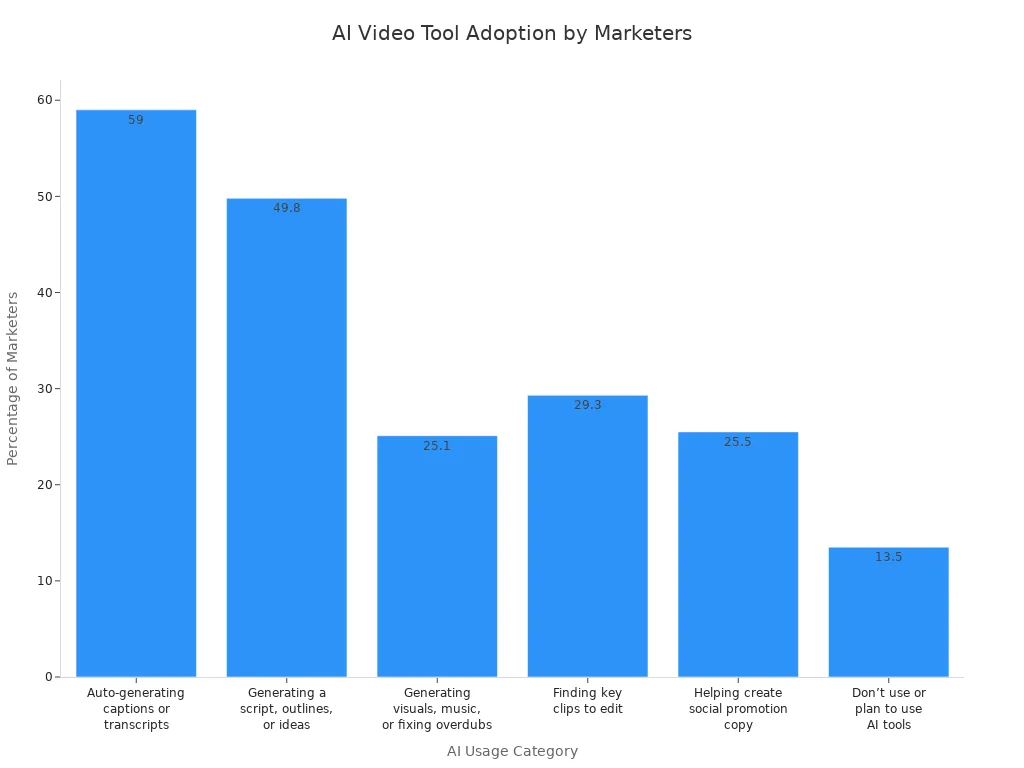
Take a look at this chart showing how many marketers use AI for video creation:
You care about features, usability, integration, and marketing impact when picking a tool. As trends change quickly and brands need real-time engagement, AI TikTok video creation tools help you stay ahead and produce high-quality content at scale.
Key Takeaways
AI TikTok video creation tools help brands produce engaging content quickly, allowing for more frequent posting and real-time engagement.
Choose tools with user-friendly designs to simplify video creation. Easy-to-use platforms enable teams to create videos without extensive training.
Customization options are essential. Look for tools that allow you to add logos, change colors, and use your own images to match your brand's style.
High-quality videos are crucial for capturing attention. Select tools that ensure sharp visuals and clear sound to maintain a professional brand image.
Integration with other marketing tools enhances efficiency. Opt for platforms that connect with scheduling and analytics tools for streamlined workflows.
Ranking Criteria for AI TikTok Video Creation Tools
When you look for the best AI TikTok video creation tools, you want to know what really matters. Here’s how you can judge which tool fits your needs.
User-Friendly Design
You want a tool that feels easy from the start. If you can drag and drop clips, add music, and see changes right away, you’ll make videos faster. Many marketers say that a simple design helps teams with less experience jump in and start creating. When a platform is easy to use, your team will use it more often and get better results.
Customization Options
Every brand has its own style. You need options to change colors, add logos, and use your own images or text. Some tools let you turn photos into videos or create clips from just a few words. You might also want to use AI avatars or stickers to make your videos stand out. The more you can customize, the more your videos will match your brand.
Tip: Look for tools that let you create videos from both images and text. This gives you more ways to tell your story.
Video Quality
High-quality videos grab attention. You want your videos to look sharp, with smooth motion and clear sound. Good tools help you keep your brand looking professional. They also make sure voiceovers sound natural and that everything matches up, even if you use different languages.
Speed and Efficiency
Time matters. Traditional video editing can take hours. With AI TikTok video creation tools, you can often finish a video in just a couple of hours or less. This means you can post more often and keep up with trends.
Integration Capabilities
You probably use other marketing tools, like scheduling apps or analytics platforms. The best video tools connect with these, so you can plan, post, and track your videos all in one place. Some even suggest hashtags or captions to help your videos reach more people.
Pricing Models
You want value for your money. Some tools charge by the month, while others let you pay as you go. Think about how often you’ll use the tool and what features you really need. Make sure the price matches the benefits you get.
Remember: The right tool should help you keep your brand message clear, work with your other apps, and use AI in a way that feels honest and helpful.
Top 10 AI TikTok Video Creation Tools
Superside
Superside gives you a blend of AI power and human creativity. You can use this platform to scale your TikTok video production without losing quality. Superside connects you with creative experts who use AI to speed up editing, design, and animation. This means you get videos that look polished and match your brand. If you want a hands-off approach but still need custom, high-impact TikTok content, Superside fits your needs. It works best for brands that want to grow fast and keep their videos looking professional.
Designs.ai
Designs.ai helps you create TikTok videos quickly with smart automation. You get tools that suggest new design styles, layouts, and color schemes. The platform uses AI to match your visuals and written content, so your marketing message always feels on point. You can add realistic voiceovers in many languages, making your videos sound natural and engaging. Here’s what you get with Designs.ai:
Suggests creative layouts and color schemes.
AI Chat helps you write captions and scripts that fit your visuals.
Adds high-quality, multilingual voiceovers to boost your video’s reach.
If you want to save time and keep your TikTok videos fresh, Designs.ai is a great choice.
Veeroll
Veeroll stands out if you want to make TikTok ads that convert. The platform uses AI to help you build video ads fast, and it comes with templates made just for TikTok. You can add your own call-to-action buttons and track how your videos perform. Veeroll also connects with other ad platforms, so you can run campaigns everywhere from one place.
Key Features | Description |
|---|---|
Uses AI to speed up TikTok video production. | |
Templates for TikTok ads | Pre-designed for TikTok’s unique style. |
Customizable call-to-action buttons | Lets you add your own CTAs. |
Integration with ad platforms | Works with other ad servers for easy campaign management. |
Social analytics | Tracks and measures your video’s performance. |
If you want to launch TikTok ads quickly and see what works, Veeroll makes it simple.
Magisto
Magisto uses AI to take the stress out of video editing. You upload your clips, and the platform finds the best scenes, adds effects, and puts everything together. This saves you hours and helps you create TikTok videos that look sharp and professional. Magisto works well for brands that want to post often but don’t have a big editing team. You can focus on your message, and let the AI handle the technical side.
Simplified
Simplified gives you an all-in-one workspace for TikTok video creation. You can design, edit, and schedule your videos in one place. The AI tools help you write captions, pick music, and even suggest hashtags. If you want to keep your workflow smooth and your team on the same page, Simplified is a smart pick. It’s great for small teams or solo marketers who want to do everything without switching between apps.
Fliki
Fliki makes TikTok video creation easy, even if you’re not a video expert. You can type your ideas, and Fliki turns them into full videos. The script-based editor lets you focus on your story, while the AI handles editing and visuals. Fliki gives you a huge library of images, music, and sound effects, so your videos always look and sound great. You can also use over 2000 AI voices and even create videos in 29 languages with avatars and voice cloning.
Turns your ideas into videos with script-based editing.
Offers a large media library for visuals and audio.
Provides AI avatars and voice cloning in many languages.
Lets you choose from thousands of AI voices for a unique sound.
If you want to make creative, personalized TikTok videos fast, Fliki is a strong option.
InVideo
InVideo helps you make TikTok videos with AI-generated scripts and visuals. You can clone your own voice or pick from many accents for narration. The platform gives you access to millions of licensed clips, so you never worry about copyright. Editing is easy, with simple controls and ready-made workflows for different video types. Here’s a quick look at what InVideo offers:
Feature | Description |
|---|---|
AI-generated scripts | Saves time by writing scripts for you. |
Voice cloning | Lets you use your own voice or pick from many options. |
Vast media library | Over 16 million licensed clips for your videos. |
User-friendly editing | Simple tools for quick changes. |
Ready-made workflows | Templates for different video styles. |
Realistic AI voices | Voiceovers in 50+ languages. |
AI visuals | Creates new visuals to keep your content fresh. |
If you want to make lots of TikTok videos without starting from scratch, InVideo is a top pick.
Flexclip
Flexclip is perfect when you need TikTok videos fast. You get a big library of templates that you can change to fit your brand. The AI tools make editing simple, so anyone on your team can use it. Flexclip also lets you export videos in the right format for TikTok, so you don’t have to worry about technical details.
Huge selection of customizable templates.
AI-powered editing tools for all skill levels.
Easy export options made for TikTok.
If you want quick, good-looking videos, Flexclip has you covered.
Speechify
Speechify helps you make your TikTok videos more accessible. It adds captions and subtitles automatically, so everyone can follow along. Captions also help people connect with your message, even if they watch without sound. If you want your videos to reach more people, including those who are hard of hearing, Speechify is a smart tool.
Improves captions and transcription for better accessibility.
Adds context and emotion with captions.
Makes your videos more inclusive for all viewers.
Vidnoz
Vidnoz gives you AI-powered video creation with a focus on avatars and voiceovers. You can make TikTok videos with talking avatars that match your brand’s style. The platform lets you create videos in many languages, so you can reach a global audience. Vidnoz works well for brands that want to stand out with unique, AI-driven content.
Tip: If you want to experiment with avatars or need videos in different languages, Vidnoz is worth trying.
These AI TikTok video creation tools help you make better videos, faster. You can boost your brand, keep up with trends, and connect with your audience in new ways.
Features Comparison
Overview Table
You want to see how different video tools stack up. Here’s a quick table that shows what each tool does best, who should use it, and how you can get started:
Tool | Budget Level | Ideal Use Cases | Key Features & Benefits | Pricing & Access Model |
|---|---|---|---|---|
Pictory | Low-budget | Social media videos | Script-to-video, stock media, easy to use | Starts at $19/month |
Synthesia | Moderate | Avatar-led training videos | AI avatars, multilingual, fast production | Subscription-based |
Descript | Moderate | Podcast and video editing | Transcript editing, 1080p export, multi-platform | Starts at $24/month, free tier |
Aeon | Cost-effective scale | Publishers, e-commerce | Automated creation, brand control, social formatting | Subscription, enterprise |
Fliki | Low to moderate | Text-to-video with AI voices | Voice library, multilingual, affordable | Starts at $11/month |
HeyGen | Moderate to premium | Personalized business messaging | Realistic avatars, voice cloning, 40+ languages | Starts at $29/month |
Elai.io | Moderate | Education, demos, presentations | AI presenters, custom avatars, multi-language | Starts at ~$29/month |
Tip: Use this table to match your needs and budget with the right tool.
Usability and Learning Curve
You don’t want to waste time learning a new tool. Some AI TikTok video creation tools are super easy. You can drag, drop, and publish in minutes. Others have more features, so you might need to spend a little time learning. If you need to make lots of videos fast, look for tools with automated workflows. These help you work quicker and avoid frustration. Many creators say that simple tools save them time and help them stay creative.
Integration and Sharing
You want your team to work together without hassle. Some tools, like Canva’s AI TikTok Video Generator, let you create and share videos with your team. You can give feedback, assign tasks, and edit together in real time. This makes your workflow smooth and helps everyone stay on the same page. Sharing options also let you post videos straight to TikTok or other platforms, so you reach your audience faster.
Value for Brands
You care about results. Brands using AI-powered video tools have seen big wins. Some report up to a 20% jump in conversion rates because of smart AI insights and personalization. Over 66% of marketers say their campaigns perform better with AI analytics. Many also see better results in influencer marketing. When you use the right tool, you can boost your ROI and make your campaigns more effective.
AI TikTok Video Creation Tools in Marketing

Faster Content Production
You want to make videos quickly, especially when your campaign needs fresh content every day. AI TikTok video creation tools help you speed up the process. These tools can turn your ideas into scripts and videos in minutes. You can use image-to-video features to create short clips from photos, or text-to-video options to test new concepts fast. If you manage a big product catalog, you can produce lots of videos for different items without spending hours editing each one.
You can generate ideas and scripts quickly.
You refine AI-generated content to match your brand voice.
Tool Type | Functionality Description |
|---|---|
Image-to-Video | Converts static images into short videos quickly, aiding in content creation without extensive production. |
Text-to-Video | Generates video clips from text prompts, allowing for rapid concept testing and idea visualization. |
Showcase Products | Uses AI avatars to create demo videos, enabling brands to showcase products without traditional model sourcing. |
You can create, test, and post videos faster than ever before.
Enhanced Engagement
You want your audience to watch, like, and share your videos. AI-powered TikTok videos often get more attention than regular ones. They keep viewers watching longer and help you gain new followers. Take a look at how AI influencers compare to human influencers:
Metric | AI Influencer | Human Influencer |
|---|---|---|
Average Watch Time | 5.2 seconds | 4.7 seconds |
Full Video Completion Rate | 12.5% | 10.14% |
New Followers Generated | 2x | N/A |
Engagement Rate | 6.13% higher | N/A |
Likes | More | More |
Bookmarks | More | N/A |
AI videos help you boost engagement and reach new audiences.
Scalable Campaigns
You want your marketing campaigns to grow without extra stress. Brands like L'Oréal Paris used AI-powered TikTok campaigns to launch products and saw a 2.5x return on ad spend. They also increased video completion rates by 40% and lowered costs. Kalshi made an NBA Finals ad with AI tools for just $2,000 and reached millions of viewers. You can scale your campaigns, test new ideas, and reach more people with less effort.
L'Oréal Paris boosted results with AI-powered campaigns.
Kalshi reached millions using AI video tools for a major event.
Human-AI Collaboration
You still need creativity to stand out. AI TikTok video creation tools work best when you combine them with your ideas. You can use virtual assistants to get tips on video style and length. AI suites help you write scripts and generate videos, but you control the final look. Custom avatars read your scripts and translate them, giving you more ways to connect with viewers. When you mix your creativity with AI features, your videos become unique and memorable.
You get the best results when you blend your creative vision with smart AI tools.
Choosing the Right Tool
Aligning with Brand Needs
You want your TikTok videos to match your brand’s goals. Start by looking at what each tool offers. Some tools help you turn text into videos, while others use AI to add captions or optimize audio. If you need to plan content, pick a tool that gives you strong prompts and lets you control the tone. You also want to make sure your team can work together easily. Here’s a quick table to help you compare what matters most:
Factor | Description |
|---|---|
Functionality and business goals | Check if features like text-to-video and multimodal AI fit your marketing objectives. |
Structured idea generation | Choose tools with detailed prompts for better content planning. |
Control over format and tone | Make sure you can customize tone and format to match your brand voice. |
Collaboration features | Look for teamwork options so multiple users can create together. |
Tip: Hyper-personalization helps you reach specific audiences. Tools with these features let you tailor content for different groups.
Team and Workflow Fit
Your team’s workflow matters. Some tools, like Crayo, make it easy for everyone to join in. You can turn scripts into videos, add AI voiceovers, and remove backgrounds without a big production crew. This helps you scale your creative output and keeps your team working smoothly. Here’s how Crayo fits different teams:
Crayo simplifies video creation for marketers.
You can produce engaging content fast, even with a small team.
The tool supports collaboration and boosts efficiency.
Balancing Cost and Features
You want the best value for your budget. Look for tools that offer predictive analytics, automated A/B testing, and dynamic personalization. These features help you get better results without wasting money. Check out this table to see how smart strategies can boost your marketing:
Strategy | Capabilities/Factors | Impact/Outcomes |
|---|---|---|
Predictive Performance Analytics | Scores viral potential, predicts engagement, finds best posting times | 78% accuracy, 156% more engagement, 89% fewer failed posts |
Automated A/B Testing | Tests hooks, visuals, and calls-to-action | 234% faster optimization, 67% higher conversions, 45% less ad waste |
Dynamic Content Personalization | Adapts messages for demographics and trends | 312% more engagement, 89% better retention, 156% more conversions |
Note: Automated testing and analytics help you spend less and get more from every video.
Maximizing Marketing Impact
You want your TikTok videos to make a difference. Pick a tool that helps you create content people love and share. Use features like audience targeting, trend adaptation, and personalized messaging. When you match your tool to your brand’s needs and your team’s workflow, you boost engagement and grow your audience. The right AI tool helps you stay ahead and get the most from your marketing efforts.
You now know the top 10 AI TikTok video creation tools. Each tool brings something special—some help you work faster, others let you customize every detail, and a few blend AI with real creative experts. Think about your goals and budget before you pick one. Try out different tools to see what fits your brand best. Remember, AI can boost your videos, but your ideas make them shine!
FAQ
What is an AI TikTok video creation tool?
You use an AI TikTok video creation tool to make videos faster. The tool helps you edit, add effects, and create scripts. You get smart features that save you time and boost your creativity.
Can I use these tools if I am new to video editing?
Yes! Most tools have easy drag-and-drop features. You follow simple steps and see instant results. You do not need special skills to start making TikTok videos.
How do AI tools help my brand stand out?
AI tools let you customize videos with your logo, colors, and style. You create unique content that matches your brand. You reach more people and keep your message clear.
Are AI TikTok video tools safe to use?
You stay safe when you pick trusted platforms. Most tools protect your data and follow privacy rules. Always check reviews and privacy policies before you sign up.
Do I need to pay for these AI video tools?
Some tools offer free versions with basic features. You pay for advanced options like voice cloning or extra templates. You choose what fits your budget and needs.
See Also
Create Your Brand Using ChatGPT in Just One Day
McKinsey Recently Released Its AI Report for 2025
The Comprehensive AI Toolkit for Boosting Sales
Enhancing Decision-Making Through Artificial Intelligence Techniques
Jule: The AI Tool Simplifying Software Development Processes

© Copyright 2025 LinkstartAI - All Rights Reserved.