How to Create Engaging Social Media Visuals with AI Tools

You do not have to be a professional designer to make great visuals for social media. AI-powered social media visuals help you get attention and make people interact. Posts with images get 650% more engagement than posts with only text. Visuals get 2.3 times more engagement than posts without them. Many new AI tools are easy to use and easy to find, so you can make special content that connects with your audience.
Key Takeaways
AI tools let you make cool visuals fast. You do not need to be a designer.
Using AI for ideas can help you think of new things. It helps you make posts your audience likes.
Custom visuals for each platform get more attention. They help your posts look different from others.
Check how your posts do with AI tools often. This helps you change your plan and make better posts next time.
Try many AI tools to see which one works best. This will help your social media and make your marketing better.
AI-Powered Social Media Visuals Workflow
Making ai-powered social media visuals starts with a simple plan. You can split the work into three steps: coming up with ideas, making visuals, and fixing the design. This way, you stay on track and make good content for your viewers. Custom visuals help your posts get more likes and make them special. Using an ai workflow for social media marketing saves time and gets better results.
Here is a table that lists the main steps in a good ai workflow for social media marketing:
Step | Description |
|---|---|
1 | Make captions better by thinking about platform style, word limits, and what gets people interested. |
2 | Let AI pick hashtags that help more people see your posts. |
3 | Use AI to write video scripts and give ideas based on your topics. |
4 | Look at how your posts do to find patterns and make better posts next time. |
5 | Use AI to check your stats so you can keep getting better at reaching people. |
Ideation for Social Media Visuals
Coming up with ideas is the first step in your ai-powered social media visuals plan. You need new ideas to keep your posts fun. AI tools help you think by looking at trends, what people like, and what others are doing. These tools give you fresh ideas and help you make many types of posts. This makes thinking of ideas faster and more fun.
AI tools look at trends and what people like to give you cool ideas.
They help you make different kinds of posts, which makes you more creative.
You can make posts for different groups so you talk to everyone better.
When you use ai-powered social media visuals, you can also make sure your posts sound like your brand. AI helps you when you can’t think of what to write by giving you caption ideas that fit your message. This makes coming up with ideas easier and better.
Generating Engaging Social Media Content
After you have ideas, you start making your posts. AI-powered social media visuals tools help you make posts that people notice. These tools can make both words and pictures that match your brand. You can use Canva Magic Studio, CapCut, and Adobe Express to make posts fast. These tools have things like writing captions for you, editing videos, and making images.
Here are some well-known AI tools for making posts:
CapCut: Good for making and editing videos with AI captions.
Canva Magic Studio: Makes social posts with text and picture tools.
Buffer: Helps you post on many networks and gives you ideas.
ContentStudio: Lets you make and check posts all in one place.
Adobe Express: Has design tools with AI for digital creators.
Custom visuals help your posts do better. You can use A/B testing, important numbers, and heatmaps to see what works best. Making posts special for your viewers and fixing them for each platform helps you reach more people and get more likes.
Method | Description |
|---|---|
A/B Testing | Tools like Optimizely and VWO test different visuals to find the best ones. |
Key Performance Metrics | Numbers like engagement rate, click-through rate, and conversion rate show how good your visuals are. |
Heatmaps | Pictures that show where people look help you fix your visuals. |
Personalization | Making visuals for different groups helps people share and like your posts more. |
Platform Optimization | Looking at data helps you change visuals for each platform, so your posts do better. |
AI & Automation | Tools guess how visuals will do, so you can make better posts. |
Using AI for Creative Concepts
AI makes it easier to think of creative ideas. You can use ChatGPT to type in design ideas and get answers right away for your ai-powered social media visuals. ChatGPT lets you change and fix your ideas without needing other design programs. This makes your work faster and helps you go from idea to picture quickly.
You can type ideas into ChatGPT and get pictures right away.
The tool lets you change your ideas as you work.
ChatGPT helps you think of ideas and makes the process faster.
Other AI tools also help you think of ideas. For example, Lumen5 turns blog posts into videos, and Anyword writes copy for you. These tools help you make posts easily and keep your ideas fresh.
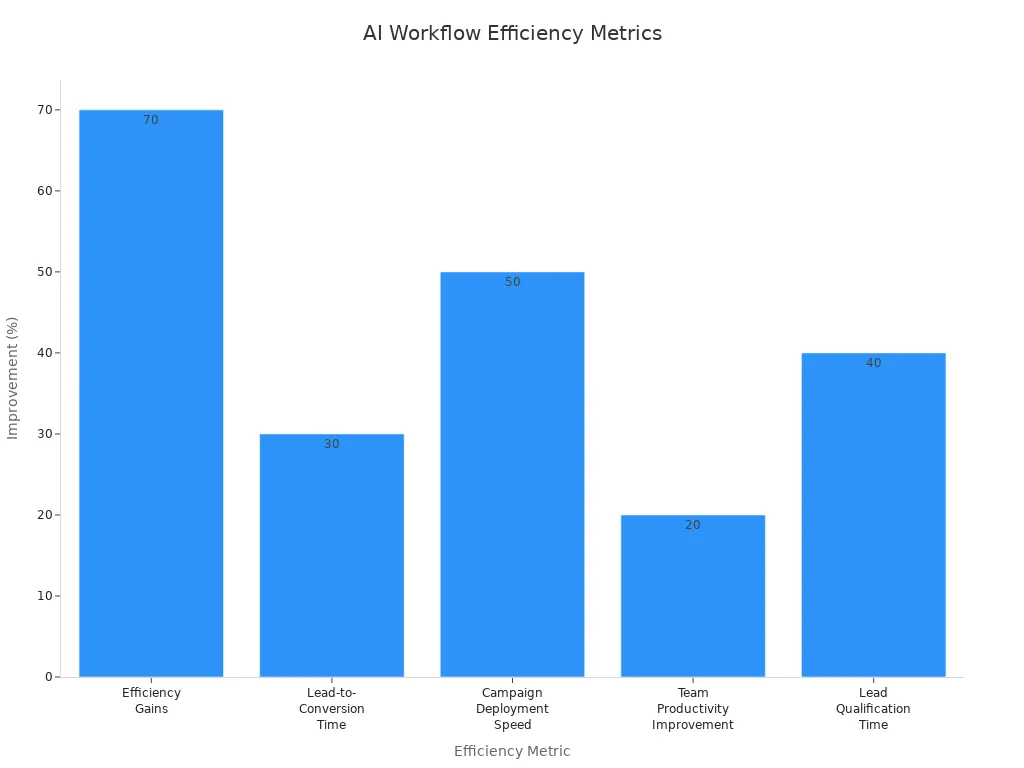
AI-powered social media visuals plans are much faster than old ways. Many companies say AI helps them work faster, post sooner, and get more done. You can see these changes in the chart below:
Tip: Use AI tools to check how your posts do. This helps you see what works and make better posts next time.
By following these steps, you can make social media posts that people like. AI tools make it easier to think of ideas and create posts. You can reach your viewers with visuals that get more likes and help your brand grow.
Visual Generation with AI Tools

Creating Unique Visuals
AI image tools help you make special pictures for social media. These tools help your posts stand out and get noticed. You do not need to be a designer to use them. AI can change the size of your pictures fast. It can also switch backgrounds or fix photos in just seconds. The table below shows how these tools help you work better:
Feature | Description |
|---|---|
Universal Resizer | Change your picture size for any social site. |
Replace background | Move anything to a new place with AI. |
Remove background | Take out the main part of a picture very well. |
Cleanup | Take away things, people, words, or mistakes from your pictures. |
Image upscaler | Make your pictures bigger and clearer in seconds. |
MyLens AI lets you turn words, PDFs, and pictures into fun visuals. It shows important points and makes sharing easy.
Matching Visuals to Social Media Ideas
AI tools help you pick the right pictures for your ideas. You can upload your brand’s pictures and use simple words to guide the design. Google Nano Banana Pro has some cool features:
Localized Global Campaigns: You can show words in many languages and change text in pictures. This helps you share your work in other countries faster.
Context-Rich Visual Assets: The tool uses Google Search to make maps, charts, and guides that are correct. You get pictures that are true for lessons or how-to guides.
Creative Control and Brand Fidelity: You can upload up to 14 brand pictures to keep your style. You can make changes by giving easy instructions.
AI Image Tools for Social Media
Many AI image tools make it easy to create social media pictures. You can pick from these choices:
Meta AI: Free for Facebook, makes lots of good pictures fast.
Gemini: Free with extra tools, makes real-looking pictures.
Microsoft Designer: Uses DALL-E2, good for groups, has free and paid plans.
Adobe Firefly: Makes art and photo pictures, easy to use again.
Canva Magic Design: Fast, simple, and makes pictures and videos.
AI tools help you save time and get more done. You can come up with ideas, make pictures, and plan posts in just minutes. More than half of marketers spend over 10 hours each week on social media pictures. AI helps you work faster and lets anyone make great results.
Tip: Use AI tools to check how people react to your posts. This helps you make your social media better and talk to your followers more.
Design Formatting for Social Media
Formatting your social media visuals helps your posts look great on every platform. Each site has its own rules for images and videos. You want your posts to stand out and look clear everywhere. Good formatting makes your content easy to see and keeps your brand looking strong.
Resizing Visuals for Platforms
You need to resize your visuals to fit each social media site. If you keep the right size, your images will not look stretched or blurry. Here are some best practices to help you format for platforms:
Keep your video and image quality high. Do not over-compress files.
Use the correct aspect ratio for each platform. This stops your visuals from looking odd.
Make sure your brand looks the same on all platforms.
Check your images for mistakes before posting. Always follow the rules for each site.
Tip: Plan your content with different aspect ratios in mind. Use editing tools to keep important parts of your visuals in the safe area.
Enhancing Social Media Visuals
You can make your social media posts even better with a few simple steps. Start by setting up a brand kit. Pick your colors, fonts, and style. This keeps your posts looking the same every time. Use templates to save time and keep your design uniform. Try grid planning tools to see how your posts will look together.
Make highlight covers that match your brand.
Review your top posts each month to see what works best.
Add alt text and captions to help more people find your posts.
Name your image files clearly so they are easy to search.
Use CamelCase in hashtags for better reading.
AI Design Tools for Final Touches
AI tools like Canva help you finish your social media visuals quickly. Canva’s AI features let you resize images, remove backgrounds, and add effects with one click. You can use templates made for each platform. This makes it easy to format for platforms and keep your posts looking sharp.
Note: AI design tools help you work faster and keep your brand style strong. You do not need to be a designer to make great social media visuals.
Choosing AI Tools for Social Media Visuals
Comparing AI Tool Features
There are lots of tools for making visuals for social media. Each tool is good at something different. Here is how some popular tools are different:
Google Nano Banana Pro keeps things in your pictures looking real. Your visuals look correct and professional.
ChatGPT can change things in your pictures. Sometimes, the pictures do not match your brand style.
Canva has easy templates and fast design tools. You can make posts quickly for any marketing job.
AI tools are not perfect. AI-made content may not have special ideas or creativity. These tools use data, not your own style. Sometimes, you might see bias or old facts in the results.
Selecting the Best Tool
Think about what you want before you pick a tool. Some tools are free, but others cost money for more features. The table below shows the main differences:
Feature/Aspect | Freemium Tools | Paid Tools |
|---|---|---|
Quality of Outputs | Limited engagement and personalization | High engagement and personalized outputs |
Customer Support | Basic support resources | Full support and tutorials |
Advanced Features | Basic features only | Bulk scheduling and analytics |
Brand Consistency | Few tools for brand voice | Tone analysis and brand guidance |
ROI Potential | Lower engagement rates | Higher engagement and conversion rates |
You can also look at what other users say about the tools. For example, Synthesia has many avatars and languages. Google Veo helps you make cool videos. OpusClip cuts videos and changes their size for different sites. These features help your marketing plan.
Tips for Social Media Visuals Creation
You can stop common mistakes when using AI for social media. Here are some tips:
Mistake | Description | Solution |
|---|---|---|
Vague Instructions | Unclear input leads to bad content | Give clear examples and review the output |
Forgetting Audience Targeting | AI may miss your audience’s needs | Use your own knowledge with AI insights |
Neglecting Visuals | Text alone does not get attention | Use image generators and design tools |
Posting Same Content Everywhere | Each platform is different | Adapt your content for each platform with AI |
Note: Always use your own ideas with AI tools. This helps your marketing stand out on social media.
You can make your marketing better by picking the right tool. Check the features and read what users say. Try different tools to see which one works best for your social media goals.
You can make cool social media visuals with AI tools, even if you are not a designer. These tools help you do better by making special pictures and videos fast.
AI tools let you try out new looks and ideas. This helps you be more creative.
You can make posts that fit your audience. This makes people like and share your posts more.
Posting often with good visuals helps your posts get noticed and reach more people.
Give these tools a try and see how your own visuals can help you do better.
FAQ
How can AI tools help you with content ideation for social media?
AI tools help you find new content ideas by analyzing trends and your audience’s interests. You can use ai-powered content brainstorming to discover creative campaign ideas. This makes your strategy stronger and helps you enhance engagement.
What is the best way to plan content for your audience?
You should use content planning tools to organize your posts. These tools let you track trends and see what your audience likes. You can generate caption ideas and use ai-generated social media captions to keep your strategy fresh.
How do you enhance engagement with visuals on social media?
You can create unique content that matches your audience’s interests. Use AI to design visuals that fit your strategy. Try different asset types and watch how your audience reacts. This helps you enhance engagement and improve your content.
Why should you follow trends in your social media strategy?
Trends show what your audience wants to see. You can use AI to spot new trends and update your content. This keeps your strategy current and helps your content stand out.
Can AI tools help you reach more people with your content?
AI tools analyze your audience and suggest ways to improve your content. You can use them to find the best times to post and the right topics. This helps your strategy grow and lets your content reach more people.
See Also
Best 10 AI Tools for Creating TikTok Videos in 2025
Boost Your Website Visits Using AI Blogging Solutions
Improving Decision-Making Processes Through AI Technology

© Copyright 2025 LinkstartAI - All Rights Reserved.