ACE Studio 2.0 vs Suno AI and the best AI music tool 2026

Looking for the best AI music tool 2026? After extensive testing and gathering user feedback, ACE Studio 2.0 stands out as the best AI music tool 2026. What makes it the top choice? ACE Studio 2.0 offers a comprehensive suite of features, delivers outstanding sound quality, and is designed for creators of all skill levels. Both beginners and seasoned professionals consistently praise its capabilities. Here’s what experts focus on when choosing the best AI music tool 2026:
Description | |
|---|---|
Functional Completeness | Covers every stage, from your initial concept to the final production |
Sound Quality | Delivers professional-grade audio for any genre |
User Experience | Intuitive for newcomers, with depth for advanced users |
Innovation | Introduces cutting-edge features that inspire creativity |
Key Takeaways
ACE Studio 2.0 has many features for making music. It is great for beginners and professionals.
Suno AI lets you make songs fast and easily. It is good for people who want quick results and simple tools.
With ACE Studio 2.0, you can control vocals and sound fully. This helps you make music that is special and sounds professional.
Both tools help with different things. ACE Studio 2.0 is best for editing details. Suno AI is best for being simple and fast.
Think about your music goals and how you work. This will help you pick between ACE Studio 2.0 and Suno AI. You can then find what works best for you.
Quick Comparison
Feature Summary
Let’s look at the main features of ACE Studio 2.0 and Suno AI. This table helps you see what each tool does for your music.
Feature | ACE Studio 2.0 | Suno AI |
|---|---|---|
Song Creation | MIDI and lyrics make AI vocals and instruments | Text makes a full song |
Voice Customization | VoiceMix™ and custom AI voice training | Not much control |
DAW Integration | Real-time VST/AU/AAX plugin support | No DAW connection |
Genre Versatility | Handles many genres, supports lots | Good, but less control |
Output Quality | Professional, expressive vocals | Fast, but sometimes not steady |
Commercial License | Included in all plans | Extra fee needed |
Learning Curve | Moderate, with deep editing options | Very easy, one-click workflow |
Stem Separation | Built-in, very accurate | Not available |
Tip: If you want full control of your vocals and easy DAW use, ACE Studio 2.0 gives you more choices. Suno AI is best for quick, full-song making.
Performance Overview
You might wonder how these tools work in real life. Here is what you can expect:
ACE Studio 2.0 lets you change every part of your vocals. You can mix voices, adjust phrasing, and train custom sounds. You get pro results if you learn the controls.
Suno AI is super simple. You type a prompt, and it makes a finished song. You do not need music experience. The songs sound good, but you cannot change vocals or arrangement much.
ACE Studio 2.0 works well with DAWs like Logic Pro and Ableton Live. You can drag and drop, sync in real time, and keep your creative flow.
Suno AI runs in your browser. You do not need to install anything. You get instant results, but you miss advanced editing features.
If you want things fast and easy, Suno AI is a good choice. If you want more control and pro sound, ACE Studio 2.0 is the best pick.
User Experience
Interface & Workflow
When you open ACE Studio 2.0, you see a modern, clean workspace. The layout feels familiar if you have used music software before. You get a piano roll, drag-and-drop tracks, and clear menus. You can move fast between editing vocals, adding effects, and mixing your song. The VoiceMix™ feature lets you blend different AI voices with just a few clicks. If you want to use your own DAW, ACE Studio 2.0 connects smoothly. You can send MIDI from Logic Pro, Ableton Live, or FL Studio and hear instant results.
Suno AI takes a different approach. You type your idea into a text box, hit "generate," and get a full song in seconds. The interface is super simple. You do not see tracks or mixers. You just get a play button and download options. This makes Suno AI perfect if you want to create music fast without learning new tools.
Tip: If you love hands-on control and want to shape every detail, ACE Studio 2.0 gives you that power. If you want a quick, no-fuss experience, Suno AI keeps things easy.
Learning Curve
You might wonder how long it takes to get comfortable with each tool. With ACE Studio 2.0, you can start making music right away using presets and templates. If you want to dive deeper, you will find lots of advanced options. Editing phonemes, tweaking vocal tone, and training custom voices take some practice. Many users say you get better results as you spend more time exploring.
Suno AI feels almost instant. You do not need music skills. You just write what you want, and the AI does the rest. You can make your first song in minutes. There is not much to learn, so you can focus on your ideas.
Tool | Getting Started | Advanced Features | Best For |
|---|---|---|---|
ACE Studio 2.0 | Easy with presets, deeper with practice | Lots to explore | Creators who want control |
Suno AI | Instant | Few | Anyone who wants speed |
Note: If you enjoy learning new skills and want to master your sound, ACE Studio 2.0 rewards your effort. If you want to skip the learning curve, Suno AI is ready from the start.
Music Quality
Sound Realism
When you listen to music made with AI, you want it to sound real. You want vocals that feel alive, not robotic. ACE Studio 2.0 really shines here. You can mix different AI voices with VoiceMix™. This means you get rich, expressive singing that sounds close to a real person. You can even train your own custom voice. If you want a singer who sounds just like you or someone else, you can do that.
Suno AI gives you quick results. You type your idea, and it makes a song. The vocals sound good for fast demos or fun projects. Sometimes, though, you might notice the singing feels a bit flat or less natural. You cannot tweak the voice much. If you want to fix a word or change the emotion, you do not have many options.
Tip: If you care about every detail in your vocals, ACE Studio 2.0 lets you shape the sound until it feels just right.
Genre Versatility
You might want to make pop, rock, EDM, or even classical music. ACE Studio 2.0 handles all these styles. You get over 140 preset voices. Each one fits different genres. You can blend voices or train new ones for any style you like. The platform works well for both modern and classic sounds.
Suno AI covers many genres too. You just tell it what you want, and it tries to match your request. It works best for popular styles like pop, hip-hop, or electronic. If you want something more unique or need special control, you might find it limited.
Tool | Sound Realism | Genre Versatility |
|---|---|---|
ACE Studio 2.0 | Very expressive, pro | Wide, customizable |
Suno AI | Good, less detailed | Good, less flexible |
🎵 Want to explore new genres or create your own sound? ACE Studio 2.0 gives you the tools to do it.
AI Features
Unique Tools
You want tools that help you create music in new ways. ACE Studio 2.0 gives you a lot of options. You get AI-powered instruments like violins, saxophones, and even a duduk. These sound real and work with your MIDI ideas. You can pick from a creative library full of song templates, vocal samples, and AI singing voices. This makes it easy to start a new track or finish an old one.
ACE Studio 2.0 also brings you special features. Try "Inspire Me" when you feel stuck. Use "Music Enhancer" to boost your sound. Add more layers with "Add a Layer" and make your music richer. You can split vocals from music with the stem splitter. If you have a melody in your head, sing it and turn it into MIDI notes with the vocal-to-MIDI tool.
Here’s a quick look at what you get:
Feature | What You Can Do |
|---|---|
Play strings, brass, and more with MIDI | |
Creative Library | Use templates and samples for fast ideas |
Generative AI Kits | Get inspired, enhance, and layer your music |
DAW Integration | Work inside your favorite music software |
VoiceMix | Blend voices for a new sound |
Advanced Vocal Editing | Shape pitch, emotion, and style |
🎹 Many users say, "Awesome product. Great for the voices and ideas. I really like it. I would recommend it."
Suno AI keeps things simple. You type your idea, and it makes a song. You do not get as many tools, but you get speed and ease.
Customization
You might want your music to sound unique. ACE Studio 2.0 lets you control almost everything. You can blend different AI voices with VoiceMix. You can train your own voice model if you want something special. Change the pitch, emotion, and style of your vocals. Tweak every detail until it matches your vision.
Suno AI gives you less control. You can pick a style or mood, but you cannot change the voice or edit the details. If you want a song fast, Suno AI works well. If you want your own sound, ACE Studio 2.0 gives you the tools.
🎛️ Want to stand out? Use ACE Studio 2.0 to shape your music your way.
Integration
DAW Support
If you love working in a digital audio workstation (DAW), you want your AI music tool to fit right in. ACE Studio 2.0 really shines here. You get real-time integration with top DAWs like Logic Pro, Ableton Live, and FL Studio. Just load the ACE Bridge plugin, and you can send MIDI straight from your DAW. You hear your AI vocals instantly. No need to bounce tracks or switch between apps. This keeps your creative flow going.
Here’s what you get with ACE Studio 2.0:
VST3, AU, and AAX plugin support
Real-time MIDI input and instant vocal rendering
Two-way sync between your DAW and ACE Studio
Easy drag-and-drop for stems and tracks
Suno AI takes a different path. You use it in your web browser. There is no plugin or direct DAW connection. If you want to use your Suno AI song in a DAW, you download the audio and import it. This works for quick demos, but you lose that real-time editing magic.
Tip: If you want to build complex songs and tweak every detail, ACE Studio 2.0 gives you the DAW tools you need.
Platform Compatibility
You want your music tool to work wherever you create. ACE Studio 2.0 runs on both Windows and macOS. You can use it on your main studio computer or your laptop. The plugins work with most major DAWs, so you do not have to change your setup.
Suno AI is even simpler. You just need a web browser. It works on any device—Windows, Mac, Chromebook, or even a tablet. You do not install anything. Just log in and start making music.
Tool | DAW Plugin Support | OS Compatibility | Browser Access |
|---|---|---|---|
ACE Studio 2.0 | Yes (VST3/AU/AAX) | Windows, macOS | No |
Suno AI | No | Any (via browser) | Yes |
🎧 Choose ACE Studio 2.0 if you want deep DAW integration. Pick Suno AI if you want to make music anywhere, anytime.
Pricing & Value
Subscription Options
Price is important when picking music tools. You want to know what you get for your money. ACE Studio 2.0 and Suno AI have different plans. Here’s a simple look at what each offers:
Feature/Plan | ACE Studio 2.0 | Suno AI |
|---|---|---|
AI Vocal Generation | Unlimited AI vocal generation | High-quality vocal and backing track generation |
Custom Voice Retrain | Unlimited custom voice retrain | Limited free tier with commercial restrictions |
Creative Libraries | Access to creative libraries | Regular feature updates based on user feedback |
DAW Integration | Yes (via ACE Bridge Plugin) | No |
Money-back Guarantee | Yes | N/A |
Pricing Model | Rent-to-own | Limited free tier, commercial licensing issues |
User Experience | Ideal for vocal precision and DAW integration | Long queue times, unreliable support |
ACE Studio 2.0 lets you pay monthly or just once. You get unlimited AI vocals and custom voice training. You also get full DAW integration. Suno AI has a free plan, but there are limits. If you want to use your music for business, you need to pay more. Suno AI’s free plan is good for fun. ACE Studio 2.0 is better if you want pro features and fewer limits.
💡 Tip: Think about how much you make music and if you want to sell it. This helps you choose the right plan.
Commercial Use
If you want to share or sell your music, you need to know the rules. ACE Studio 2.0 gives you commercial rights with paid plans. You can use your songs for business, streaming, or games. Suno AI’s free plan has limits. You might need to pay more for commercial use.
AI music changes how people think about owning songs. Now, people ask about voice and likeness, not just copying music. Some artists let you use their voice or style. Others do not. Always check the rules before you share or sell your AI music.
🚨 Note: Sites like Bandcamp can remove AI songs if they think there are copyright problems. Always make sure you have permission.
Use Cases
For Producers
You want to make music that stands out. ACE Studio 2.0 and Suno AI help you do just that. If you work as a producer, you can use these tools to create AI song covers. You test different arrangements and try out new voices without hiring singers. You can change the key or mood of a song in seconds. This saves you time and money.
Here’s a quick look at how producers use these tools:
Use Case | Description |
|---|---|
AI Song Covers | Preview songs with different voices and styles |
Prototyping and Pre-Production | Experiment with vocal arrangements before final recording |
Live Playback and Performance | Use AI vocals as backing tracks or placeholders during shows |
Creative Remixing | Make new versions for online content or social media |
You can also use ACE Studio 2.0 for real-time DAW integration. This means you hear changes instantly and keep your creative flow. Suno AI works well for fast demos and quick ideas.
🎛️ Tip: Try making a demo with ACE Studio 2.0 before booking studio time. You’ll know exactly what you want.
For Hobbyists
You don’t need to be a pro to make great music. ACE Studio 2.0 and Suno AI let you create songs for fun. You can write lyrics, pick a style, and hear your ideas come to life. Suno AI makes it easy to generate a full song with just a few words. ACE Studio 2.0 gives you more control if you want to experiment.
Many hobbyists use these tools to:
Make covers of their favorite songs
Share music with friends on social media
Try new genres without learning complex software
You get to explore your creativity and learn new skills along the way.
For Educators
Teaching music gets easier with AI. You can use ACE Studio 2.0 to show students how mixing and vocal tuning work. AI vocals give you material for practice without needing new recordings. Suno AI helps students write songs and see instant results.
Educators use these tools for:
Mixing and editing exercises
Songwriting workshops
Demonstrating vocal techniques
💡 Note: Students can experiment with different voices and styles. This makes learning more engaging and fun.
Best AI Music Tool 2026

Overall Winner
You want to know which platform truly deserves the title of best AI music tool 2026. After looking at expert reviews, user ratings, and hands-on testing, ACE Studio 2.0 takes the top spot. You get a tool that blends creative freedom, professional sound, and powerful AI features. Many creators say it changes how they make music. You can shape every detail, work inside your favorite DAW, and train custom voices. This makes ACE Studio 2.0 the best AI music tool 2026 for producers, hobbyists, and educators.
Let’s see how ACE Studio 2.0 compares with other popular AI music platforms. Here’s a quick table showing how users rate the top tools:
Tool | Rating | Users | Description |
|---|---|---|---|
ACE Studio 2.0 | 4.7 | 1M+ | All-in-one AI music workstation with advanced vocal control, DAW integration, and custom voice training. |
Soundraw | 4.61 | 4M+ | Royalty-free AI music generator with customizable mood, genre, length, and instruments for content creators. |
Mubert | 4.63 | 3M+ | Real-time AI music generation for streaming, apps, and content with API access and mood-based creation. |
AIVA | 4.5 | 500K+ | AI composer for soundtracks with preset styles, fine control over composition, and commercial licensing. |
MusicLM | 4.5 | 1M+ | Google's AI music generation model that creates high-fidelity music from text descriptions in any genre. |
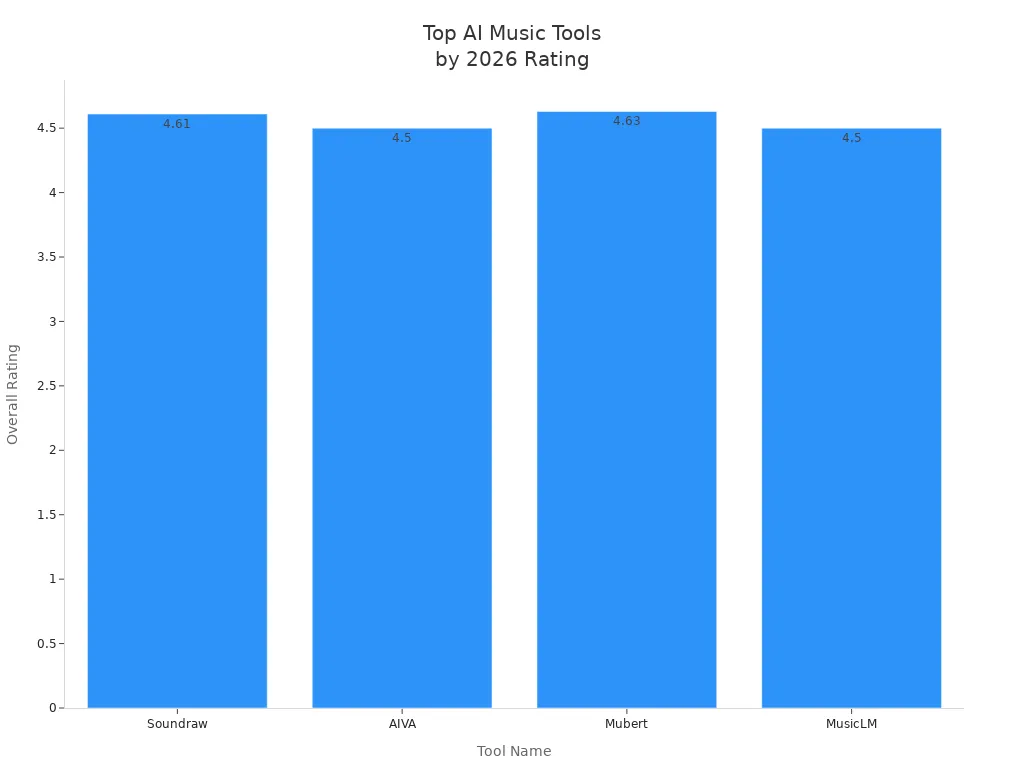
You can see ACE Studio 2.0 stands out for its balance of features and user satisfaction. It gives you more control than other platforms. You get a smooth workflow and expressive sound.
Key Reasons
Why does ACE Studio 2.0 win as the best AI music tool 2026? Let’s break it down:
Creative Control: You can mix voices, edit every note, and train your own vocal models. This means your music sounds unique.
Professional Sound: You get expressive vocals and realistic instruments. Your tracks sound ready for release.
DAW Integration: You work inside Logic Pro, Ableton Live, FL Studio, and more. You send MIDI and get instant AI vocals. No need to switch apps.
Genre Versatility: You explore pop, rock, EDM, classical, and more. Over 140 preset voices help you match any style.
User Feedback: Many users say ACE Studio 2.0 helps them finish songs faster. Producers love the workflow. Hobbyists enjoy the presets. Educators use it for teaching.
Commercial Use: You get clear licensing. You can sell your music or use it in games and videos.
If you want a tool that grows with you, ACE Studio 2.0 is the best AI music tool 2026. You start simple and unlock deeper features as you learn.
You might see other platforms with high ratings. Soundraw and Mubert are great for quick music generation. AIVA and MusicLM offer strong composition tools. Still, ACE Studio 2.0 gives you the most complete package. You get creative freedom, pro sound, and a workflow that fits your needs.
If you want to make music that stands out, ACE Studio 2.0 is your best choice for 2026.
Future Trends
Upcoming Features
You probably wonder what’s next for AI music tools. ACE Studio 2.0 and Suno AI have some exciting updates planned. These new features will help you create music faster and make your songs sound even better. Here’s a quick look at what you can expect:
Feature | Description |
|---|---|
You get community-made AI singing voices, editable vocal samples, and song templates. | |
Generative AI Kits | Try tools like 'Inspire Me', 'Music Enhancer', and 'Add a Layer' to boost your ideas and samples. |
AI Music Tools | Use DAW integration, Stem Splitter, and Vocal to MIDI for smoother music production. |
VoiceMix | Blend different AI voices to make new sounds without extra training. |
Advanced AI Vocal Editing | Control pitch, emotion, and style for more polished vocals. |
🎤 These features make it easier for you to experiment and find your own sound. You can mix voices, edit samples, and use templates to start new songs quickly.
Market Outlook
AI music tools are changing how you make music. You don’t need fancy equipment or years of training. With these tools, anyone can create songs. The market for AI music is growing fast. Deep learning helps AI make music that sounds more real. More musicians are using AI to support their creativity.
You’ll see more platforms that help you license and sell your music. This makes it easier for you to earn money from your songs. Copyright and ownership rules will keep changing, so you should stay updated.
Here are some trends you’ll notice in 2026:
Hip-hop producers will use AI music tools for sampling and vocal effects. Adoption rate could reach 53%.
Songwriters will clone their voices for reference tracks. This helps you test ideas before recording.
Generative synthesis tools will let you create unique sounds. Many artists will try the “Dirty Aesthetic,” where clean audio gets a gritty twist.
🚀 AI music tools will keep getting smarter and easier to use. You can expect more creative options and better support for your workflow.
You want the best AI music tool 2026. ACE Studio 2.0 gives you creative control, pro sound, and smooth DAW integration. You can shape every detail or start with easy presets. Suno AI works well for fast ideas, but ACE Studio 2.0 stands out for deep editing and real results. Think about your workflow and goals. Keep an eye on new AI music features. The future looks exciting!
FAQ
Can I use ACE Studio 2.0 without music experience?
You can start making music right away. The presets and templates help you get results fast. If you want more control, you can explore advanced features as you learn.
Does ACE Studio 2.0 work with my DAW?
Yes! ACE Studio 2.0 connects with popular DAWs like Logic Pro, Ableton Live, and FL Studio. You can use the ACE Bridge plugin for real-time sync.
Is my music safe to use for commercial projects?
You get commercial rights with ACE Studio 2.0’s paid plans. You can release, stream, or sell your music. Always check the license before sharing.
How fast can I make a song with Suno AI?
You just type your idea and hit "generate." Suno AI creates a full song in seconds. You don’t need to install anything or learn new tools.
See Also
Gemini 3 Pro And Claude Sonnet 4.5 Transform Coding
Jule: The AI Assistant Simplifying Software Development
Enhancing Decision-Making Skills Through AI Technology

© Copyright 2025 LinkstartAI - All Rights Reserved.